> ## Documentation Index
> Fetch the complete documentation index at: https://domoinc-openapi-sync-dataflows.mintlify.site/llms.txt
> Use this file to discover all available pages before exploring further.
# FAQ
### AppDB
***
\*\*
Q: I configured my AppDB collection in the manifest correctly, why can't I see
the dataset?
\*\*
**A**: The dataset can sometimes take up to 15 minutes to show in
the data center assuming that you setup the collection correctly the first time.
If it is not setup correctly, there is not any feedback you will get in the data
center to tell you why. Once the dataset has been successfully created the first
time, however, any errors regarding updating that dataset will appear in the
history tab of the dataset.
The dataset that is created by AppDB will follow the following naming convention:
```text theme={"dark"}
{collectionName}_{collectionUUID}_APP_DB
```
### Data
***
**Q: How can I leverage enhanced data analysis in my app?**
**A**: You should leverage Domo as your backend service to perform
the necessary data transformation and analysis as much as possible. Domo offers
data transformations via Blend, ETL, SQL, or R. Additional options include
Workbench plugins, custom connectors, and custom services that leverage the Domo
APIs. However, if your app does need to do any additional analysis on the
front-end, you’re able to use any JavaScript library that provides that
functionality, such as JsStat.
**Q: Can I create datasets from a Domo App?**
**A**: Yes. You can persist your application data to an AppDB
datastore (which can optionally sync back to a dataset that it creates).
**Q: Can I query any dataset from an App?**
**A**: The Domo App platform exposes a data query API for datasets
that have been listed in your app’s manifest, which defines the datasets that
are wired to the app. Your app is not able to look at other datasets in your
Domo instance.
\*\*
Q: Can I leverage 3rd party APIs to get, post, or transform data?
\*\*
**A**: Yes, as long as your 3rd party API supports requests from
other domains (ref
CORS
) you’re able to consume those APIs in your app.
**Q: Do Domo Apps use real-time data?**
**A**: Yes. Domo Apps have the same direct access to datasets that
standard Domo cards have. Just like standard cards, your app will automatically
refresh each time the underlying dataset is updated. Please refer to this
documentation that details how to customize the default
behavior [onDataUpdate](/portal/Apps/App-Framework/Tools/domo-js#domo-ondataupdated-callback).
**Q: Can I query datasets using SQL?**
**A:** Yes, for more details checkout the SQL section of [the Getting
Data Guide](/portal/Apps/App-Framework/Guides/getting-data#sql-api).
\*\*
Q: Is there a limit on how many data sources I can feed into my App?
\*\*
**A:** There is currently a limit of 100 data connections per Custom
App.
### Design
***
**Q: Do Domo Apps support a responsive design?**
**A**: Absolutely. By setting `full-page: true` in your manifest
file your app will grow to fill the remaining screen space on the detail,
fullscreen, and mobile.
**Q: Why isn’t my app resizing as the window resizes?**
**A**: Domo Apps will maintain the grid size that you specified in
your manifest when viewed at the page level in Domo. If `fullpage` hasn’t been
enabled, your app will also maintain that same size when viewed at the detail
level.
**Q: How can I make an App full screen?**
**A**: Assuming you’ve configured `fullpage: true` in your
manifest, you’ll be able to open your app in full screen by going to the detail
view of the app and selecting the fullscreen option in the card menu.
**Q: Does the Mobile app support Domo Apps?**
**A**: Yes, but the mobile experience will only be as good as your
app’s responsive design. If your app doesn’t accommodate for a mobile screen
size then it will be a suboptimal experience for your user.
**Q: How do I add a thumbnail to my project?**
A: To ensure your app has a thumbnail, place a 300×300 image named `thumbnail.png` in the base directory of your design. A basic hello world project will likely have all of the following files in the base directory of the project and the thumbnail should be included right alongside them. Once the thumbnail is present in your project, simply publish your design to your instance using the `domo publish` command.
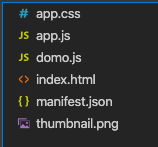 If you forget to upload your project with a `thumbnail.png`, you will be reminded by the CLI that you cannot create cards off of the design until you re-publish to that design ID with a thumbnail available at the root of the project.
### Limitations
***
**Q: Ok, Apps seem to be pretty awesome. What can they not do?**
**A**: Apps currently don’t have access to some of the core product
features available to standard cards, such as alerts, Buzz, data export, and
export to slideshow. However, if you have a custom use-case you can reach out to
Engineering Services who can help you leverage additional Domo functionality.
**Q: Can I publish a backend service with my front-end Domo App?**
**A**: No. Where possible you should leverage the Domo Platform for
your backend processing. Consider how AppDB might be used to solve your backend
needs.
**Q: Can I export data from the card details page in Domo?**
**A:** The following Export commands from the card details page are
not currently supported:
If you forget to upload your project with a `thumbnail.png`, you will be reminded by the CLI that you cannot create cards off of the design until you re-publish to that design ID with a thumbnail available at the root of the project.
### Limitations
***
**Q: Ok, Apps seem to be pretty awesome. What can they not do?**
**A**: Apps currently don’t have access to some of the core product
features available to standard cards, such as alerts, Buzz, data export, and
export to slideshow. However, if you have a custom use-case you can reach out to
Engineering Services who can help you leverage additional Domo functionality.
**Q: Can I publish a backend service with my front-end Domo App?**
**A**: No. Where possible you should leverage the Domo Platform for
your backend processing. Consider how AppDB might be used to solve your backend
needs.
**Q: Can I export data from the card details page in Domo?**
**A:** The following Export commands from the card details page are
not currently supported:
- Export to Excel
- Export to CSV
- Export as PPT
Custom Apps do not currently support viewing in an external slide show
**Q: Can Custom Apps cards leverage Domo Alerts?**
**A:** Custom App cards do not currently support Alerts.
### Navigation
***
**Q: Can I navigate to other places within Domo from my app?**
**A**: `domo.navigate` allows you to link users to other pages in
Domo as well as external domains. Refer to
the [navigate](/portal/Apps/App-Framework/Tools/domo-js#domo-navigate-url,-isnewwindow)
command in the `domo.js` library for more information.
### Security and Access Control
***
**Q: Do I have access to Domo Parent DOM from an App?**
**A**: No. Domo Apps are completely sandboxed from your Domo
instance to prevent potential security issues.
**Q: Do Domo APIs support Domo Apps?**
**A**: For security, the General Domo Product APIs can only be
called from backend services. Because Domo Apps are front-end services only,
you’re not able to call those APIs directly from an app. See the "API
References" section for more information about what Domo Apps specific APIs are
available for use.
**Q: How can I link to sites external to Domo in my App?**
**A:** Regular html link syntax does not work inside the app iframe.
For example, the following will not work:
\Dev Portal\
For security reasons, Custom Apps can link only to approved, whitelisted domains via the `domo.navigate()` function available on the `domo.js` library. The current list includes:
You may customize this whitelist, but will need to request a feature switch to be enabled by your CSM. See the `domo.navigate()` command [for more information here](/portal/Apps/App-Framework/Tools/domo-js#domo-navigate-url,-isnewwindow).
### Tech Stack
***
**Q: Can I use my favorite front-end framework/library in an app?**
**A**: Absolutely. Any JavaScript library/framework that you use in
your other projects should work in a Domo App. Check out [Domo's App Starter
Kits](/portal/Apps/App-Framework/Quickstart/Starter-Kits) for React, Angular,
and Vue templates.