> ## Documentation Index
> Fetch the complete documentation index at: https://domoinc-openapi-sync-dataflows.mintlify.site/llms.txt
> Use this file to discover all available pages before exploring further.
# Process Data
After you have configured the authentication and reports, you are ready to define how to process the data returned from the API endpoint. This is the hardest part of writing a custom connector, but with a little JavaScript knowledge, you can do it!
Once you have defined how the data will be processed, you can verify that the data was processed correctly by sending your generated data to Domo.
This tutorial will provide an overview of the flow you usually need to follow when processing data (including tips on writing and debugging your code) and several examples for you to look through. The Connector Dev Studio has several built-in functions to make the process easier for you. For a list of these built-in JavaScript functions, see [Reference](/portal/Connectors/Custom-Connectors/reference).
### Overview
***
In this section, you can handle API calls and return results as you wish. However most custom connectors will follow this general pattern.
For each report:
1. Compose the https URL, request parameters, and request header as required for the report by your API endpoint. Call the API endpoint, and retrieve the data.
* You can access the data from the authentication process (like your username and password or access token) in the [metadata.account object](/portal/Connectors/Custom-Connectors/reference#metadata).
* Because the IDE is built using the [Java 8.0 Nashorn engine](https://docs.oracle.com/javase/8/docs/technotes/guides/scripting/nashorn/), you need to write your code using JavaScript compatible with [ECMAScript 5 (ES5)](https://www.w3schools.com/js/js_es5.asp). This means you cannot use XMLHttpRequest. To build the header and add parameters, you can use the [built-in http request functions](/portal/Connectors/Custom-Connectors/reference#http-request).
2. Parse the data. You will need to know how the data from your endpoint will be returned.
* Websites frequently return data in .json, .xml, and .csv formats.
* If you need to examine the data returned from your API endpoint, try making the call in a tool like [Postman](https://www.getpostman.com/). You can also print the response in your browser's console by using the [console.log](https://developer.mozilla.org/en-US/docs/Web/API/Console/log) function.
3. Store the data in Domo.
* If your website is returning data in a compatible format, you may be able to use one of the [built-in magic Parse functions](/portal/Connectors/Custom-Connectors/reference#datagrid) which will parse and store the data in one simple call.
* If magicParse is not an option, first define the columns with a column name and data type, then add the data, one row at a time, one cell at a time. See [Examples](/portal/Connectors/Custom-Connectors/process-data#examples).
* When adding a row, remember to call datagrid.endRow() when the row is complete.
* Dates inserted into the table need to be formatted yyyy-MM-dd'T'HH:mm:ss.
* If your endpoint paginates its data, you may need to make multiple API calls to get all the data.
Best Practices:
-
Ensure the script runs in{' '}
ECMA Strict Mode
{' '}
to avoid any unexpected behavior.
-
Click Run Script anytime you want to test your code.
-
Print large amounts of data in your browser's console by using the{' '}
console.log
{' '}
function.
-
You can use DOMO.log(), console.log(), and{' '}
alert()
{' '}
to help you debug your JavaScript and examine variables. Just remove what
you don't need before you submit your custom connector.
### Send Data to Domo
***
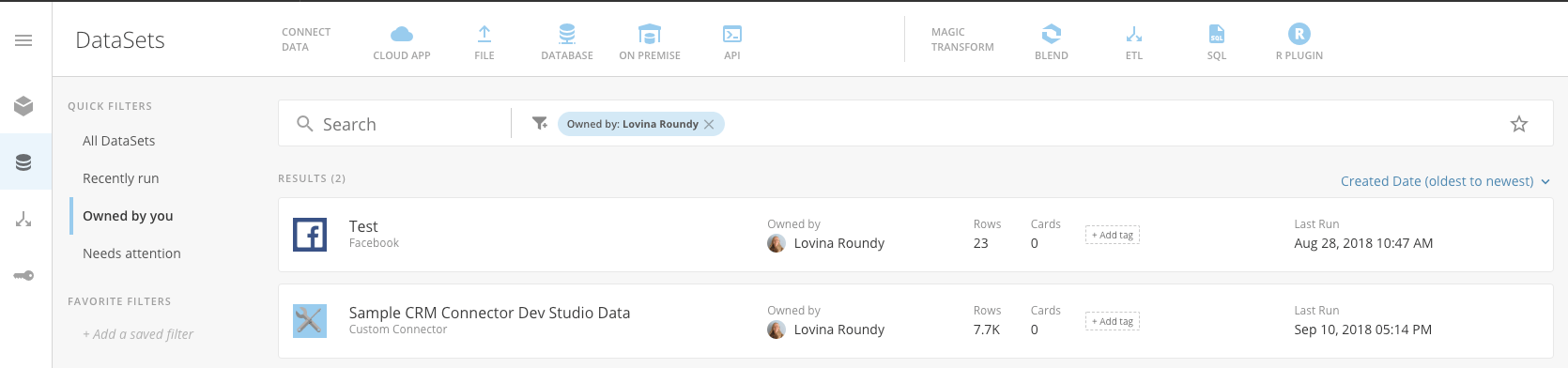
After you have defined how the data will be processed, you can verify if the data is correctly represented in Domo by sending your generated data to Domo.
-
Check Create/Update Dataset.
-
Click Run Script. A success or error message about the
process will appear next to the Run Script button.
-
If successful, the dataset will be published in your Domo instance. A pop-up
window will provide a link directly to the dataset (this may be blocked by a
pop-up blocker).
In your Domo instance, you can verify that your datatypes and values are correct.
Note: These datasets cannot be scheduled. The connector must be
published to schedule dataset updates.
 ### Examples
***
The Connector Dev Studio has a couple of example connectors provided to you: Sample CRM and USGS.
### Examples
***
The Connector Dev Studio has a couple of example connectors provided to you: Sample CRM and USGS.
-
The Sample CRM connector pulls fake data from an API endpoint provided by
Domo.
-
The USGS connector pulls data available from the{' '}
United States Geological Survey
.
The following examples of data processing blocks are pulled from these sample connectors.
 ### **SampleCRM**
**Authentication type**: Username and password
**Reports**: Opportunities
**Parameters**: None
**Endpoint data return format**: CSV
```js theme={"dark"}
//This logging is here for testing! Remove before publishing your connector
DOMO.log('metadata.account.username: ' + metadata.account.username);
DOMO.log('metadata.account.password: ' + metadata.account.password);
DOMO.log('metadata.report: ' + metadata.report); // Opportunities
var encodedData = DOMO.b64EncodeUnicode(
metadata.account.username + ':' + metadata.account.password,
);
// Perform work per report
if (metadata.report == 'Opportunities') {
// Compose http request and call API Endpoint
httprequest.addHeader('Authorization', 'Basic ' + encodedData);
var res = httprequest.get('https://developer.domo.com/samplecrm');
// Parse Return
var lines = res.split('r');
var header = lines[0].split(',');
// Store data in domo
//Add Columns. There are four data types:
// datagrid.DATA_TYPE_STRING,
// datagrid.DATA_TYPE_DOUBLE
// datagrid.DATA_TYPE_DATETIME and
// datagrid.DATA_TYPE_DATE
datagrid.addColumn('Account.Id', datagrid.DATA_TYPE_STRING);
datagrid.addColumn('Account.Industry', datagrid.DATA_TYPE_STRING);
datagrid.addColumn('Account.Name', datagrid.DATA_TYPE_STRING);
datagrid.addColumn('Amount', datagrid.DATA_TYPE_DOUBLE);
datagrid.addColumn('CloseDate', datagrid.DATA_TYPE_DATETIME);
datagrid.addColumn('CreatedDate', datagrid.DATA_TYPE_DATETIME);
datagrid.addColumn('Id', datagrid.DATA_TYPE_STRING);
datagrid.addColumn('IsClosed', datagrid.DATA_TYPE_STRING);
datagrid.addColumn('IsWon', datagrid.DATA_TYPE_STRING);
datagrid.addColumn('LastActivityDate', datagrid.DATA_TYPE_DATETIME);
datagrid.addColumn('LastModifiedDate', datagrid.DATA_TYPE_DATETIME);
datagrid.addColumn('LeadSource', datagrid.DATA_TYPE_STRING);
datagrid.addColumn('Name', datagrid.DATA_TYPE_STRING);
datagrid.addColumn('NextStep', datagrid.DATA_TYPE_STRING);
datagrid.addColumn('Probability', datagrid.DATA_TYPE_DOUBLE);
datagrid.addColumn('StageName', datagrid.DATA_TYPE_STRING);
datagrid.addColumn('Type', datagrid.DATA_TYPE_STRING);
datagrid.addColumn('ForecastCategoryName', datagrid.DATA_TYPE_STRING);
datagrid.addColumn('Strategic_Account__c', datagrid.DATA_TYPE_STRING);
datagrid.addColumn('Forecasted_ACV__c', datagrid.DATA_TYPE_DOUBLE);
datagrid.addColumn('Competitor__c', datagrid.DATA_TYPE_STRING);
datagrid.addColumn('Owner.CreatedDate', datagrid.DATA_TYPE_DATETIME);
datagrid.addColumn('Owner.Email', datagrid.DATA_TYPE_STRING);
datagrid.addColumn('Owner.FullPhotoUrl', datagrid.DATA_TYPE_STRING);
datagrid.addColumn('Owner.Id', datagrid.DATA_TYPE_STRING);
datagrid.addColumn('Owner.IsActive', datagrid.DATA_TYPE_STRING);
datagrid.addColumn('Owner.Manager', datagrid.DATA_TYPE_STRING);
datagrid.addColumn('Owner.Name', datagrid.DATA_TYPE_STRING);
datagrid.addColumn('Owner.UserRole.Name', datagrid.DATA_TYPE_STRING);
// Add Rows
for (var i = 1; i < lines.length; i++) {
console.log('line: ' + lines[i]);
// For heavy logging, use browser console logging
var rows = lines[i].split(',');
// Add cells
for (var j = 0; j < rows.length; j++) {
// Ensure time string in right format. It needs to be yyyy-MM-dd'T'HH:mm:ss
if (j == 4 || j == 9) {
datagrid.addCell(rows[j] + 'T00:00:00');
} else {
datagrid.addCell(rows[j]);
}
}
// Make sure to end the row!
datagrid.endRow();
}
} else {
// Gracefully handle a report error
DOMO.log(metadata.report + ' is not a supported report.');
datagrid.error(0, metadata.report + ' is not a supported report.');
}
```
### **SampleCRM using datagrid.magicParseCSV**
* **Authentication type**: Username and password
* **Reports**: Opportunities
* **Parameters**: None
* **Endpoint data return format**: CSV
```js theme={"dark"}
//This logging is here for testing! Remove before publishing your connectors
DOMO.log('metadata.account.username: ' + metadata.account.username);
DOMO.log('metadata.account.password: ' + metadata.account.password);
DOMO.log('metadata.report: ' + metadata.report); // Opportunities
var encodedData = DOMO.b64EncodeUnicode(
metadata.account.username + ':' + metadata.account.password,
);
// Perform work per report
if (metadata.report == 'Opportunities') {
// Compose http request and call API Endpoint
httprequest.addHeader('Authorization', 'Basic ' + encodedData);
var res = httprequest.get('https://developer.domo.com/samplecrm');
// Parse Return and store data in Domo
console.log(res);
datagrid.magicParseCSV(res);
} else {
// Gracefully handle a report error
DOMO.log(metadata.report + ' is not a supported report.');
datagrid.error(0, metadata.report + ' is not a supported report.');
}
```
### **USGS**
* **Authentication type**: None
* **Reports**: Past Hour, Past Day, Past 7 Days, Past 30 Days, Pull data from the last X day(s)
* **Parameters**: None
* **Endpoint data return format**: JSON
```js theme={"dark"}
DOMO.log('metadata.report: ' + metadata.report);
if (metadata.report == 'Past Hour') {
pastHour();
} else if (metadata.report == 'Past Day') {
pastDay();
} else if (metadata.report == 'Past 7 Days') {
past7Days();
} else if (metadata.report == 'Past 30 Days') {
past30Days();
} else if (metadata.report == 'Pull data from the last X day(s)') {
pastXDays();
} else {
DOMO.log(metadata.report + ' is not a supported report.');
datagrid.error(0, metadata.report + ' is not a supported report.');
}
// Report-specific functions
function pastHour() {
DOMO.log('pastHour');
processRecords(
'http://earthquake.usgs.gov/earthquakes/feed/v1.0/summary/all_hour.geojson',
);
}
function pastDay() {
DOMO.log('pastDay');
processRecords(
'http://earthquake.usgs.gov/earthquakes/feed/v1.0/summary/all_day.geojson',
);
}
function past7Days() {
DOMO.log('past7Days');
processRecords(
'http://earthquake.usgs.gov/earthquakes/feed/v1.0/summary/all_week.geojson',
);
}
function past30Days() {
DOMO.log('past30Days');
processRecords(
'http://earthquake.usgs.gov/earthquakes/feed/v1.0/summary/all_month.geojson',
);
}
function pastXDays() {
DOMO.log('pastXDays');
processRecords(
'http://earthquake.usgs.gov/fdsnws/event/1/query?format=geojson&starttime=' +
calculateEndDate() +
'&endtime=' +
currentDate(),
);
}
//Time calculation functions
function calculateEndDate() {
var now = new Date(); // This will be UTC when running server side
var end = new Date(now.getTime() - metadata.days * 1000 * 60 * 60 * 24);
DOMO.log('Start: ' + now);
DOMO.log('End: ' + end);
return (
end.getFullYear() +
'-' +
addOneLeadingZero(end.getMonth() + 1) +
'-' +
addOneLeadingZero(end.getDate())
);
}
function currentDate() {
var now = new Date(); // This will be UTC when running server side
return (
now.getFullYear() +
'-' +
addOneLeadingZero(now.getMonth() + 1) +
'-' +
addOneLeadingZero(now.getDate())
);
}
function addOneLeadingZero(value) {
if (value < 10 && value > -10) {
value = '0' + value;
}
return value;
}
// Function to make call and build dataset
function processRecords(url) {
var res = httprequest.get(url);
DOMO.log('res' + res);
var data = JSON.parse(res).features;
// Adding columns
datagrid.addColumn('Place', datagrid.DATA_TYPE_STRING);
datagrid.addColumn('Magnitude', datagrid.DATA_TYPE_STRING);
datagrid.addColumn('Time', datagrid.DATA_TYPE_DATETIME); // date format needs to be yyyy-MM-dd'T'HH:mm:ss
datagrid.addColumn('URL', datagrid.DATA_TYPE_STRING);
DOMO.log('data: ');
for (var i = 0; i < data.length; i++) {
var quakeDetails = data[i].properties;
// Adding data, cell by cell
datagrid.addCell(quakeDetails.place);
datagrid.addCell(quakeDetails.mag);
datagrid.addCell(formatTime(quakeDetails.time));
datagrid.addCell(quakeDetails.url);
// REMEMBER TO END ROW!
datagrid.endRow();
}
}
// Function to convert date format from USGA to date format required by Domo
function formatTime(value) {
var d = new Date(value);
return (
d.getFullYear() +
'-' +
addOneLeadingZero(d.getMonth() + 1) +
'-' +
addOneLeadingZero(d.getDate()) +
'T' +
addOneLeadingZero(d.getHours()) +
':' +
addOneLeadingZero(d.getMinutes()) +
':' +
addOneLeadingZero(d.getSeconds())
);
}
```
### **SampleCRM**
**Authentication type**: Username and password
**Reports**: Opportunities
**Parameters**: None
**Endpoint data return format**: CSV
```js theme={"dark"}
//This logging is here for testing! Remove before publishing your connector
DOMO.log('metadata.account.username: ' + metadata.account.username);
DOMO.log('metadata.account.password: ' + metadata.account.password);
DOMO.log('metadata.report: ' + metadata.report); // Opportunities
var encodedData = DOMO.b64EncodeUnicode(
metadata.account.username + ':' + metadata.account.password,
);
// Perform work per report
if (metadata.report == 'Opportunities') {
// Compose http request and call API Endpoint
httprequest.addHeader('Authorization', 'Basic ' + encodedData);
var res = httprequest.get('https://developer.domo.com/samplecrm');
// Parse Return
var lines = res.split('r');
var header = lines[0].split(',');
// Store data in domo
//Add Columns. There are four data types:
// datagrid.DATA_TYPE_STRING,
// datagrid.DATA_TYPE_DOUBLE
// datagrid.DATA_TYPE_DATETIME and
// datagrid.DATA_TYPE_DATE
datagrid.addColumn('Account.Id', datagrid.DATA_TYPE_STRING);
datagrid.addColumn('Account.Industry', datagrid.DATA_TYPE_STRING);
datagrid.addColumn('Account.Name', datagrid.DATA_TYPE_STRING);
datagrid.addColumn('Amount', datagrid.DATA_TYPE_DOUBLE);
datagrid.addColumn('CloseDate', datagrid.DATA_TYPE_DATETIME);
datagrid.addColumn('CreatedDate', datagrid.DATA_TYPE_DATETIME);
datagrid.addColumn('Id', datagrid.DATA_TYPE_STRING);
datagrid.addColumn('IsClosed', datagrid.DATA_TYPE_STRING);
datagrid.addColumn('IsWon', datagrid.DATA_TYPE_STRING);
datagrid.addColumn('LastActivityDate', datagrid.DATA_TYPE_DATETIME);
datagrid.addColumn('LastModifiedDate', datagrid.DATA_TYPE_DATETIME);
datagrid.addColumn('LeadSource', datagrid.DATA_TYPE_STRING);
datagrid.addColumn('Name', datagrid.DATA_TYPE_STRING);
datagrid.addColumn('NextStep', datagrid.DATA_TYPE_STRING);
datagrid.addColumn('Probability', datagrid.DATA_TYPE_DOUBLE);
datagrid.addColumn('StageName', datagrid.DATA_TYPE_STRING);
datagrid.addColumn('Type', datagrid.DATA_TYPE_STRING);
datagrid.addColumn('ForecastCategoryName', datagrid.DATA_TYPE_STRING);
datagrid.addColumn('Strategic_Account__c', datagrid.DATA_TYPE_STRING);
datagrid.addColumn('Forecasted_ACV__c', datagrid.DATA_TYPE_DOUBLE);
datagrid.addColumn('Competitor__c', datagrid.DATA_TYPE_STRING);
datagrid.addColumn('Owner.CreatedDate', datagrid.DATA_TYPE_DATETIME);
datagrid.addColumn('Owner.Email', datagrid.DATA_TYPE_STRING);
datagrid.addColumn('Owner.FullPhotoUrl', datagrid.DATA_TYPE_STRING);
datagrid.addColumn('Owner.Id', datagrid.DATA_TYPE_STRING);
datagrid.addColumn('Owner.IsActive', datagrid.DATA_TYPE_STRING);
datagrid.addColumn('Owner.Manager', datagrid.DATA_TYPE_STRING);
datagrid.addColumn('Owner.Name', datagrid.DATA_TYPE_STRING);
datagrid.addColumn('Owner.UserRole.Name', datagrid.DATA_TYPE_STRING);
// Add Rows
for (var i = 1; i < lines.length; i++) {
console.log('line: ' + lines[i]);
// For heavy logging, use browser console logging
var rows = lines[i].split(',');
// Add cells
for (var j = 0; j < rows.length; j++) {
// Ensure time string in right format. It needs to be yyyy-MM-dd'T'HH:mm:ss
if (j == 4 || j == 9) {
datagrid.addCell(rows[j] + 'T00:00:00');
} else {
datagrid.addCell(rows[j]);
}
}
// Make sure to end the row!
datagrid.endRow();
}
} else {
// Gracefully handle a report error
DOMO.log(metadata.report + ' is not a supported report.');
datagrid.error(0, metadata.report + ' is not a supported report.');
}
```
### **SampleCRM using datagrid.magicParseCSV**
* **Authentication type**: Username and password
* **Reports**: Opportunities
* **Parameters**: None
* **Endpoint data return format**: CSV
```js theme={"dark"}
//This logging is here for testing! Remove before publishing your connectors
DOMO.log('metadata.account.username: ' + metadata.account.username);
DOMO.log('metadata.account.password: ' + metadata.account.password);
DOMO.log('metadata.report: ' + metadata.report); // Opportunities
var encodedData = DOMO.b64EncodeUnicode(
metadata.account.username + ':' + metadata.account.password,
);
// Perform work per report
if (metadata.report == 'Opportunities') {
// Compose http request and call API Endpoint
httprequest.addHeader('Authorization', 'Basic ' + encodedData);
var res = httprequest.get('https://developer.domo.com/samplecrm');
// Parse Return and store data in Domo
console.log(res);
datagrid.magicParseCSV(res);
} else {
// Gracefully handle a report error
DOMO.log(metadata.report + ' is not a supported report.');
datagrid.error(0, metadata.report + ' is not a supported report.');
}
```
### **USGS**
* **Authentication type**: None
* **Reports**: Past Hour, Past Day, Past 7 Days, Past 30 Days, Pull data from the last X day(s)
* **Parameters**: None
* **Endpoint data return format**: JSON
```js theme={"dark"}
DOMO.log('metadata.report: ' + metadata.report);
if (metadata.report == 'Past Hour') {
pastHour();
} else if (metadata.report == 'Past Day') {
pastDay();
} else if (metadata.report == 'Past 7 Days') {
past7Days();
} else if (metadata.report == 'Past 30 Days') {
past30Days();
} else if (metadata.report == 'Pull data from the last X day(s)') {
pastXDays();
} else {
DOMO.log(metadata.report + ' is not a supported report.');
datagrid.error(0, metadata.report + ' is not a supported report.');
}
// Report-specific functions
function pastHour() {
DOMO.log('pastHour');
processRecords(
'http://earthquake.usgs.gov/earthquakes/feed/v1.0/summary/all_hour.geojson',
);
}
function pastDay() {
DOMO.log('pastDay');
processRecords(
'http://earthquake.usgs.gov/earthquakes/feed/v1.0/summary/all_day.geojson',
);
}
function past7Days() {
DOMO.log('past7Days');
processRecords(
'http://earthquake.usgs.gov/earthquakes/feed/v1.0/summary/all_week.geojson',
);
}
function past30Days() {
DOMO.log('past30Days');
processRecords(
'http://earthquake.usgs.gov/earthquakes/feed/v1.0/summary/all_month.geojson',
);
}
function pastXDays() {
DOMO.log('pastXDays');
processRecords(
'http://earthquake.usgs.gov/fdsnws/event/1/query?format=geojson&starttime=' +
calculateEndDate() +
'&endtime=' +
currentDate(),
);
}
//Time calculation functions
function calculateEndDate() {
var now = new Date(); // This will be UTC when running server side
var end = new Date(now.getTime() - metadata.days * 1000 * 60 * 60 * 24);
DOMO.log('Start: ' + now);
DOMO.log('End: ' + end);
return (
end.getFullYear() +
'-' +
addOneLeadingZero(end.getMonth() + 1) +
'-' +
addOneLeadingZero(end.getDate())
);
}
function currentDate() {
var now = new Date(); // This will be UTC when running server side
return (
now.getFullYear() +
'-' +
addOneLeadingZero(now.getMonth() + 1) +
'-' +
addOneLeadingZero(now.getDate())
);
}
function addOneLeadingZero(value) {
if (value < 10 && value > -10) {
value = '0' + value;
}
return value;
}
// Function to make call and build dataset
function processRecords(url) {
var res = httprequest.get(url);
DOMO.log('res' + res);
var data = JSON.parse(res).features;
// Adding columns
datagrid.addColumn('Place', datagrid.DATA_TYPE_STRING);
datagrid.addColumn('Magnitude', datagrid.DATA_TYPE_STRING);
datagrid.addColumn('Time', datagrid.DATA_TYPE_DATETIME); // date format needs to be yyyy-MM-dd'T'HH:mm:ss
datagrid.addColumn('URL', datagrid.DATA_TYPE_STRING);
DOMO.log('data: ');
for (var i = 0; i < data.length; i++) {
var quakeDetails = data[i].properties;
// Adding data, cell by cell
datagrid.addCell(quakeDetails.place);
datagrid.addCell(quakeDetails.mag);
datagrid.addCell(formatTime(quakeDetails.time));
datagrid.addCell(quakeDetails.url);
// REMEMBER TO END ROW!
datagrid.endRow();
}
}
// Function to convert date format from USGA to date format required by Domo
function formatTime(value) {
var d = new Date(value);
return (
d.getFullYear() +
'-' +
addOneLeadingZero(d.getMonth() + 1) +
'-' +
addOneLeadingZero(d.getDate()) +
'T' +
addOneLeadingZero(d.getHours()) +
':' +
addOneLeadingZero(d.getMinutes()) +
':' +
addOneLeadingZero(d.getSeconds())
);
}
```