> ## Documentation Index
> Fetch the complete documentation index at: https://domoinc-openapi-sync-dataflows.mintlify.site/llms.txt
> Use this file to discover all available pages before exploring further.

# SCIM (System for Cross-domain Identity Management) in Domo

export const InlineImage = ({src, alt = '', height = '1.6em'}) => {
  return <img noZoom src={src} alt={alt} style={{
    display: 'inline',
    verticalAlign: 'start',
    height: height,
    margin: '0'
  }} />;
};

### Intro

The System for Cross-domain Identity Management (SCIM) is a standard that defines API endpoints that systems can use to manage identity. With an SSO integration, Domo receives information about new or updated users only when they log into Domo. However, with SCIM, you can configure your identity provider (IdP) to create and/or update users and groups in Domo when those users and groups are created and modified in your IdP.

<Note>
  **Note:** To learn more about SCIM, see the [IETF protocol document](https://datatracker.ietf.org/doc/html/rfc7644) <InlineImage src="/images/kb/ka0Vq000000EOth-00N5w00000Ri7BU-0EMVq000003uGmj.jpg" />.
</Note>

This article describes how to get started with SCIM in Domo.

<Tip>
  **Tip:** Learn more about [implementing SSO](https://domo-support.domo.com/s/topic/0TO5w000000ZanoGAC/implementing-sso?language=en_US) for Domo and other [security topics](https://domo-support.domo.com/s/topic/0TO5w000000ZandGAC/domo-security-options?language=en_US) in the Knowledge Base.
</Tip>

***

### Prerequisites

Domo's SCIM endpoints use header-based authorization with a Domo access token.

Domo's SCIM endpoints accept either of the two authorization headers, both of which require access tokens:

* Authorization: Bearer \< *Domo Access Token* >
* X-Domo-Developer-Token: \< *Domo Access Token* >

Learn how to [generate an access token](https://domo-support.domo.com/s/article/360042934494?language=en_US).

### Required Grants & SCIM Integration User

We recommend that you create a SCIM Integration custom role and user:

1. **Create a "SCIM Integration Role" as a custom role in your Domo instance —** This role can be assigned only the grants required to support your intended usage of the SCIM integration (see required grants below). Learn how to [create and define custom roles](https://domo-support.domo.com/s/article/360043438973%22%20/t%20%22_self).
2. **Create a "SCIM Integration User" in your Domo instance and assign it to the SCIM Integration Role —** Domo’s SCIM endpoints require authorization using a Domo access token, and access tokens are associated with specific Domo users. Taking this approach, the access token used in the SCIM integration can be assigned to the SCIM Integration User.

Whether or not you create this recommended user and role, the owner of the access token used in the SCIM integration must have the following grants enabled:

* **Manage All Users —** This grant allows the holder to create, edit, and delete any user and reset their password.
* **Manage All Roles —** This grant allows the holder to create, edit, and delete custom roles and assign any role to any user.
* **Manage All Groups** **—** This grant allows the holder to manage group settings, modify Ad Hoc Domo groups, and create and manage Directory groups via SCIM.

  **Note:** This grant is not required if you don't intend to use the SCIM Groups endpoints or the group-related attributes in the SCIM Users endpoint.

  <Note>
    **Note:** These are all admin-level grants, included automatically with the Admin system role, and allow you to add and manage all aspects of users, including setting roles and changing passwords.
  </Note>

Learn how to add these grants to a [custom role](/s/article/360043438973).

### IdP Configuration

The SCIM integration between your IdP and Domo is configured on the IdP side. To get started, please refer to the documentation from your IdP.

During configuration, you must configure which user attributes are synchronized to Domo from your IdP. Domo's SCIM endpoints map elements from six SCIM schemas:

# User Endpoints

* `Core (urn:ietf:params:scim:schemas:core:2.0:User)`

* `Enterprise (urn:ietf:params:scim:schemas:extension:enterprise:2.0:User)`

* `Custom (urn:ietf:params:scim:schemas:extension:custom:2.0:User)`

# Group Endpoints

* `Domo (urn:ietf:params:scim:schemas:extension:domo:2.0:User)`

* `Group (urn:ietf:params:scim:schemas:core:2.0:Group)`

* `Domo Group (urn:ietf:params:scim:schemas:extension:domo:2.0:Group)`

These schemas and their elements are mapped to various Domo user and group attributes. The tables below list the Domo user and group attribute names and the corresponding SCIM schema and attribute.

<table border="1" cellpadding="1" cellspacing="1" data-aura-rendered-by="33:209;a"><thead><tr><th colspan="1" rowspan="1"><p> Domo Attribute & SCIM User Endpoints </p></th><th colspan="1" rowspan="1"><p> SCIM Schema and Element </p></th></tr></thead><tbody><tr><td colspan="1" rowspan="1"><p> User Name </p><p> This is the user's email address, which is the unique identifier for the user in Domo. </p></td><td colspan="1" rowspan="1"><p> Core / userName </p></td></tr><tr><td colspan="1" rowspan="1"><p> Name </p></td><td colspan="1" rowspan="1"><p> Core / displayName </p></td></tr><tr><td colspan="1" rowspan="1"><p> Email </p></td><td colspan="1" rowspan="1"><p> Core / emails / \{emails (required), type \[primary | alternate]} </p></td></tr><tr><td colspan="1" rowspan="1"><p> Alternate email </p></td><td colspan="1" rowspan="1"><p> Core / emails / \{email (required), type \[primary | alternate]} </p></td></tr><tr><td colspan="1" rowspan="1"><p> Role </p><p> Domo supports a single role per user. </p></td><td colspan="1" rowspan="1"><p> Core / roles / \{id(required), name} </p></td></tr><tr><td colspan="1" rowspan="1"><p> Employee ID </p></td><td colspan="1" rowspan="1"><p> Enterprise / employeeNumber </p></td></tr><tr><td colspan="1" rowspan="1"><p> Hire date </p></td><td colspan="1" rowspan="1"><p> Domo / hireDate </p></td></tr><tr><td colspan="1" rowspan="1"><p> Title </p></td><td colspan="1" rowspan="1"><p> Core / title </p></td></tr><tr><td colspan="1" rowspan="1"><p> Department </p></td><td colspan="1" rowspan="1"><p> Enterprise / department </p></td></tr><tr><td colspan="1" rowspan="1"><p> Location </p></td><td colspan="1" rowspan="1"><p> Domo / employeeLocation </p></td></tr><tr><td colspan="1" rowspan="1"><p> Mobile phone </p></td><td colspan="1" rowspan="1"><p> Core / phoneNumbers / \{phoneNumber, type \[cell | desk]} </p></td></tr><tr><td colspan="1" rowspan="1"><p> Desk phone </p></td><td colspan="1" rowspan="1"><p> Core / phoneNumbers / \{phoneNumber, type \[cell | desk]} </p></td></tr><tr><td colspan="1" rowspan="1"><p> Locale </p></td><td colspan="1" rowspan="1"><p> Core / locale </p></td></tr><tr><td colspan="1" rowspan="1"><p> Timezone </p></td><td colspan="1" rowspan="1"><p> Core / timezone </p></td></tr><tr><td colspan="1" rowspan="1"><p> Group </p></td><td colspan="1" rowspan="1"><p> Core / groups / \{ <em> value </em>, <em> display </em> } </p><p> Where <b> value </b> is the ID of the group in Domo and <b> display </b> is the group name as defined in the IdP. </p></td></tr><tr><td colspan="1" rowspan="1"><p> Organization </p></td><td colspan="1" rowspan="1"><p> Enterprise / organization </p></td></tr><tr><td colspan="1" rowspan="1"><p> Manager </p></td><td colspan="1" rowspan="1"><p> Enterprise / manager \{ <em> value, display </em> } </p><p> Where <b> value </b> is the manager Domo user ID. </p></td></tr><tr><td colspan="1" rowspan="1"><p> All custom attributes </p><div class="mdx-embed"><Note><b> Note: </b> Custom attributes must be defined in Domo before they can be populated via SCIM, and the key in the SCIM must match the attribute key in Domo exactly (case-sensitive). </Note></div><p /><div class="mdx-embed"><Note><p><b> The supported value types are the same as custom user attributes in Domo: </b></p><ul><li> string </li><li> string list </li><li> big decimal </li><li> big decimal list </li><li> integer </li><li> integer list </li><li> positive integer </li><li> date </li><li> date list </li><li> datetime </li><li> datetime list </li><li> long number </li></ul></Note></div><p> Learn more about <a href="https://domo-support.domo.com/s/article/000005164?language=en_US#create_a_custom_attribute" target="_self"> Domo custom attributes </a>. </p></td><td colspan="1" rowspan="1"><p> Custom / customAttributes \[\{ <em> key </em>, <em> values </em> }] </p><p> Where <b> key </b> is the attribute key as defined in Domo and <b> values </b> are the user attribute values. </p><div class="mdx-embed"><Note><b> Note: </b> Values must be provided as a list of strings, regardless of the data type of the attribute or whether the attribute is single-valued or a list. </Note></div></td></tr><tr><td colspan="1" rowspan="1"><p> Directory Name </p><p> The group name as defined in the IdP. </p></td><td colspan="1" rowspan="1"><p> Group / displayName </p></td></tr><tr><td colspan="1" rowspan="1"><p> Domo Group Display Name </p><p> The group name in Domo that is most readily accessible to Domo users and is presented to users throughout the product, such as when sharing content or viewing card ownership. </p></td><td colspan="1" rowspan="1"><p> Domo Group / domoDisplayName </p></td></tr><tr><td colspan="1" rowspan="1"><p> Description </p></td><td colspan="1" rowspan="1"><p> Domo Group / description <a id="supported_endpoints" target="_blank" /></p></td></tr><tr><td colspan="1" rowspan="1"><p> Group Membership </p></td><td colspan="1" rowspan="1"><p> Group / members / \[\{ <em> value </em>, <em> display </em> }] </p><p> Where <b> value </b> is the Domo user ID of the group member and <b> display </b> is the username. </p><p /></td></tr></tbody></table>

### Supported Endpoints

Domo's SCIM implementation supports many standard endpoints. The endpoint information provided in the sections below is to help you configure your IdP.

For details of what is required with each action, please refer to the [SCIM spec](https://datatracker.ietf.org/doc/html/rfc7644) <InlineImage src="/images/kb/ka0Vq000000EOth-00N5w00000Ri7BU-0EMVq000003vb4L.jpg" />.

Endpoint root:

```json theme={"dark"}
 {YourDomoSubdomain}.domo.com/api/identity/v1/scim
```

# Configuration and Schemas

The following configuration and schema endpoints are supported in Domo:

<table border="1" cellpadding="1" cellspacing="1" data-aura-rendered-by="33:209;a"><thead><tr><th colspan="1" rowspan="1"><p> Endpoint Name </p></th><th colspan="1" rowspan="1"><p> Description </p></th><th colspan="1" rowspan="1"><p> Endpoint </p></th></tr></thead><tbody><tr><td colspan="1" rowspan="1"><p> Get Service Provider Configuration </p></td><td colspan="1" rowspan="1"><p> Retrieves the SCIM features and functionality supported by Domo. </p></td><td colspan="1" rowspan="1"><pre class="ckeditor_codeblock">GET /ServiceProviderConfig</pre></td></tr><tr><td colspan="1" rowspan="1"><p> Get Schemas </p></td><td colspan="1" rowspan="1"><p> Retrieves a detailed list of supported SCIM schemas. <a id="user_endpoints" target="_blank" /></p></td><td colspan="1" rowspan="1"><pre class="ckeditor_codeblock">GET /Schemas</pre></td></tr><tr><td colspan="1" rowspan="1"><p> Get User Schemas </p></td><td colspan="1" rowspan="1"><p> Retrieves the user schemas. </p></td><td colspan="1" rowspan="1"><pre class="ckeditor_codeblock">GET /Schemas/User</pre></td></tr></tbody></table>

# User

The following user endpoints are supported in Domo:

<table border="1" cellpadding="1" cellspacing="1" data-aura-rendered-by="33:209;a"><thead><tr><th colspan="1" rowspan="1"><p> Endpoint Name </p></th><th colspan="1" rowspan="1"><p> Description </p></th><th colspan="1" rowspan="1"><p> Endpoint </p></th></tr></thead><tbody><tr><td colspan="1" rowspan="1"><p> Get Users </p></td><td colspan="1" rowspan="1"><p> Retrieves all users with different request parameters to filter users. The following request and filter parameters are supported: </p><ul><li> Filter </li><li> requestedAttributes (comma-separated list of strings) </li><li> startIndex (offset) </li><li> count (limit) </li><li> sortBy (choose a user attribute to sort by) </li><li> sortOrder (`ascending` or `descending`) </li></ul></td><td colspan="1" rowspan="1"><pre class="ckeditor_codeblock">GET /Users</pre></td></tr><tr><td colspan="1" rowspan="1"><p> Get User </p></td><td colspan="1" rowspan="1"><p> Retrieves a user specified by their Domo userId. The requested attributes can be passed in as a comma-separated list via query parameters named "attributes." Note that some attributes are always returned. </p><p /></td><td colspan="1" rowspan="1"><pre class="ckeditor_codeblock">GET /Users/{userId}</pre><p /><p> Examples: </p><ul><li> Returns a user with the phoneNumber attribute <br /><pre class="ckeditor_codeblock">/Users/{userId}?<br /><br />attributes=phoneNumbers</pre></li><li> Returns a user with all Domo attributes, including custom attributes. <br /><pre class="ckeditor_codeblock">/scim/Users/{userId}?<br /><br />attributes= \_all</pre></li></ul></td></tr><tr><td colspan="1" rowspan="1"><p> Put User </p></td><td colspan="1" rowspan="1"><p> Updates a user by Domo userId. The user's existing attributes will be completely replaced by the attributes specified in the PUT request. If you need to update partially existing users, use the PATCH user endpoint. </p></td><td colspan="1" rowspan="1"><pre class="ckeditor_codeblock">PUT /Users/{userId}</pre></td></tr><tr><td colspan="1" rowspan="1"><p> Patch User (Beta) </p></td><td colspan="1" rowspan="1"><p> Partially updates a user's attributes as specified in the request body. Most user attributes can be added, replaced, or removed. </p></td><td colspan="1" rowspan="1"><pre class="language-markup"><code>PATCH /Users/{userID}</code></pre></td></tr><tr><td colspan="1" rowspan="1"><p> Delete User </p></td><td colspan="1" rowspan="1"><p> Deletes the specified Domo user. </p><p /><div class="mdx-embed"><Note><b> Note: </b> If a user owns Domo DataSets or DataFlows, the user cannot be deleted via SCIM. This is because Domo requires all DataSets and DataFlows to have owners and requires ownership of those objects to be reassigned before the owner can be deleted. </Note></div></td><td colspan="1" rowspan="1"><p /><pre class="ckeditor_codeblock">DELETE /Users/{userId}</pre><p /></td></tr><tr><td colspan="1" rowspan="1"><p> Post User </p></td><td colspan="1" rowspan="1"><p> Creates a user in Domo. <a id="group_endpoints" target="_blank" /></p></td><td colspan="1" rowspan="1"><pre class="ckeditor_codeblock">POST /Users</pre></td></tr></tbody></table>

# Group (Beta)

Domo directory groups (groups defined in the IdP and created and managed in Domo via SSO or SCIM integration) can be created, managed, and deleted via SSO and SCIM. The SCIM APIs only function on directory groups. This means that groups created via SCIM are always directory groups, and the Get Group endpoint only returns information about directory groups. [Learn more](https://domo-support.domo.com/s/article/360042934294?language=en_US#group_types) about directory groups and other group types in Domo.

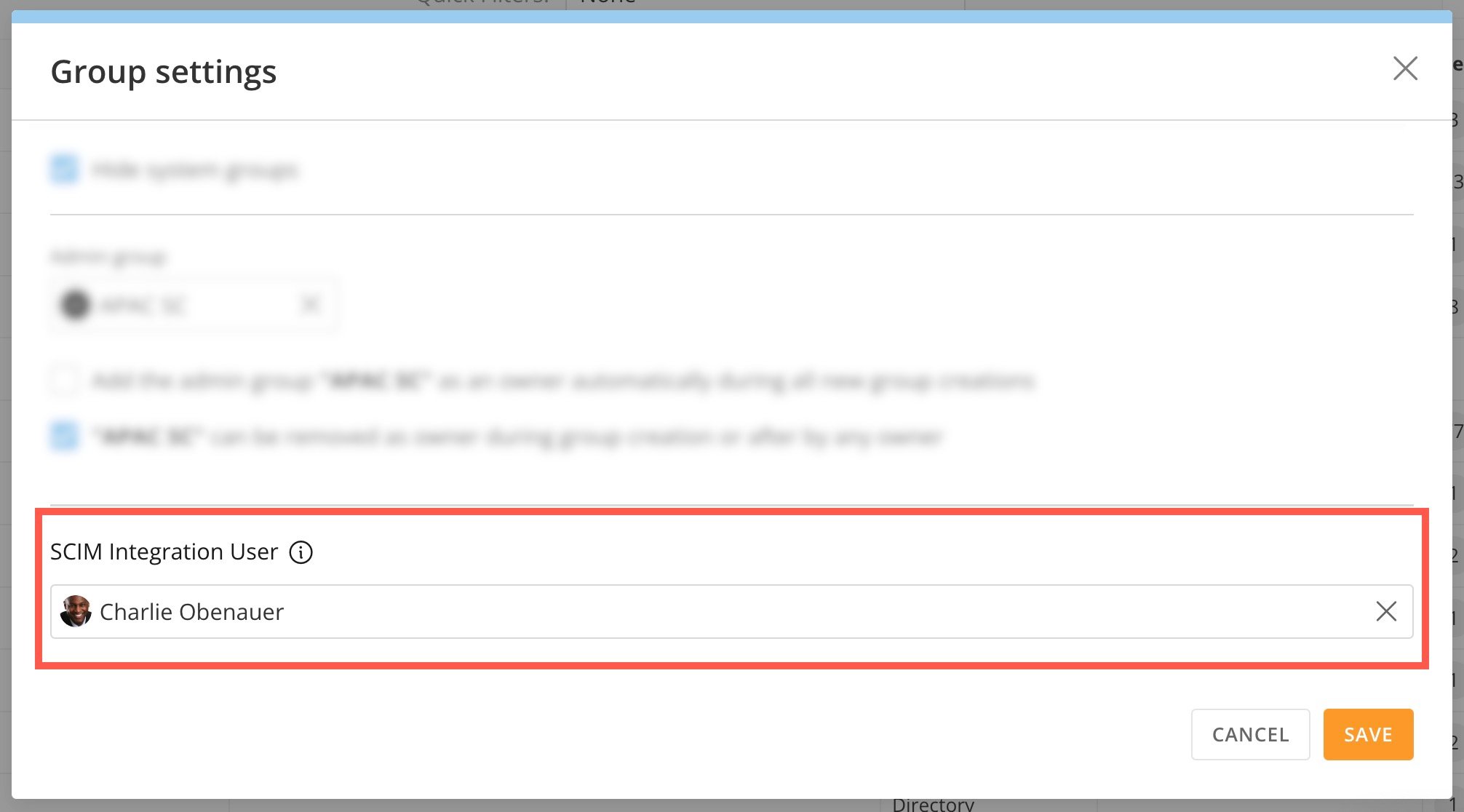
Domo’s SCIM integration functions in the context of the Domo user who owns the Domo Access Token used by the SCIM integration. (See our recommendations for the SCIM Integration User [above](#required_grants).) To allow Domo directory groups to be managed via SCIM, the Domo SCIM Integration User must be designated in Groups Settings as the user permitted to manage directory groups.

Follow these steps to designate the SCIM Integration User in Group Settings:

1. Go to **Admin** > **Governance** > **Groups**.

2. Select
   <InlineImage src="/images/kb/ka0Vq000000EOth-00N5w00000Ri7BU-0EMVq000007742s.jpg" /> **Group Settings** (gear icon).

   <Frame>
     <img alt="" src="https://mintcdn.com/domoinc-openapi-sync-dataflows/8E3HpyZujsEhQGNi/images/kb/ka0Vq000000CdP0-00N5w00000Ri7BU-0EMVq00000776cX.jpg?fit=max&auto=format&n=8E3HpyZujsEhQGNi&q=85&s=74ca54cece9900c031e6794a2085662a" style={{width: 300, height: 118}} width="962" height="378" data-path="images/kb/ka0Vq000000CdP0-00N5w00000Ri7BU-0EMVq00000776cX.jpg" />
   </Frame>

3. In the modal that displays, use the dropdown to choose the SCIM Integration User and save your changes.
   <Frame>
     <img alt="" src="https://mintcdn.com/domoinc-openapi-sync-dataflows/8E3HpyZujsEhQGNi/images/kb/ka0Vq000000CdP0-00N5w00000Ri7BU-0EMVq00000772p4.jpg?fit=max&auto=format&n=8E3HpyZujsEhQGNi&q=85&s=f32e0293fcbec1cc138bbd30fe5a6e21" style={{width: 451, height: 250}} width="2012" height="1116" data-path="images/kb/ka0Vq000000CdP0-00N5w00000Ri7BU-0EMVq00000772p4.jpg" />
   </Frame>

The following group endpoints are supported in Domo:

<table border="1"><tbody><tr><td colspan="1" rowspan="1"><b> Endpoint Name </b></td><td colspan="1" rowspan="1"><b> Description </b></td><td colspan="1" rowspan="1"><b> Endpoint </b></td></tr><tr><td colspan="1" rowspan="1"> Get Group </td><td colspan="1" rowspan="1"> Get a group by ID. </td><td colspan="1" rowspan="1"><pre class="language-markup"><code>GET /Groups/{groupID}</code></pre></td></tr><tr><td colspan="1" rowspan="1"> Post Group </td><td colspan="1" rowspan="1"> Create a group in Domo. </td><td colspan="1" rowspan="1"><pre class="language-markup"><code>POST /Groups</code></pre></td></tr><tr><td colspan="1" rowspan="1"> Put Group </td><td colspan="1" rowspan="1"> Update a group—group definition in Domo is completely replaced by the new group definition. </td><td colspan="1" rowspan="1"><pre class="language-markup"><code>PUT /Groups{groupId}</code></pre></td></tr><tr><td colspan="1" rowspan="1"> Patch Group </td><td colspan="1" rowspan="1"> Update a group. <a id="scim_status" target="_blank" /></td><td colspan="1" rowspan="1"><pre class="language-markup"><code>PATCH /Groups/{groupID}</code></pre></td></tr><tr><td colspan="1" rowspan="1"> Delete Group </td><td colspan="1" rowspan="1"> Delete a group. </td><td colspan="1" rowspan="1"><pre class="language-markup"><code>DELETE /Groups/{groupID}</code></pre></td></tr></tbody></table>

### SCIM Status

This table lists the status of each available action.

<table border="1" data-aura-rendered-by="33:209;a"><tbody><tr><td colspan="1" rowspan="1"><b> Type </b></td><td colspan="1" rowspan="1"><b> Action </b></td><td colspan="1" rowspan="1"><b> Spec-compliant APIs </b></td><td colspan="1" rowspan="1"><b> Tested with Okta </b></td><td colspan="1" rowspan="1"><b> Tested with Entra </b></td><td colspan="1" rowspan="1"><b> Other </b></td></tr><tr><td colspan="1" rowspan="1"> Config and Schema </td><td colspan="1" rowspan="1"> GET Service Provider Configuration </td><td colspan="1" rowspan="1"><img alt="" src="https://mintcdn.com/domoinc-openapi-sync-dataflows/DkLG580DK4bdXUC1/images/kb/ka0Vq0000001Fg9-00N5w00000Ri7BU-0EM5w000005wybS.jpg?fit=max&auto=format&n=DkLG580DK4bdXUC1&q=85&s=0c7f5735b9fff7a57a3dd82c89d7b77f" style={{width: 31, height: 32}} width="70" height="72" data-path="images/kb/ka0Vq0000001Fg9-00N5w00000Ri7BU-0EM5w000005wybS.jpg" /></td><td colspan="1" rowspan="1" /><td colspan="1" rowspan="1" /><td colspan="1" rowspan="1" /></tr><tr><td colspan="1" rowspan="1"> Config and Schema </td><td colspan="1" rowspan="1"> GET Schemas </td><td colspan="1" rowspan="1"><img alt="" src="https://mintcdn.com/domoinc-openapi-sync-dataflows/DkLG580DK4bdXUC1/images/kb/ka0Vq0000001Fg9-00N5w00000Ri7BU-0EM5w000005wybS.jpg?fit=max&auto=format&n=DkLG580DK4bdXUC1&q=85&s=0c7f5735b9fff7a57a3dd82c89d7b77f" style={{width: 31, height: 32}} width="70" height="72" data-path="images/kb/ka0Vq0000001Fg9-00N5w00000Ri7BU-0EM5w000005wybS.jpg" /></td><td colspan="1" rowspan="1" /><td colspan="1" rowspan="1" /><td colspan="1" rowspan="1" /></tr><tr><td colspan="1" rowspan="1"> Config and Schema </td><td colspan="1" rowspan="1"> GET User Schemas </td><td colspan="1" rowspan="1"><img alt="" src="https://mintcdn.com/domoinc-openapi-sync-dataflows/DkLG580DK4bdXUC1/images/kb/ka0Vq0000001Fg9-00N5w00000Ri7BU-0EM5w000005wybS.jpg?fit=max&auto=format&n=DkLG580DK4bdXUC1&q=85&s=0c7f5735b9fff7a57a3dd82c89d7b77f" style={{width: 31, height: 32}} width="70" height="72" data-path="images/kb/ka0Vq0000001Fg9-00N5w00000Ri7BU-0EM5w000005wybS.jpg" /></td><td colspan="1" rowspan="1" /><td colspan="1" rowspan="1" /><td colspan="1" rowspan="1" /></tr><tr><td colspan="1" rowspan="1"> Users </td><td colspan="1" rowspan="1"> GET Users </td><td colspan="1" rowspan="1"><img alt="" src="https://mintcdn.com/domoinc-openapi-sync-dataflows/DkLG580DK4bdXUC1/images/kb/ka0Vq0000001Fg9-00N5w00000Ri7BU-0EM5w000005wybS.jpg?fit=max&auto=format&n=DkLG580DK4bdXUC1&q=85&s=0c7f5735b9fff7a57a3dd82c89d7b77f" style={{width: 31, height: 32}} width="70" height="72" data-path="images/kb/ka0Vq0000001Fg9-00N5w00000Ri7BU-0EM5w000005wybS.jpg" /></td><td colspan="1" rowspan="1" /><td colspan="1" rowspan="1" /><td colspan="1" rowspan="1" /></tr><tr><td colspan="1" rowspan="1"> Users </td><td colspan="1" rowspan="1"> GET User </td><td colspan="1" rowspan="1"><img alt="" src="https://mintcdn.com/domoinc-openapi-sync-dataflows/DkLG580DK4bdXUC1/images/kb/ka0Vq0000001Fg9-00N5w00000Ri7BU-0EM5w000005wybS.jpg?fit=max&auto=format&n=DkLG580DK4bdXUC1&q=85&s=0c7f5735b9fff7a57a3dd82c89d7b77f" style={{width: 31, height: 32}} width="70" height="72" data-path="images/kb/ka0Vq0000001Fg9-00N5w00000Ri7BU-0EM5w000005wybS.jpg" /></td><td colspan="1" rowspan="1" /><td colspan="1" rowspan="1" /><td colspan="1" rowspan="1" /></tr><tr><td colspan="1" rowspan="1"> Users </td><td colspan="1" rowspan="1"> PUT User </td><td colspan="1" rowspan="1"><img alt="" src="https://mintcdn.com/domoinc-openapi-sync-dataflows/DkLG580DK4bdXUC1/images/kb/ka0Vq0000001Fg9-00N5w00000Ri7BU-0EM5w000005wybS.jpg?fit=max&auto=format&n=DkLG580DK4bdXUC1&q=85&s=0c7f5735b9fff7a57a3dd82c89d7b77f" style={{width: 31, height: 32}} width="70" height="72" data-path="images/kb/ka0Vq0000001Fg9-00N5w00000Ri7BU-0EM5w000005wybS.jpg" /></td><td colspan="1" rowspan="1" /><td colspan="1" rowspan="1" /><td colspan="1" rowspan="1" /></tr><tr><td colspan="1" rowspan="1"> Users </td><td colspan="1" rowspan="1"> PATCH User </td><td colspan="1" rowspan="1"> beta </td><td colspan="1" rowspan="1" /><td colspan="1" rowspan="1" /><td colspan="1" rowspan="1" /></tr><tr><td colspan="1" rowspan="1"> Users </td><td colspan="1" rowspan="1"> DELETE User </td><td colspan="1" rowspan="1"><img alt="" src="https://mintcdn.com/domoinc-openapi-sync-dataflows/DkLG580DK4bdXUC1/images/kb/ka0Vq0000001Fg9-00N5w00000Ri7BU-0EM5w000005wybS.jpg?fit=max&auto=format&n=DkLG580DK4bdXUC1&q=85&s=0c7f5735b9fff7a57a3dd82c89d7b77f" style={{width: 31, height: 32}} width="70" height="72" data-path="images/kb/ka0Vq0000001Fg9-00N5w00000Ri7BU-0EM5w000005wybS.jpg" /></td><td colspan="1" rowspan="1" /><td colspan="1" rowspan="1" /><td colspan="1" rowspan="1" /></tr><tr><td colspan="1" rowspan="1"> Users </td><td colspan="1" rowspan="1"> POST User </td><td colspan="1" rowspan="1"><img alt="" src="https://mintcdn.com/domoinc-openapi-sync-dataflows/DkLG580DK4bdXUC1/images/kb/ka0Vq0000001Fg9-00N5w00000Ri7BU-0EM5w000005wybS.jpg?fit=max&auto=format&n=DkLG580DK4bdXUC1&q=85&s=0c7f5735b9fff7a57a3dd82c89d7b77f" style={{width: 31, height: 32}} width="70" height="72" data-path="images/kb/ka0Vq0000001Fg9-00N5w00000Ri7BU-0EM5w000005wybS.jpg" /></td><td colspan="1" rowspan="1" /><td colspan="1" rowspan="1" /><td colspan="1" rowspan="1" /></tr><tr><td colspan="1" rowspan="1"> Groups </td><td colspan="1" rowspan="1"> GET Groups </td><td colspan="1" rowspan="1"> beta </td><td colspan="1" rowspan="1" /><td colspan="1" rowspan="1" /><td colspan="1" rowspan="1" /></tr><tr><td colspan="1" rowspan="1"> Groups </td><td colspan="1" rowspan="1"> POST Groups </td><td colspan="1" rowspan="1"> beta </td><td colspan="1" rowspan="1" /><td colspan="1" rowspan="1" /><td colspan="1" rowspan="1" /></tr><tr><td colspan="1" rowspan="1"> Groups </td><td colspan="1" rowspan="1"> PUT Groups </td><td colspan="1" rowspan="1"> beta </td><td colspan="1" rowspan="1" /><td colspan="1" rowspan="1" /><td colspan="1" rowspan="1" /></tr><tr><td colspan="1" rowspan="1"> Groups </td><td colspan="1" rowspan="1"> PATCH Groups </td><td colspan="1" rowspan="1"> beta </td><td colspan="1" rowspan="1" /><td colspan="1" rowspan="1" /><td colspan="1" rowspan="1" /></tr><tr><td colspan="1" rowspan="1"> Groups </td><td colspan="1" rowspan="1"> DELETE Groups </td><td colspan="1" rowspan="1"> beta </td><td colspan="1" rowspan="1" /><td colspan="1" rowspan="1" /><td colspan="1" rowspan="1" /></tr></tbody></table>