> ## Documentation Index
> Fetch the complete documentation index at: https://domoinc-openapi-sync-dataflows.mintlify.site/llms.txt
> Use this file to discover all available pages before exploring further.
# Magic ETL on Snowflake (Beta)
export const InlineImage = ({src, alt = '', height = '1.6em'}) => {
return  ;
};
### Intro
Magic ETL on Snowflake uses the Snowflake-Cloud Amplifier integration to give Snowflake users the power of Magic ETL transforms without moving data or requiring assistance from data engineers. While keeping your data secure inside your existing data structure, Magic ETL on Snowflake makes self-serve transformation possible for low-code users and reduces the burden on engineering resources.
**Note:** This feature is in beta. To enable it, contact your Domo account team. Magic ETL on Snowflake is only available to customers on the Domo Consumption agreement.
***
### Prerequisites
To use this feature, complete the items below in Domo and Snowflake.
# Domo Requirements
Complete the following in Domo:
* Configure
[write capability](https://domo-support.domo.com/s/article/4402322966807?language=en_US#write_setup) for Snowflake with Cloud Amplifier.
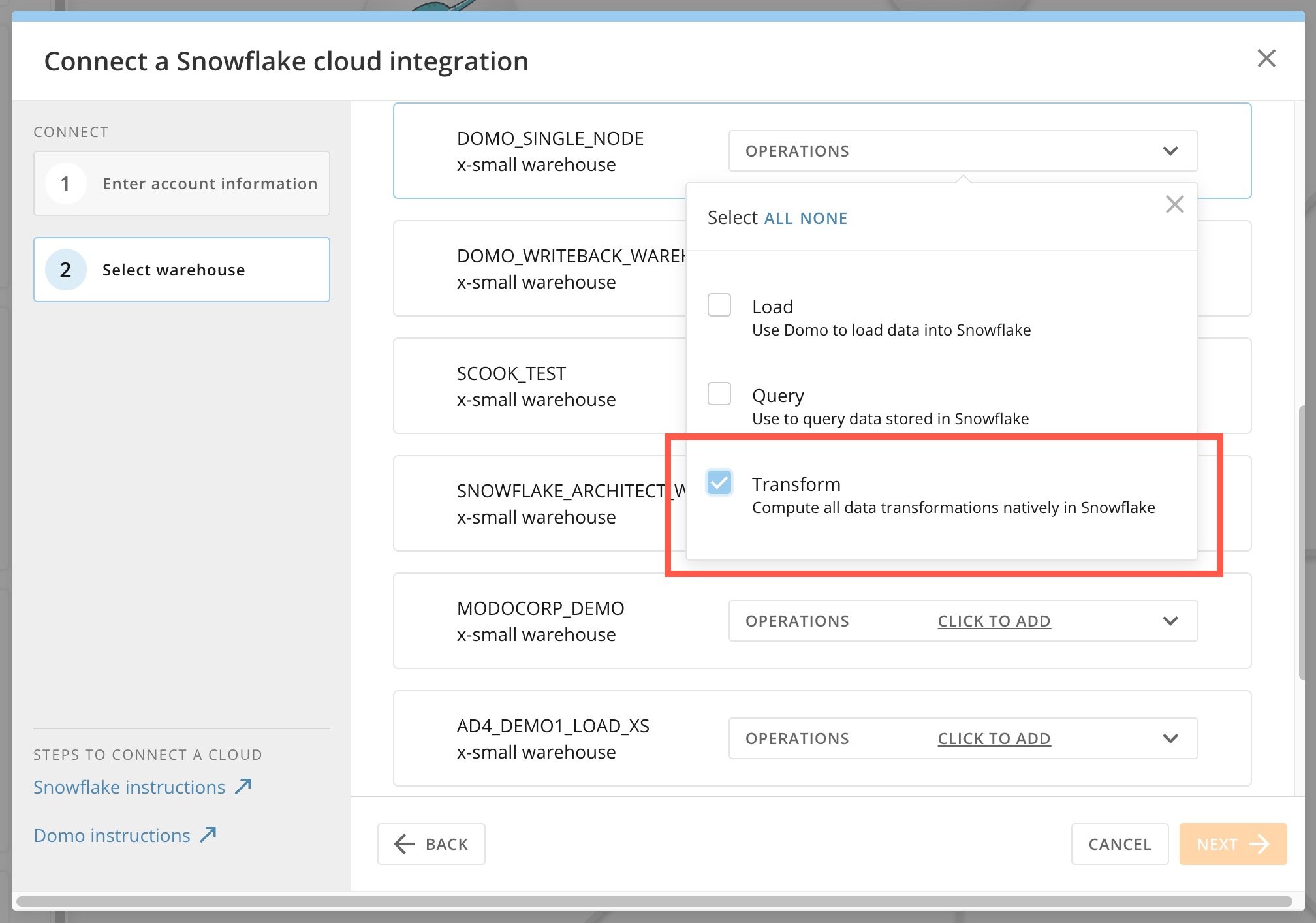
* For at least one Snowflake warehouse, choose **Transform** as the operation.
* This MUST be on the same Cloud Amplifier integration configured with write capability.
;
};
### Intro
Magic ETL on Snowflake uses the Snowflake-Cloud Amplifier integration to give Snowflake users the power of Magic ETL transforms without moving data or requiring assistance from data engineers. While keeping your data secure inside your existing data structure, Magic ETL on Snowflake makes self-serve transformation possible for low-code users and reduces the burden on engineering resources.
**Note:** This feature is in beta. To enable it, contact your Domo account team. Magic ETL on Snowflake is only available to customers on the Domo Consumption agreement.
***
### Prerequisites
To use this feature, complete the items below in Domo and Snowflake.
# Domo Requirements
Complete the following in Domo:
* Configure
[write capability](https://domo-support.domo.com/s/article/4402322966807?language=en_US#write_setup) for Snowflake with Cloud Amplifier.
* For at least one Snowflake warehouse, choose **Transform** as the operation.
* This MUST be on the same Cloud Amplifier integration configured with write capability.
 * All input DataSets must be part of the same Snowflake-Cloud Amplifier integration. A Magic ETL DataFlow with inputs from the Domo cloud cannot execute on the Snowflake cloud.
* Inputs from more than one Snowflake cloud are not supported.
# Snowflake Requirements
Complete the following in Snowflake:
* The Snowflake role of the service account used in the Snowflake-Cloud Amplifier integration needs SELECT, MODIFY, USAGE, and CREATE privileges on the tables you are referencing as inputs. This should be addressed by the commands run when you configure write capability.
### Required Grant
To use Magic ETL on Snowflake, users must have the following grant enabled for their role:
* **Edit Adrenaline DataFlow —** Allows users to create, edit, and run Adrenaline DataFlows to which they have access.
### Access Magic ETL on Snowflake
You can use this feature in the Magic ETL interface after completing a Snowflake-Cloud Amplifier transform integration.
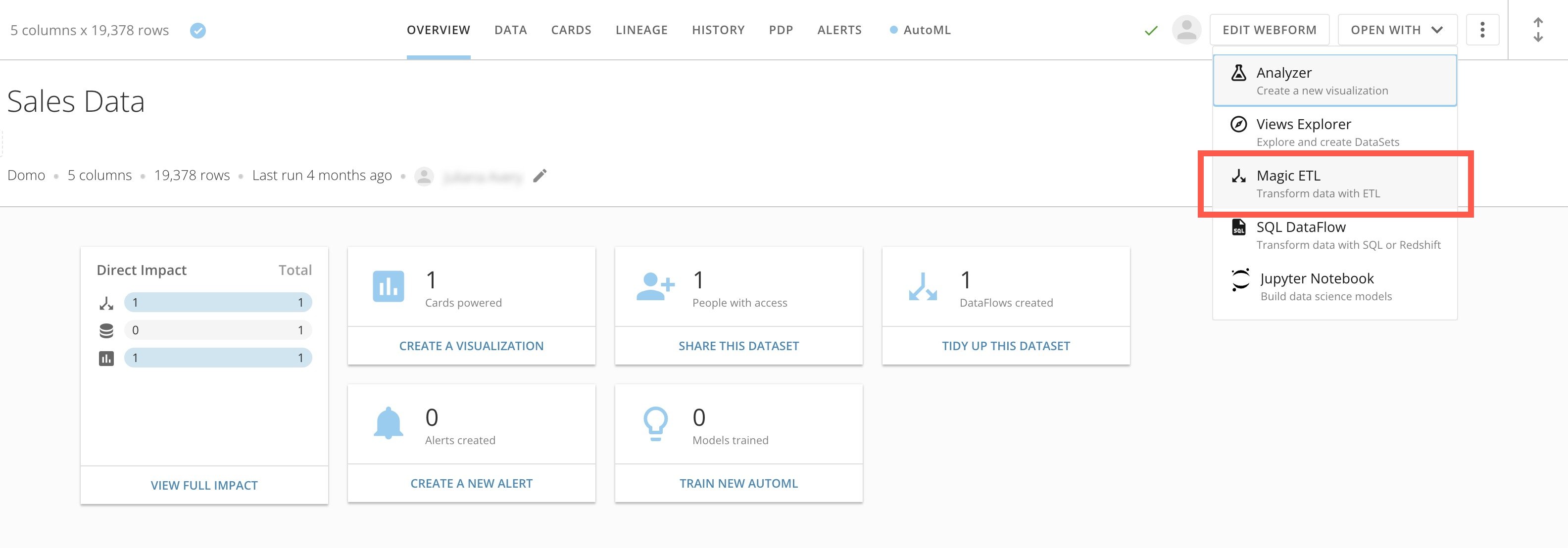
Access Magic ETL from the details page of any DataSet by selecting **Open With** > **Magic ETL**.
* All input DataSets must be part of the same Snowflake-Cloud Amplifier integration. A Magic ETL DataFlow with inputs from the Domo cloud cannot execute on the Snowflake cloud.
* Inputs from more than one Snowflake cloud are not supported.
# Snowflake Requirements
Complete the following in Snowflake:
* The Snowflake role of the service account used in the Snowflake-Cloud Amplifier integration needs SELECT, MODIFY, USAGE, and CREATE privileges on the tables you are referencing as inputs. This should be addressed by the commands run when you configure write capability.
### Required Grant
To use Magic ETL on Snowflake, users must have the following grant enabled for their role:
* **Edit Adrenaline DataFlow —** Allows users to create, edit, and run Adrenaline DataFlows to which they have access.
### Access Magic ETL on Snowflake
You can use this feature in the Magic ETL interface after completing a Snowflake-Cloud Amplifier transform integration.
Access Magic ETL from the details page of any DataSet by selecting **Open With** > **Magic ETL**.
 ### Use Magic ETL on Snowflake
Magic ETL on Snowflake allows you to use the Magic ETL interface to *define* a data transformation, but the transformation *executes* on Snowflake.
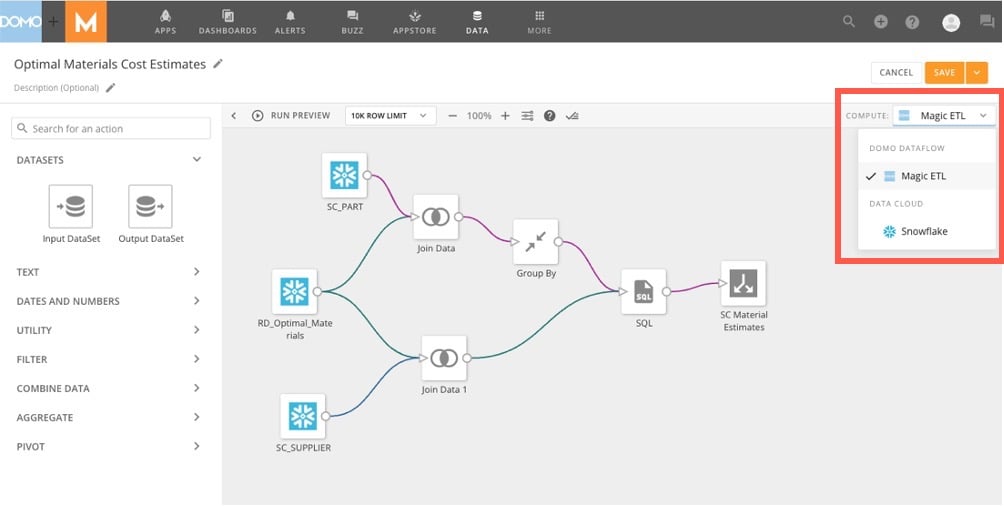
When you configure a Snowflake-Cloud Amplifier integration to allow transform operations, a dropdown displays in the Magic ETL editor, where you can choose where the ETL executes. The dropdown provides options for each of the available Snowflake clouds.
### Use Magic ETL on Snowflake
Magic ETL on Snowflake allows you to use the Magic ETL interface to *define* a data transformation, but the transformation *executes* on Snowflake.
When you configure a Snowflake-Cloud Amplifier integration to allow transform operations, a dropdown displays in the Magic ETL editor, where you can choose where the ETL executes. The dropdown provides options for each of the available Snowflake clouds.
 When a Magic ETL on Snowflake DataFlow executes for the first time, a new table is created in the Snowflake database configured as part of the write setup of the Snowflake-Cloud Amplifier integration. By default, all subsequent runs of the Magic ETL DataFlow are configured with the Replace update method, but you can choose to use the Append method. Learn about [DataSet update methods](https://domo-support.domo.com/s/article/360043430733?language=en_US).
**Tip:** With Magic ETL on Snowflake, you can use Snowflake Pass-Through SQL in Magic ETL to write and execute SQL queries directly on your Snowflake data. Learn [more](/s/article/000005815).
### FAQ
Yes. The default method is Replace, but you can change it to Append.
Yes, subset processing is supported by leveraging Snowflake Dynamic tables. Learn more about [subset processing](/s/article/000005150).
Yes. Magic ETL can leverage optimizations like cluster keys and cluster tables at execution time without additional configuration. Learn about [configuring these items](https://docs.snowflake.com/en/user-guide/tables-clustering-keys) in Snowflake documentation.
Yes. Only Domo users with the Edit Adrenaline DataFlow grant can execute DataFlows.
Yes — if all inputs for the DataFlow are in that Snowflake cloud and if the DataFlow uses the Replace or Append update method. If the DataFlow was configured with the Upsert or Partition method, it will error. Learn about [DataSet update methods](https://domo-support.domo.com/s/article/360043430733?language=en_US).
No. The Python and R scripting tiles are not supported for Magic ETL on Snowflake.
Yes. Please refer to your sales agreement for credit consumption terms.
**Next steps:** Learn how to [create](/s/article/360055259234) a Magic ETL DataFlow or learn about the [action tiles](https://domo-support.domo.com/s/topic/0TO5w000000ZdTHGA0/tiles?language=en_US) available in the Magic ETL drag-and-drop interface.
When a Magic ETL on Snowflake DataFlow executes for the first time, a new table is created in the Snowflake database configured as part of the write setup of the Snowflake-Cloud Amplifier integration. By default, all subsequent runs of the Magic ETL DataFlow are configured with the Replace update method, but you can choose to use the Append method. Learn about [DataSet update methods](https://domo-support.domo.com/s/article/360043430733?language=en_US).
**Tip:** With Magic ETL on Snowflake, you can use Snowflake Pass-Through SQL in Magic ETL to write and execute SQL queries directly on your Snowflake data. Learn [more](/s/article/000005815).
### FAQ
Yes. The default method is Replace, but you can change it to Append.
Yes, subset processing is supported by leveraging Snowflake Dynamic tables. Learn more about [subset processing](/s/article/000005150).
Yes. Magic ETL can leverage optimizations like cluster keys and cluster tables at execution time without additional configuration. Learn about [configuring these items](https://docs.snowflake.com/en/user-guide/tables-clustering-keys) in Snowflake documentation.
Yes. Only Domo users with the Edit Adrenaline DataFlow grant can execute DataFlows.
Yes — if all inputs for the DataFlow are in that Snowflake cloud and if the DataFlow uses the Replace or Append update method. If the DataFlow was configured with the Upsert or Partition method, it will error. Learn about [DataSet update methods](https://domo-support.domo.com/s/article/360043430733?language=en_US).
No. The Python and R scripting tiles are not supported for Magic ETL on Snowflake.
Yes. Please refer to your sales agreement for credit consumption terms.
**Next steps:** Learn how to [create](/s/article/360055259234) a Magic ETL DataFlow or learn about the [action tiles](https://domo-support.domo.com/s/topic/0TO5w000000ZdTHGA0/tiles?language=en_US) available in the Magic ETL drag-and-drop interface.