> ## Documentation Index
> Fetch the complete documentation index at: https://domoinc-openapi-sync-dataflows.mintlify.site/llms.txt
> Use this file to discover all available pages before exploring further.
# 2024 Release 4 | July
export const InlineImage = ({src, alt = '', height = '1.6em'}) => {
return  ;
};
***
### New Features
# DomoGPT
DomoGPT provides a robust Large Language Model (LLM) hosted within the Domo Cloud, ensuring that none of your sensitive data leaves the Domo ecosystem. DomoGPT allows you to leverage Domo. AI safely and securely.
DomoGPT is automatically available for those with [Domo.AI](http://Domo.AI) enabled. Speak to your Domo account team for more information.
Visit [Domo.AI](https://ai.domo.com/) to learn more about our AI offering or s ee our [Domo.AI documentation](https://domo-support.domo.com/s/topic/0TO5w000000ZmGPGA0/domoai?language=en_US) in the Knowledge Base.
***
### Platform Enhancements
# AI Model Inference Tile
You can now integrate third-party models into Magic ETL with the AI Model Inference tile.
Learn how to [manage AI models](/s/article/000005502).
For more information on the AI Model Inference tile, see our [Magic ETL Tiles: Data Science](https://domo-support.domo.com/s/article/360045259294?language=en_US) article in the Knowledge Base.
;
};
***
### New Features
# DomoGPT
DomoGPT provides a robust Large Language Model (LLM) hosted within the Domo Cloud, ensuring that none of your sensitive data leaves the Domo ecosystem. DomoGPT allows you to leverage Domo. AI safely and securely.
DomoGPT is automatically available for those with [Domo.AI](http://Domo.AI) enabled. Speak to your Domo account team for more information.
Visit [Domo.AI](https://ai.domo.com/) to learn more about our AI offering or s ee our [Domo.AI documentation](https://domo-support.domo.com/s/topic/0TO5w000000ZmGPGA0/domoai?language=en_US) in the Knowledge Base.
***
### Platform Enhancements
# AI Model Inference Tile
You can now integrate third-party models into Magic ETL with the AI Model Inference tile.
Learn how to [manage AI models](/s/article/000005502).
For more information on the AI Model Inference tile, see our [Magic ETL Tiles: Data Science](https://domo-support.domo.com/s/article/360045259294?language=en_US) article in the Knowledge Base.
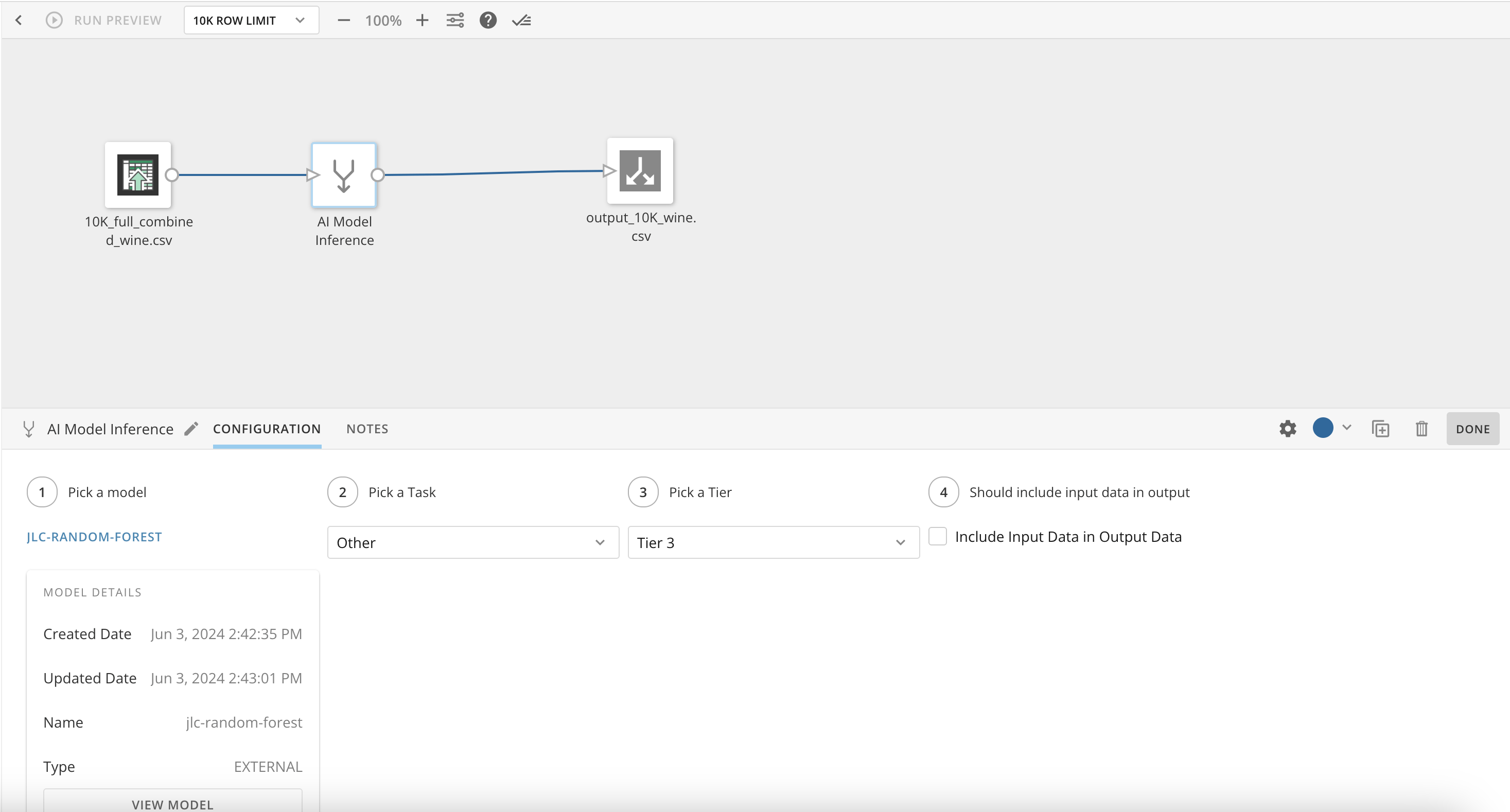 The AI Model Inference tile is automatically available for those with [Domo.AI](http://Domo.AI) enabled, speak to your Domo account team for more information.
# DataFlow Sharing Modal
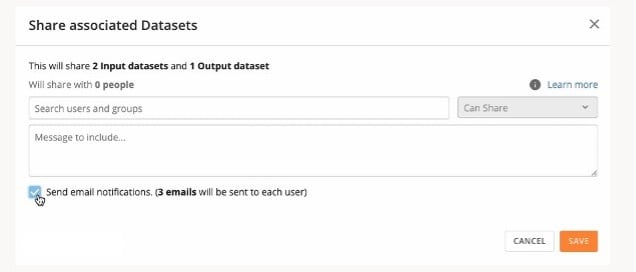
The DataFlow Sharing modal allows you to share a DataFlow, including all of its associated input and output DataSets, with another person or group from one convenient menu. You can choose to notify recipients of each share event by email.
Learn about [DataFlow sharing](https://domo-support.domo.com/s/article/360043430713?language=en_US#dataflow_sharing_modal) in the Knowledge Base.
The AI Model Inference tile is automatically available for those with [Domo.AI](http://Domo.AI) enabled, speak to your Domo account team for more information.
# DataFlow Sharing Modal
The DataFlow Sharing modal allows you to share a DataFlow, including all of its associated input and output DataSets, with another person or group from one convenient menu. You can choose to notify recipients of each share event by email.
Learn about [DataFlow sharing](https://domo-support.domo.com/s/article/360043430713?language=en_US#dataflow_sharing_modal) in the Knowledge Base.
 # Data Center Navigation Updates
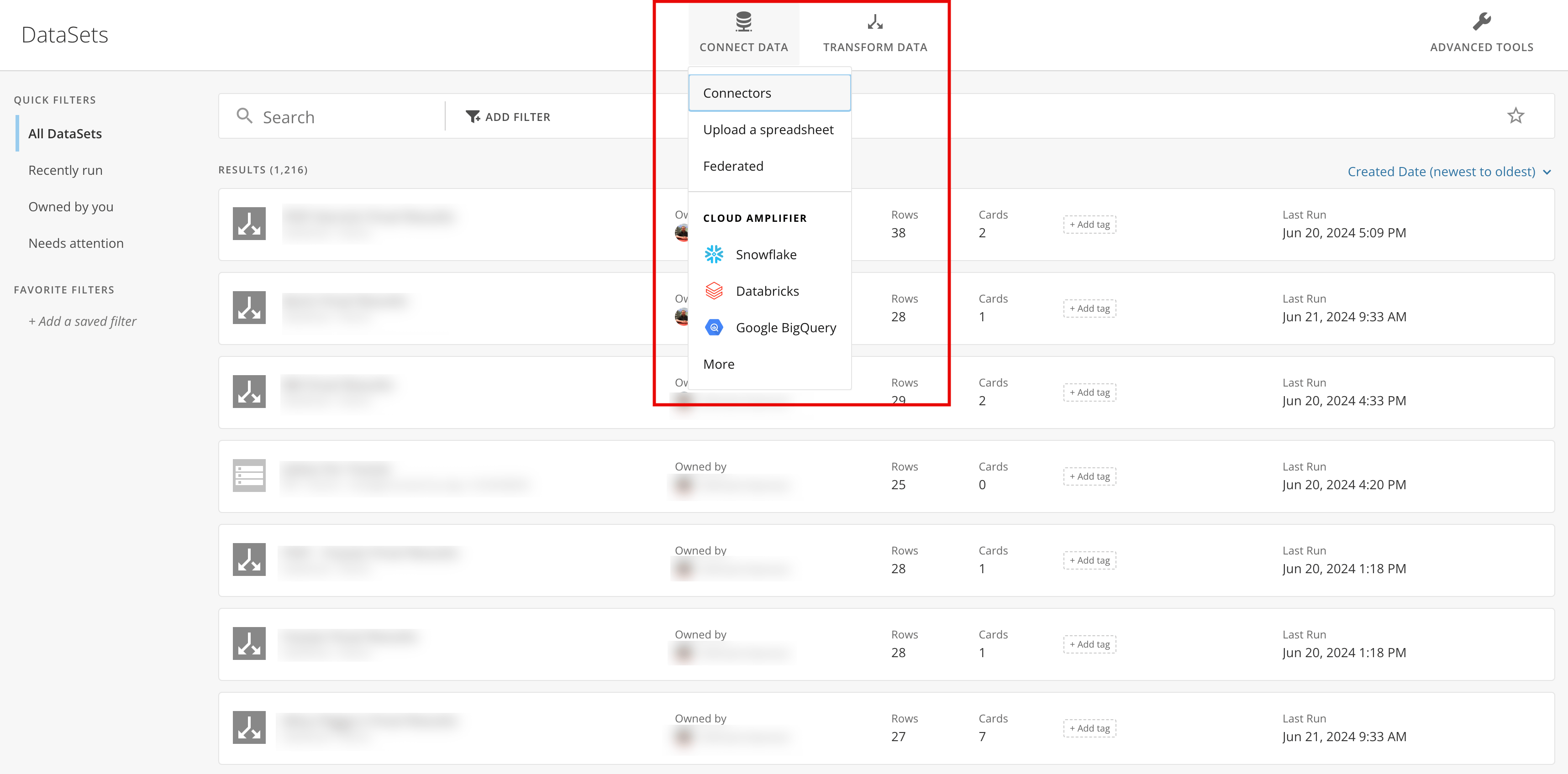
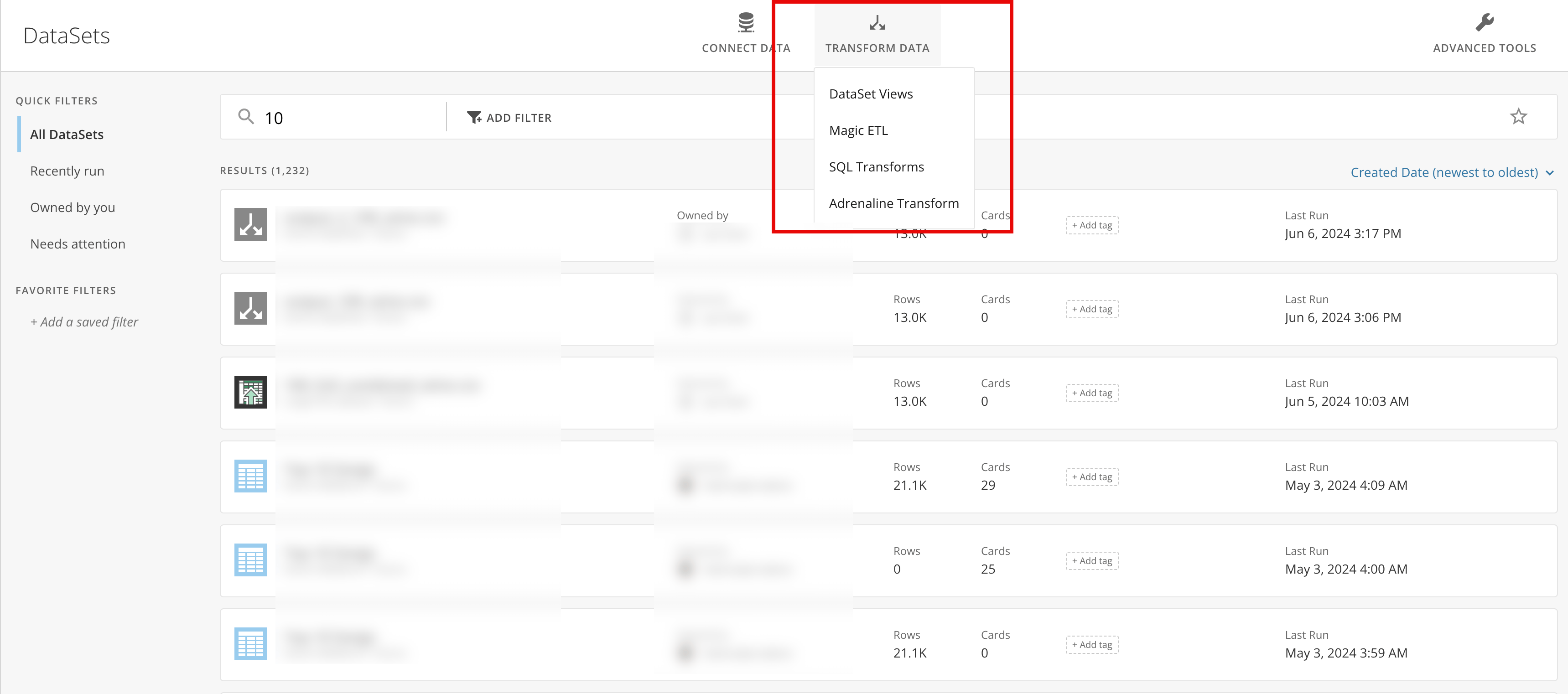
The Data Center now bundles options for connecting and transforming data. The new, cleaner Data Center navigation includes two actions: **Connect Data** and **Transform Data**. Selecting an action displays a larger list of associated options.
The following options are available under **Connect Data**:
* Connectors
* Upload a spreadsheet
* Federated
* Available Cloud Amplifier connections
# Data Center Navigation Updates
The Data Center now bundles options for connecting and transforming data. The new, cleaner Data Center navigation includes two actions: **Connect Data** and **Transform Data**. Selecting an action displays a larger list of associated options.
The following options are available under **Connect Data**:
* Connectors
* Upload a spreadsheet
* Federated
* Available Cloud Amplifier connections
 The following options are available under **Transform Data**:
* DataSet Views
* Magic ETL
* SQL Transforms
* Adrenaline Transform
The following options are available under **Transform Data**:
* DataSet Views
* Magic ETL
* SQL Transforms
* Adrenaline Transform
 Learn about [Connecting Data to Domo](https://domo-support.domo.com/s/topic/0TO5w000000ZammGAC/connecting-data-to-domo?language=en_US) or learn more about our powerful [transform options](https://domo-support.domo.com/s/topic/0TO5w000000ZamzGAC/transforming-data-in-domo?language=en_US) in the Knowledge Base.
# Quick Delete Dashboard
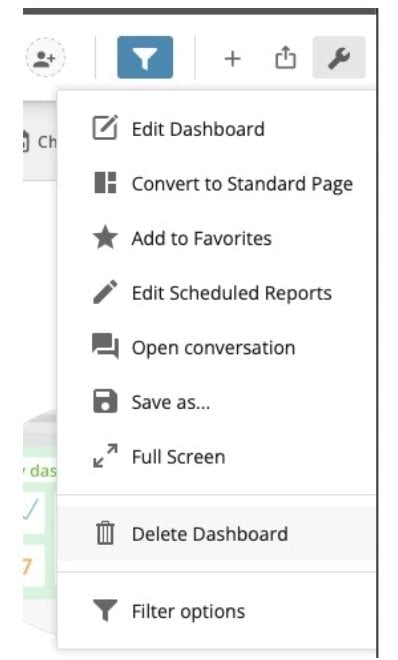
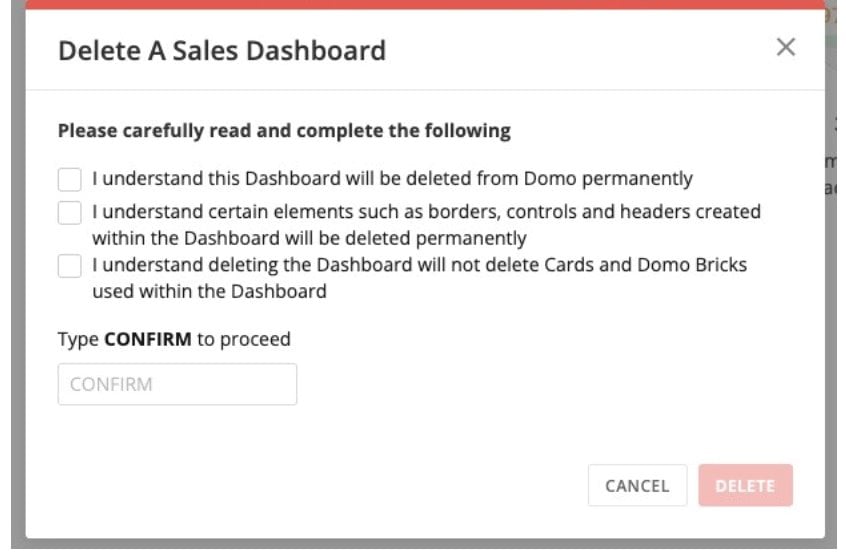
The new Delete Dashboard functionality allows dashboard owners to quickly delete a dashboard without going to the Admin Settings. Deleting a dashboard removes all borders, controls, and headers created for the dashboard, but does not delete any cards or Domo Bricks placed on the dashboard.
Learn how to [delete dashboards](https://domo-support.domo.com/s/article/360043428253?language=en_US#delete_a_dashboard) or about [dashboard management](https://domo-support.domo.com/s/article/360043428253?language=en_US) in the Knowledge Base.
Learn about [Connecting Data to Domo](https://domo-support.domo.com/s/topic/0TO5w000000ZammGAC/connecting-data-to-domo?language=en_US) or learn more about our powerful [transform options](https://domo-support.domo.com/s/topic/0TO5w000000ZamzGAC/transforming-data-in-domo?language=en_US) in the Knowledge Base.
# Quick Delete Dashboard
The new Delete Dashboard functionality allows dashboard owners to quickly delete a dashboard without going to the Admin Settings. Deleting a dashboard removes all borders, controls, and headers created for the dashboard, but does not delete any cards or Domo Bricks placed on the dashboard.
Learn how to [delete dashboards](https://domo-support.domo.com/s/article/360043428253?language=en_US#delete_a_dashboard) or about [dashboard management](https://domo-support.domo.com/s/article/360043428253?language=en_US) in the Knowledge Base.
 # DomoStats: New Columns Used in Beast Modes Report & Beast Modes Updates
 With the new Columns Used in Beast Modes report, admins have more visibility into what DataSet columns are being used in calculated fields within their instance.
The Columns Used in Beast Modes DataSet includes two columns: BeastModeID and ColumnName.
Additionally, two new fields are available in the Beast Modes DomoStats report—ArchivedStatus and Validity. These fields can help you determine whether each calculation has been archived and if the calculation syntax is valid.
Learn more about [DomoStats](/s/article/360043433813).
# European Number Formatting
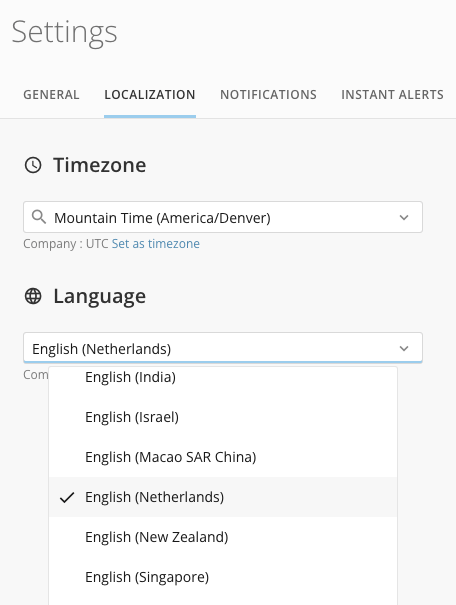
We have added the 'English (Netherlands)' option to the language localization settings. When the 'English (Netherlands)' option is enabled, number formatting throughout the instance defaults to European conventions, including using a dot (.) as a thousands separator and a comma (,) as a decimal separator. This feature includes default, company-wide, personal, and user-specific settings that override the default setting.
For more information, see [Use European Number Formatting](https://domo-support.domo.com/s/article/360043439133?language=en_US#use_european_number_formatting).
With the new Columns Used in Beast Modes report, admins have more visibility into what DataSet columns are being used in calculated fields within their instance.
The Columns Used in Beast Modes DataSet includes two columns: BeastModeID and ColumnName.
Additionally, two new fields are available in the Beast Modes DomoStats report—ArchivedStatus and Validity. These fields can help you determine whether each calculation has been archived and if the calculation syntax is valid.
Learn more about [DomoStats](/s/article/360043433813).
# European Number Formatting
We have added the 'English (Netherlands)' option to the language localization settings. When the 'English (Netherlands)' option is enabled, number formatting throughout the instance defaults to European conventions, including using a dot (.) as a thousands separator and a comma (,) as a decimal separator. This feature includes default, company-wide, personal, and user-specific settings that override the default setting.
For more information, see [Use European Number Formatting](https://domo-support.domo.com/s/article/360043439133?language=en_US#use_european_number_formatting).
 # DataSet Views Replace Blend Transform
With the [Data Center updates](#discoverability_updates), we have removed the Blend transform. Existing DataFusions are not being deprecated and continue to function as expected.
When editing a DataFusion in DataSet Views, your DataFusion will be saved as a DataSet View. This action cannot be undone.
DataSet Views allow you to filter, group, aggregate, and combine data in a spreadsheet interface without having to build a transform.
Learn more about [DataSet Views](https://domo-support.domo.com/s/article/360046074774?language=en_US) in the Knowledge Base.
# Persistent App Studio Filters
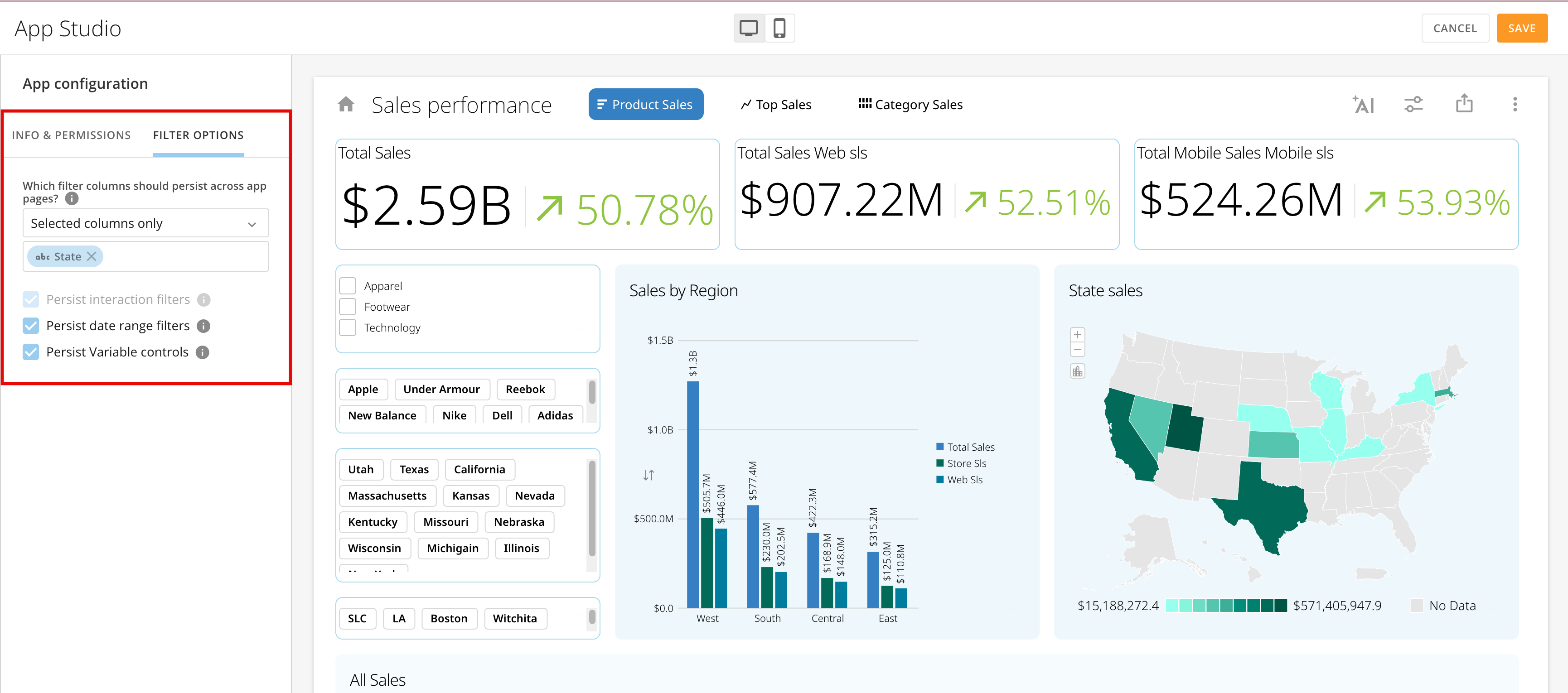
Persistent Filters in App Studio allow you to configure column-based and date filters to persist across all app pages. Persistent Variable controls are also available. App admins can enable or disable Persistent Filters.
Learn about [Persistent Filters](https://domo-support.domo.com/s/article/000005295?language=en_US#configure_persistent_filters) in the App Studio documentation.
# DataSet Views Replace Blend Transform
With the [Data Center updates](#discoverability_updates), we have removed the Blend transform. Existing DataFusions are not being deprecated and continue to function as expected.
When editing a DataFusion in DataSet Views, your DataFusion will be saved as a DataSet View. This action cannot be undone.
DataSet Views allow you to filter, group, aggregate, and combine data in a spreadsheet interface without having to build a transform.
Learn more about [DataSet Views](https://domo-support.domo.com/s/article/360046074774?language=en_US) in the Knowledge Base.
# Persistent App Studio Filters
Persistent Filters in App Studio allow you to configure column-based and date filters to persist across all app pages. Persistent Variable controls are also available. App admins can enable or disable Persistent Filters.
Learn about [Persistent Filters](https://domo-support.domo.com/s/article/000005295?language=en_US#configure_persistent_filters) in the App Studio documentation.
 # Analyzer Updates
#### Chart Property Number Input Types
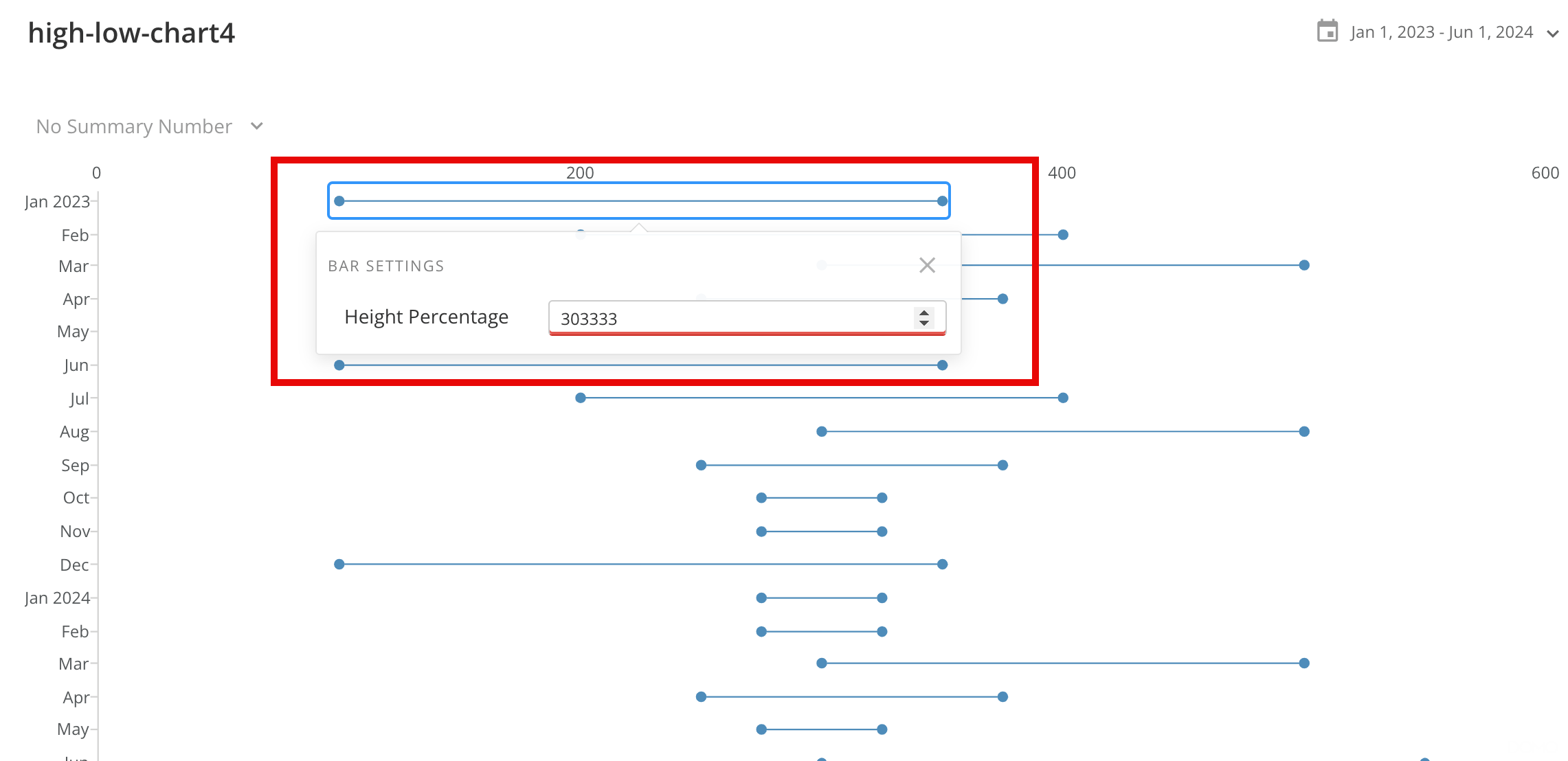
All chart types in Analyzer now include a validation feature for input fields that accept numbers. Validation ensures clean numeric values throughout your chart.
In the example below, the height percentage attribute requires a numeric input between zero and one hundred. If the entered value is outside that range, then the attribute is highlighted in red and the chart does not render.
# Analyzer Updates
#### Chart Property Number Input Types
All chart types in Analyzer now include a validation feature for input fields that accept numbers. Validation ensures clean numeric values throughout your chart.
In the example below, the height percentage attribute requires a numeric input between zero and one hundred. If the entered value is outside that range, then the attribute is highlighted in red and the chart does not render.
 #### Context Sensitive Chart Properties
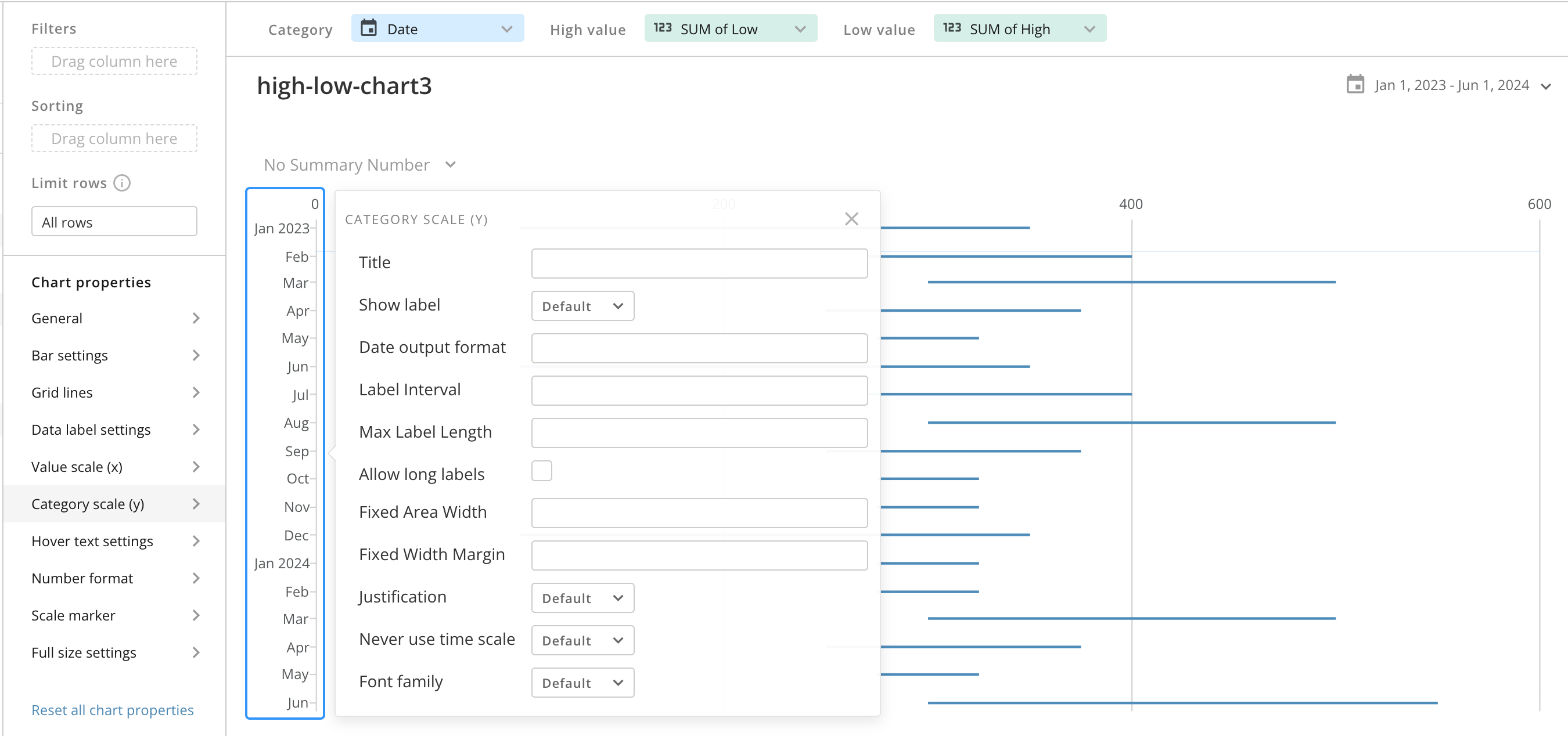
Context Sensitive Chart Properties in Analyzer allow you to right-click on chart elements and see the list of applicable chart properties. In the image below, right-clicking on the y-axis displays the category scale (Y) chart property.
#### Context Sensitive Chart Properties
Context Sensitive Chart Properties in Analyzer allow you to right-click on chart elements and see the list of applicable chart properties. In the image below, right-clicking on the y-axis displays the category scale (Y) chart property.
 #### Mega Tables Sort Icons
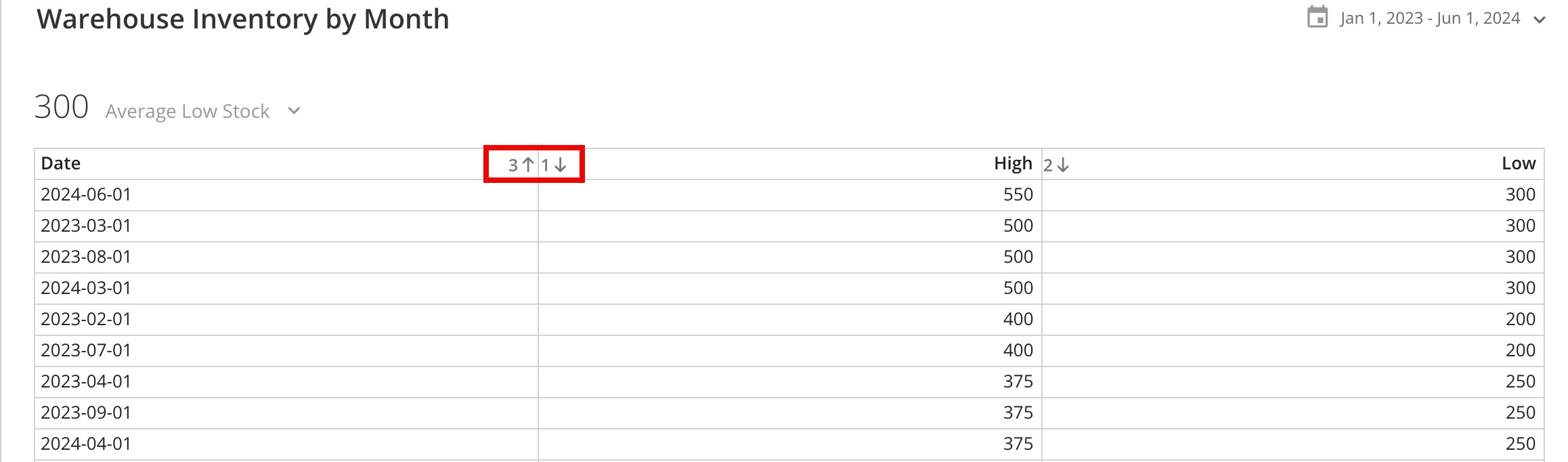
The sort icons on Mega Tables have been updated for greater visibility. The icons now display as up and down arrows alongside numbers identifying the sort order of each column.
#### Mega Tables Sort Icons
The sort icons on Mega Tables have been updated for greater visibility. The icons now display as up and down arrows alongside numbers identifying the sort order of each column.
 #### Quick Render in Analyzer
The new Quick Render feature in Analyzer no longer queries the data on every load, decreasing the overall render time. For charts using large DataSets, Quick Render allows you to update multiple chart elements without waiting for repeated chart refreshes.
# Workflows Updates
#### Canvas Facelift
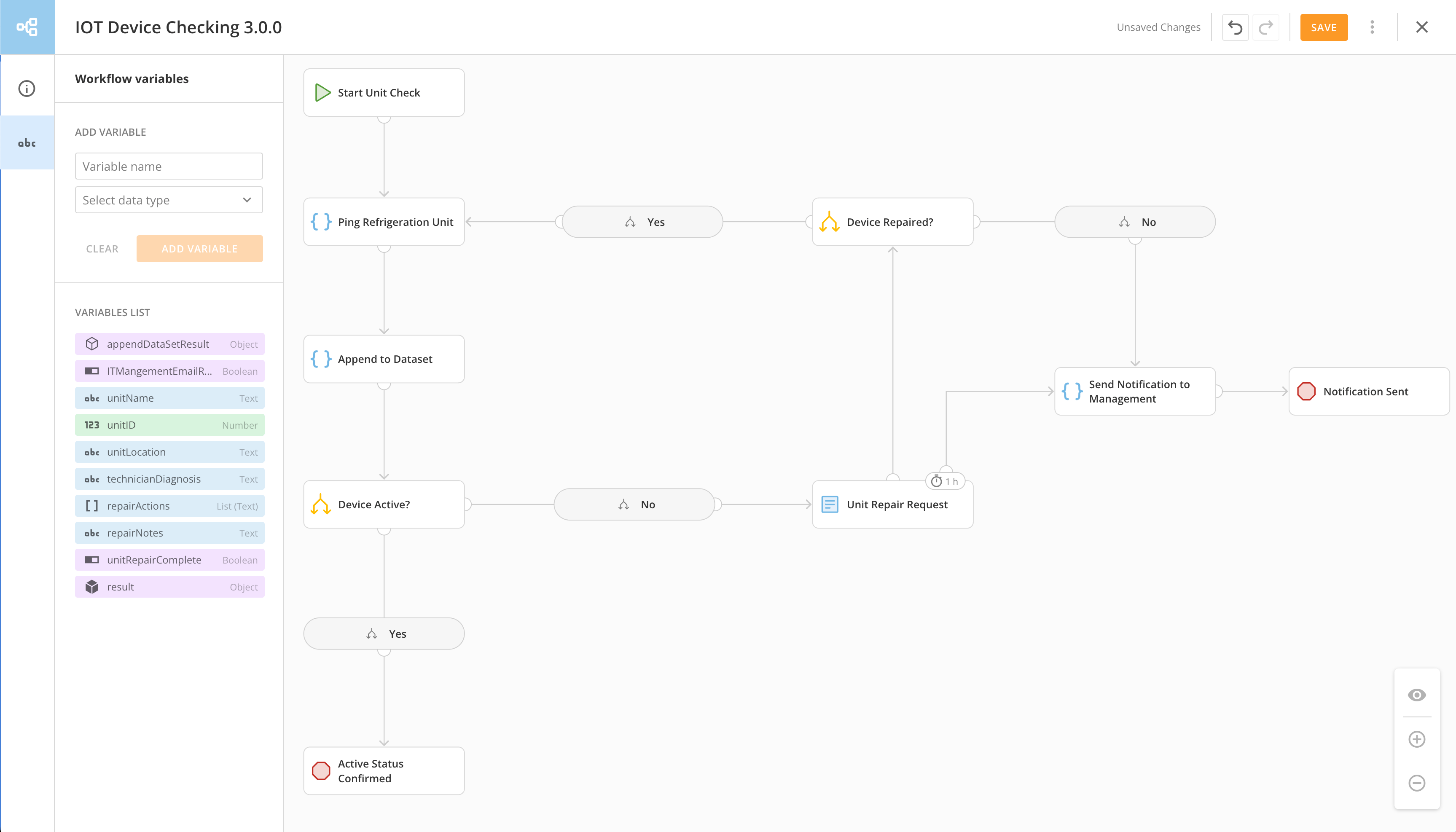
The Workflows canvas receives a facelift with the following upgrades to aesthetics and usability:
* **Centrally positioned modals** **—** Modals for custom values and conditional rules are now centered in the canvas.
* **Collapsible sections in the configuration panel —** Each section in a shape’s configuration panel can be collapsed or expanded for greater viewing flexibility.
* **Fonts and colors —** The entire canvas has been updated with fonts and colors consistent with the Domo style guide.
* **Left gallery** **—** The left gallery now shows navigation controls for the Workflows canvas only, consistent with other Domo products.
* **New icons —** Shapes and data types are represented by new icons.
* **Shape dimensions** **—** Overall shape width has been reduced to maximize canvas area.
* **Shape titles** **—** Shape titles are now the only labels that appear in a workflow shape and can be wrapped to show multiple lines of characters.
* **Stacked parameters and mapping fields** **—** Parameters and mapping fields in the configuration panel are now stacked on top of each other.
* **Variable list** **—** The variable list has better spacing between entries.
#### Quick Render in Analyzer
The new Quick Render feature in Analyzer no longer queries the data on every load, decreasing the overall render time. For charts using large DataSets, Quick Render allows you to update multiple chart elements without waiting for repeated chart refreshes.
# Workflows Updates
#### Canvas Facelift
The Workflows canvas receives a facelift with the following upgrades to aesthetics and usability:
* **Centrally positioned modals** **—** Modals for custom values and conditional rules are now centered in the canvas.
* **Collapsible sections in the configuration panel —** Each section in a shape’s configuration panel can be collapsed or expanded for greater viewing flexibility.
* **Fonts and colors —** The entire canvas has been updated with fonts and colors consistent with the Domo style guide.
* **Left gallery** **—** The left gallery now shows navigation controls for the Workflows canvas only, consistent with other Domo products.
* **New icons —** Shapes and data types are represented by new icons.
* **Shape dimensions** **—** Overall shape width has been reduced to maximize canvas area.
* **Shape titles** **—** Shape titles are now the only labels that appear in a workflow shape and can be wrapped to show multiple lines of characters.
* **Stacked parameters and mapping fields** **—** Parameters and mapping fields in the configuration panel are now stacked on top of each other.
* **Variable list** **—** The variable list has better spacing between entries.
 #### Form Start
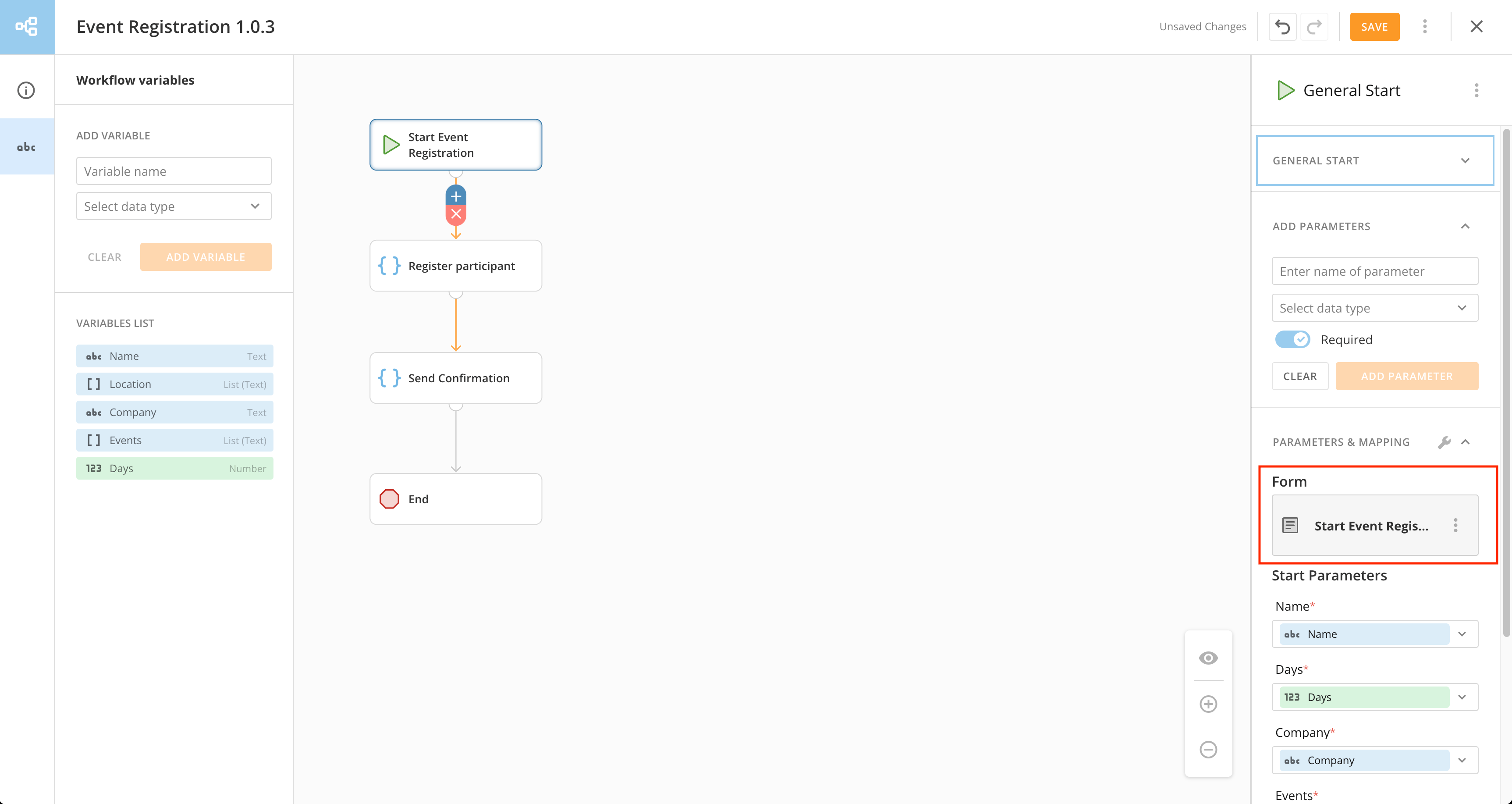
To start any workflow, users now complete a form that may be pre-populated with default information. Workflow creators can configure and edit the starting form within the Workflows canvas.
#### Form Start
To start any workflow, users now complete a form that may be pre-populated with default information. Workflow creators can configure and edit the starting form within the Workflows canvas.
 #### Workflow Widget
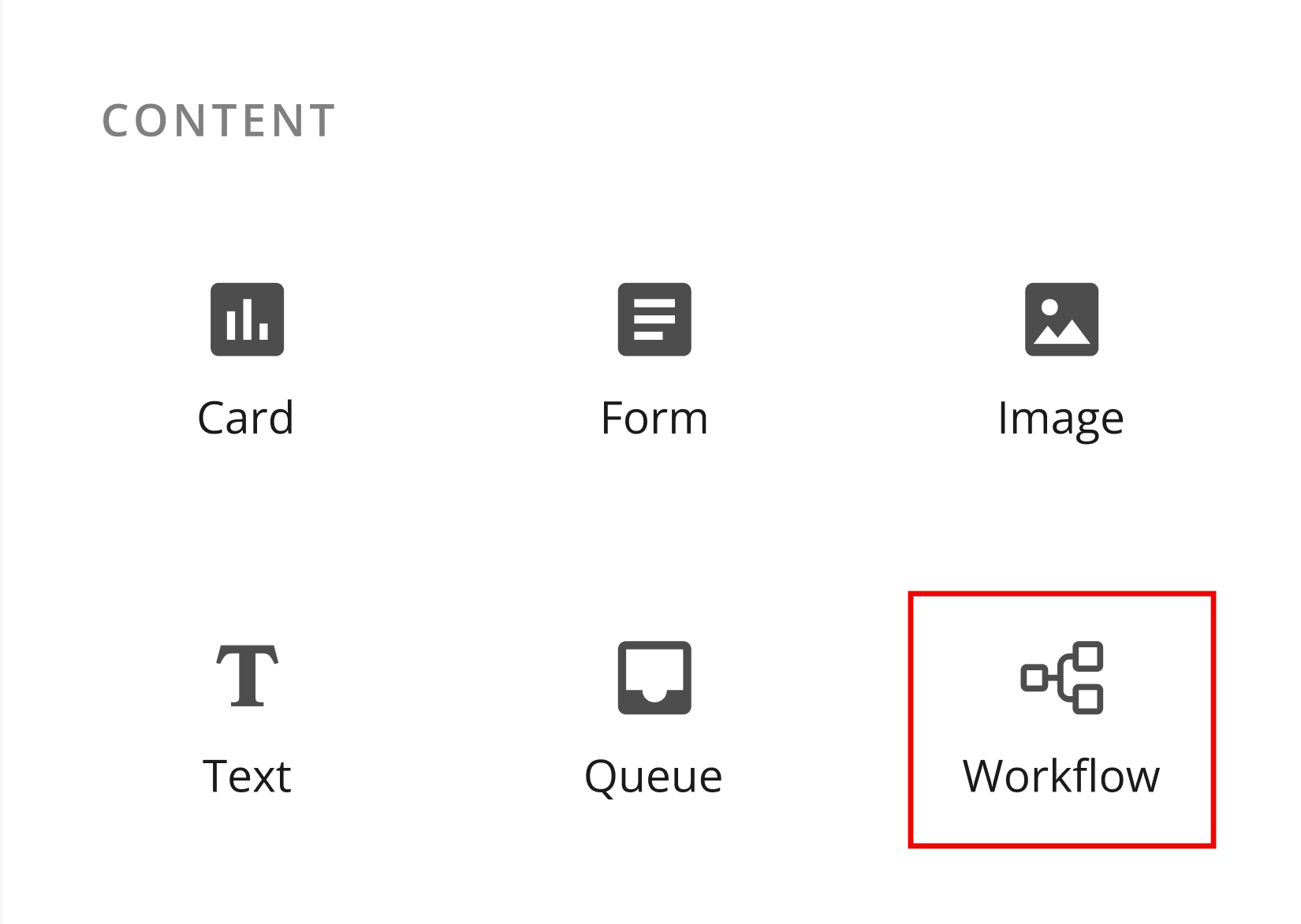
The new Workflow widget in App Studio renders the starting form for a specified Workflow. When an App Studio user submits the form in the app, the corresponding workflow executes.
#### Workflow Widget
The new Workflow widget in App Studio renders the starting form for a specified Workflow. When an App Studio user submits the form in the app, the corresponding workflow executes.
 See the [Workflows documentation](https://domo-support.domo.com/s/topic/0TO5w000000ZkAMGA0/workflows?language=en_US) in the Knowledge Base.
***
### Beta Features
*To join a beta, reach out to your Domo account team. If you do not have contact information for your account team, you can reach out to Domo Support at [support@domo.com](mailto:support@domo.com). You may be required to complete training before you can use the feature.*
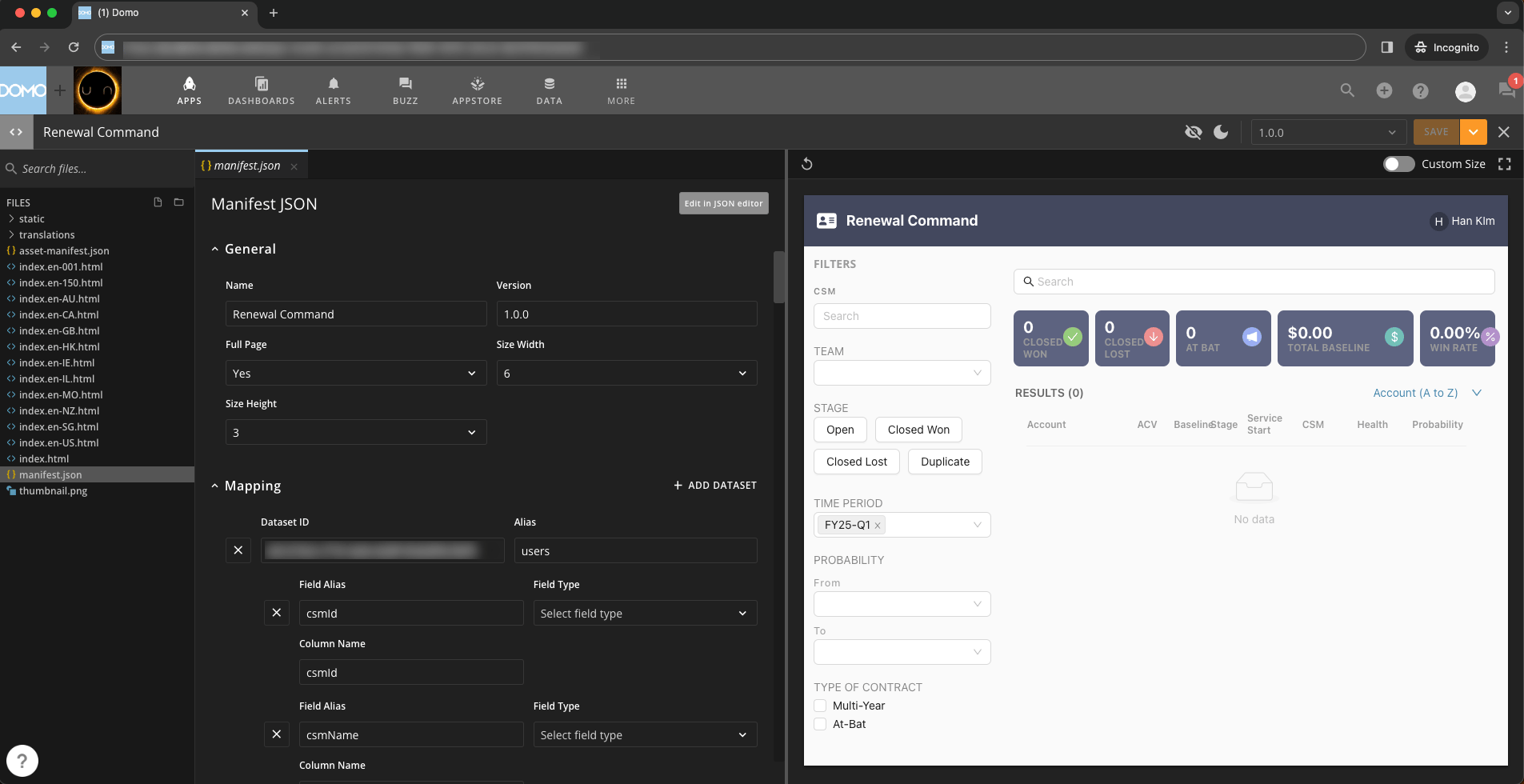
# Pro-code Editor
The Pro-code Editor allows you to develop pro-code apps in a web IDE. Writing and previewing code in the familiar Domo interface and access to other Domo-specific tools support fluid development.
See the [Workflows documentation](https://domo-support.domo.com/s/topic/0TO5w000000ZkAMGA0/workflows?language=en_US) in the Knowledge Base.
***
### Beta Features
*To join a beta, reach out to your Domo account team. If you do not have contact information for your account team, you can reach out to Domo Support at [support@domo.com](mailto:support@domo.com). You may be required to complete training before you can use the feature.*
# Pro-code Editor
The Pro-code Editor allows you to develop pro-code apps in a web IDE. Writing and previewing code in the familiar Domo interface and access to other Domo-specific tools support fluid development.
 ***
### Need Support?
Domo provides education, community answers, and technical support.
* Search for a topic in the
[Help Center](https://www.domo.com/domo-central/help)
* Learn from
[Domo University](https://www.domo.com/domo-central/university)
* Search for training apps in the
[Appstore ](https://www.domo.com/appstore/)
* Get answers in the
[Community Forums ](https://community-forums.domo.com/main)
* Contact Technical Support by entering a help ticket in the
[Domo Support Portal ](https://www.domo.com/login/customer-community)
* Reach out to your Domo account team
### Have Feedback?
If you have feedback, please send it from within Domo:
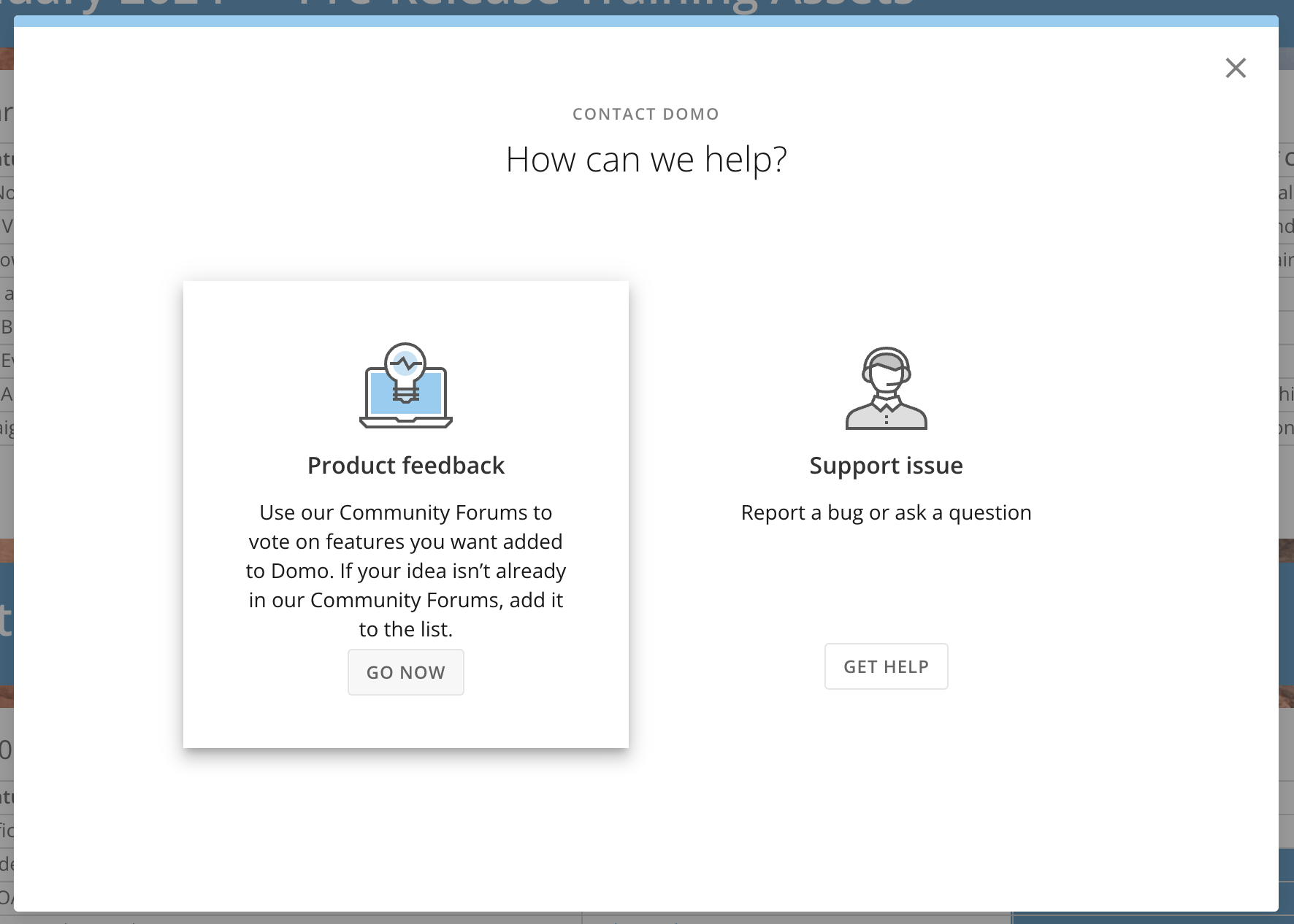
In the navigation header, select **More** > **Feedback.**
In the **Contact Domo** modal under **Product Feedback**, select **Go Now.**
***
### Need Support?
Domo provides education, community answers, and technical support.
* Search for a topic in the
[Help Center](https://www.domo.com/domo-central/help)
* Learn from
[Domo University](https://www.domo.com/domo-central/university)
* Search for training apps in the
[Appstore ](https://www.domo.com/appstore/)
* Get answers in the
[Community Forums ](https://community-forums.domo.com/main)
* Contact Technical Support by entering a help ticket in the
[Domo Support Portal ](https://www.domo.com/login/customer-community)
* Reach out to your Domo account team
### Have Feedback?
If you have feedback, please send it from within Domo:
In the navigation header, select **More** > **Feedback.**
In the **Contact Domo** modal under **Product Feedback**, select **Go Now.**