> ## Documentation Index
> Fetch the complete documentation index at: https://domoinc-openapi-sync-dataflows.mintlify.site/llms.txt
> Use this file to discover all available pages before exploring further.
# 2025 Release 6 | November
export const InlineImage = ({src, alt = '', height = '1.6em'}) => {
return  ;
};
***
## New Features and Enhancements
### App Components
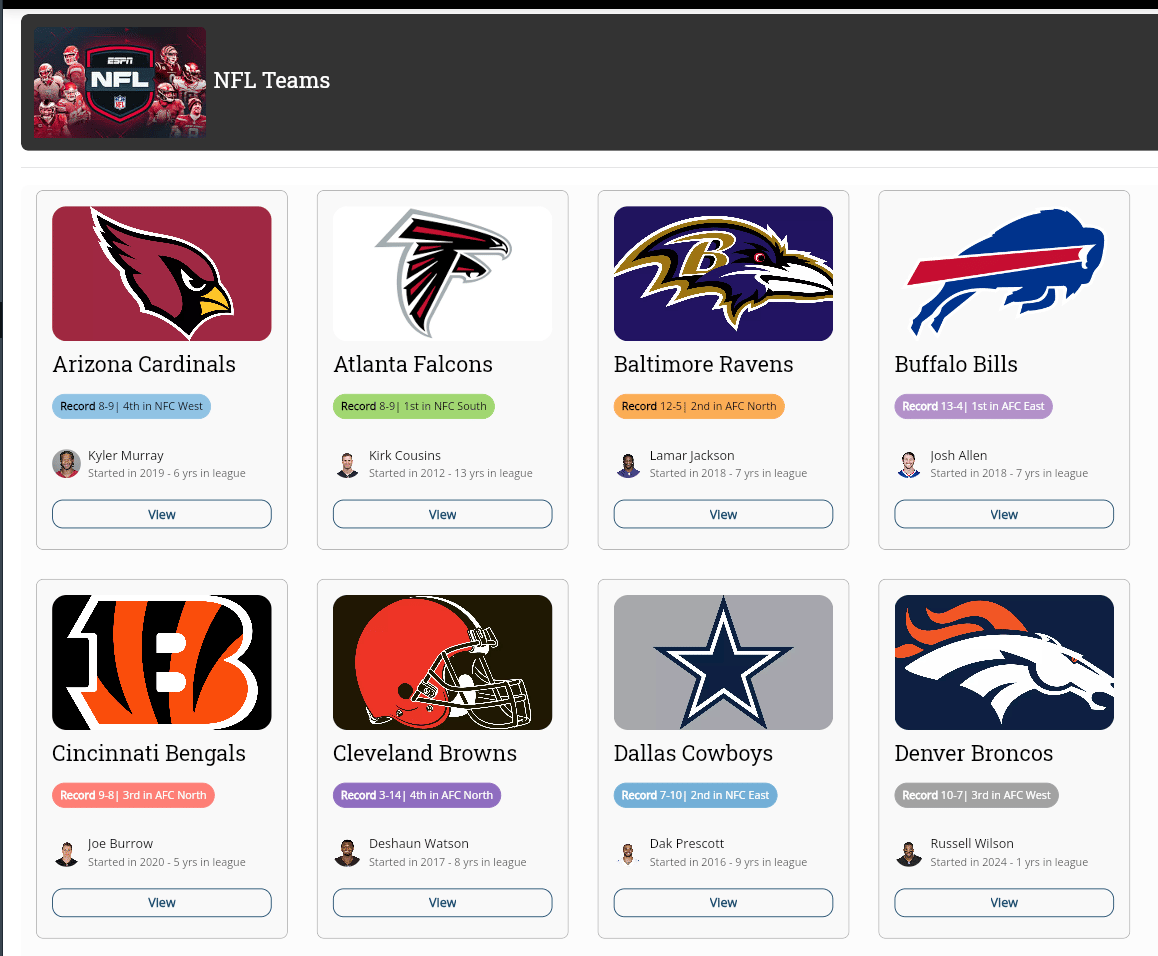
The new drag-and-drop app component builder includes various features for creating visually appealing app components. You can use the six new app components and twenty templates to assemble and edit your apps in one place. Learn how to [create and customize app components in App Studio](https://domo-support.domo.com/s/article/000005864?language=en_US).
The following components are available:
* List
* Gallery
* Grid
* Filter List
* Details
* Banner
Available widgets include:
* Images
* Hyperlinks
* Pills
* Buttons
* Text
* Sort
* Search
;
};
***
## New Features and Enhancements
### App Components
The new drag-and-drop app component builder includes various features for creating visually appealing app components. You can use the six new app components and twenty templates to assemble and edit your apps in one place. Learn how to [create and customize app components in App Studio](https://domo-support.domo.com/s/article/000005864?language=en_US).
The following components are available:
* List
* Gallery
* Grid
* Filter List
* Details
* Banner
Available widgets include:
* Images
* Hyperlinks
* Pills
* Buttons
* Text
* Sort
* Search
 ### Cloud Integration
#### Azure SQL and MySQL Read-only Support
### Cloud Integration
#### Azure SQL and MySQL Read-only Support

 Domo's Cloud Integration now includes read-only support for Azure SQL connections. This enables you to use your data without needing to copy or move it.
#### Magic ETL on BigQuery Pushdown + Replace
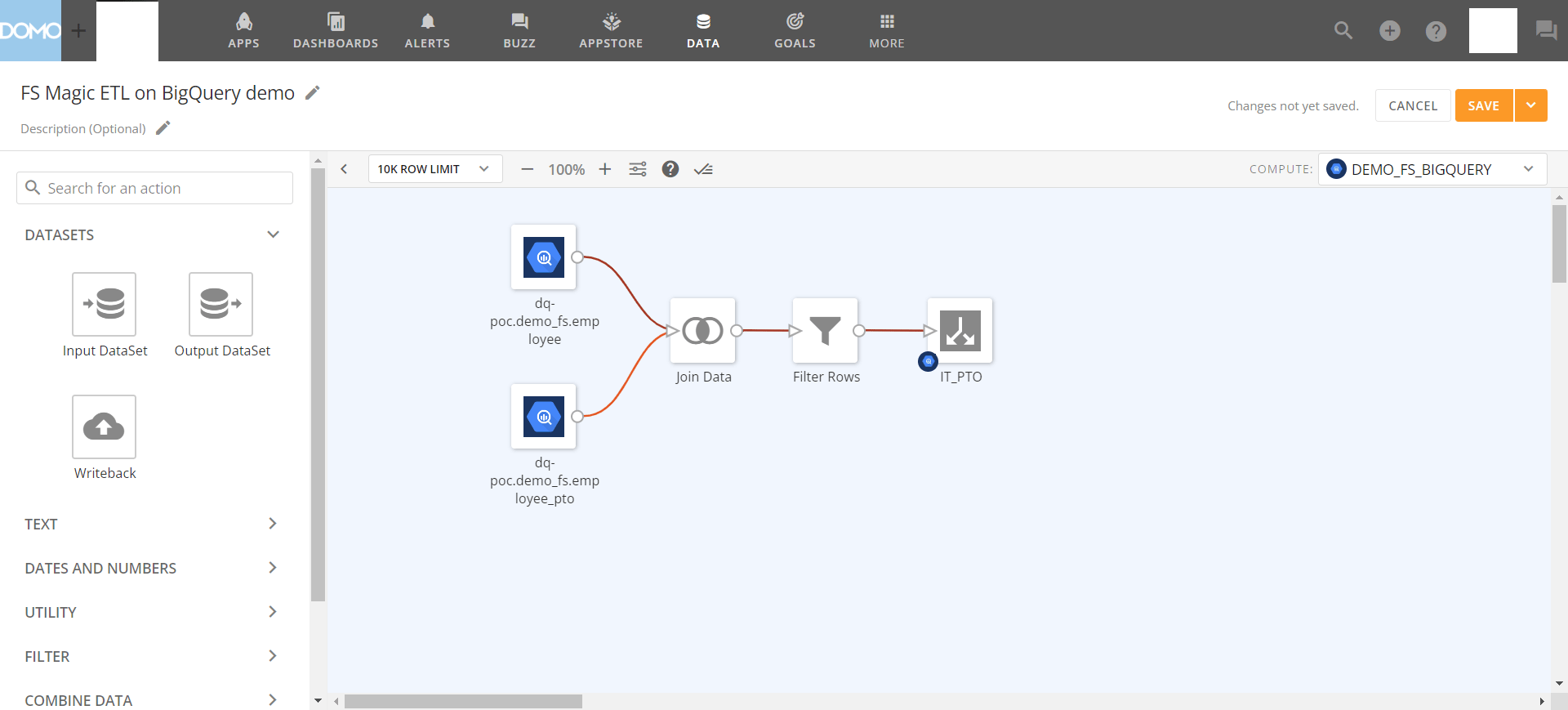
Magic ETL on BigQuery, powered by Domo's Cloud Integration platform, enables you to perform your own data transformations without moving data or changing permissions, security, or data structures.
Domo's Cloud Integration now includes read-only support for Azure SQL connections. This enables you to use your data without needing to copy or move it.
#### Magic ETL on BigQuery Pushdown + Replace
Magic ETL on BigQuery, powered by Domo's Cloud Integration platform, enables you to perform your own data transformations without moving data or changing permissions, security, or data structures.
 ### New Integration Setup UI for all Cloud Integrations
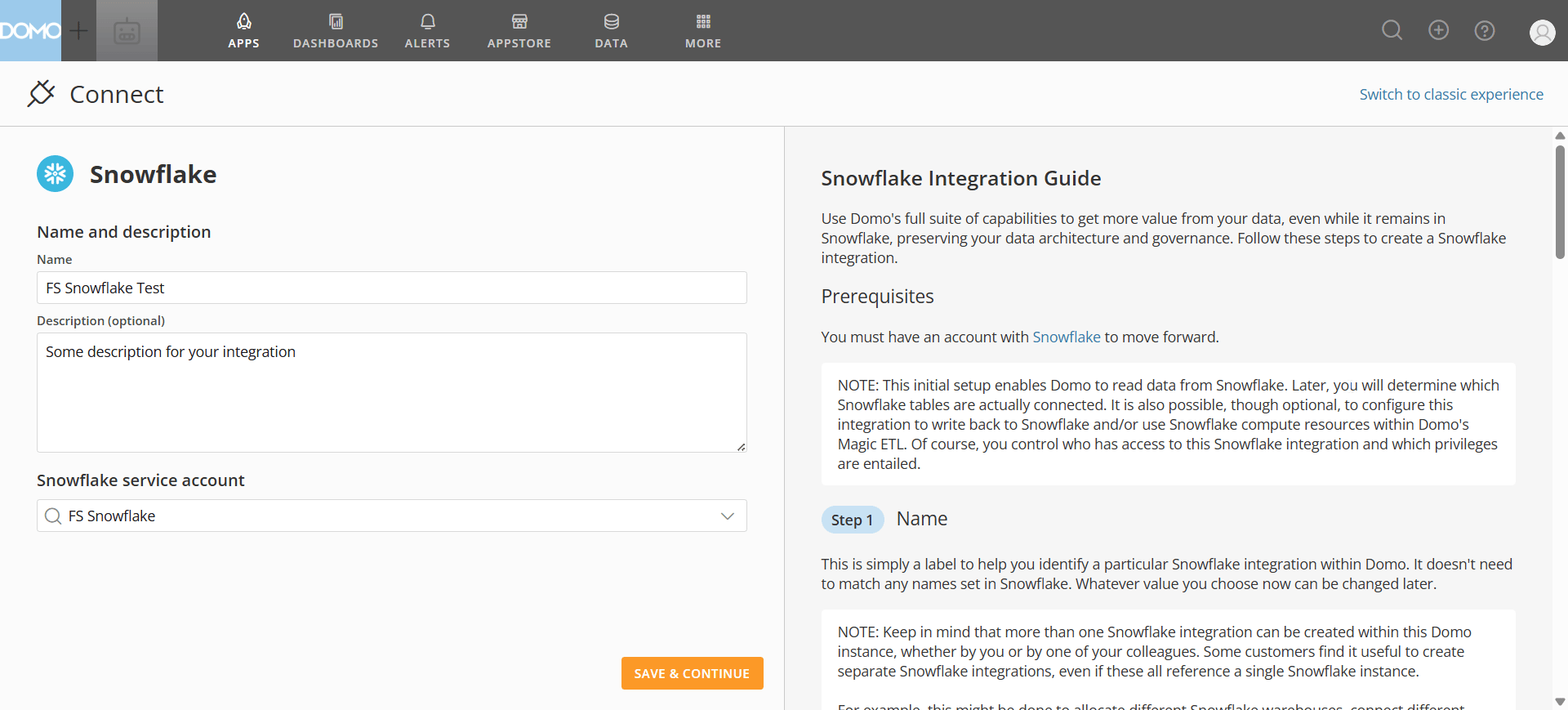
The new Cloud Integration setup experience is more user-friendly and enables Domo to deliver clear, detailed instructions and definitions directly in the product as you set up your integrations.
This new experience enhances usability, provides detailed instructions on hand, and facilitates better documentation management.
Learn how to integrate [Domo on Snowflake](https://domo-support.domo.com/s/article/4402322966807?language=en_US).
### New Integration Setup UI for all Cloud Integrations
The new Cloud Integration setup experience is more user-friendly and enables Domo to deliver clear, detailed instructions and definitions directly in the product as you set up your integrations.
This new experience enhances usability, provides detailed instructions on hand, and facilitates better documentation management.
Learn how to integrate [Domo on Snowflake](https://domo-support.domo.com/s/article/4402322966807?language=en_US).
 ### DomoStats: Balance Statements
 The new Balance Statement DomoStats reports include information on your account's balance summary and balance details. These reports enable you to easily navigate between the data in the report and the data presented in the Credit Balance tab of the Credit Utilization screen in the Admin Settings.
Balance Statement reports are available in the primary Domo instance for an account and are only available to those with Consumption. Learn more about your [DomoStats reports](https://domo-support.domo.com/s/article/000005326?language=en_US#domostats_reports).
### Google Add-ins
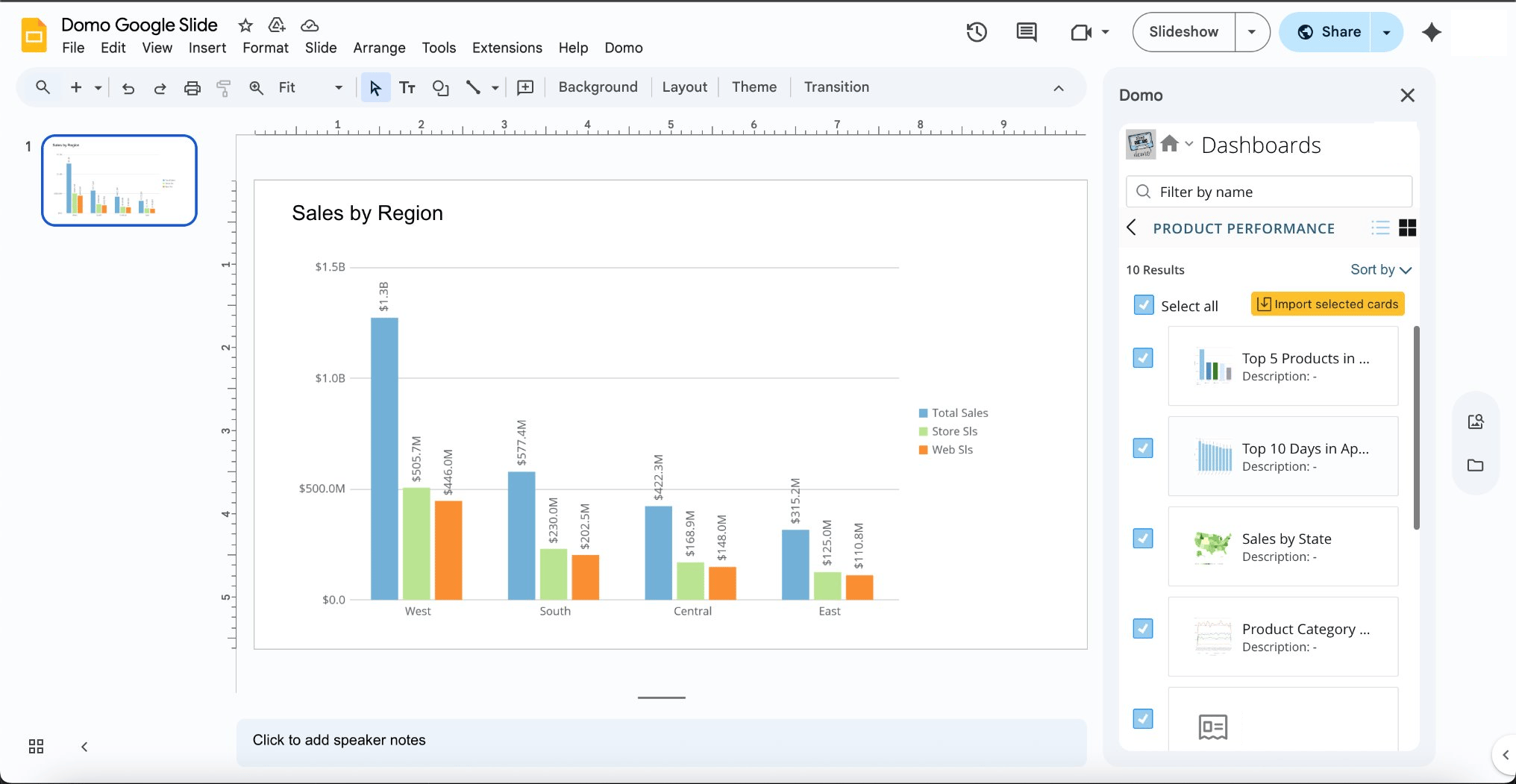
Access Domo Add-ins directly within Google tools and workspaces with the new Google Domo Add-ins.
Features in this update include:
* Immediate access to trusted, up-to-date Domo content without leaving Google tools and workspaces.
* Consistent reporting and visualization experiences across both Microsoft and Google platforms.
* Accelerated team collaboration and decision-making by embedding live analytics in your work.
* Content is kept up to date using on-demand refresh and Live mode, eliminating the need to reinvent workflows.
The new Balance Statement DomoStats reports include information on your account's balance summary and balance details. These reports enable you to easily navigate between the data in the report and the data presented in the Credit Balance tab of the Credit Utilization screen in the Admin Settings.
Balance Statement reports are available in the primary Domo instance for an account and are only available to those with Consumption. Learn more about your [DomoStats reports](https://domo-support.domo.com/s/article/000005326?language=en_US#domostats_reports).
### Google Add-ins
Access Domo Add-ins directly within Google tools and workspaces with the new Google Domo Add-ins.
Features in this update include:
* Immediate access to trusted, up-to-date Domo content without leaving Google tools and workspaces.
* Consistent reporting and visualization experiences across both Microsoft and Google platforms.
* Accelerated team collaboration and decision-making by embedding live analytics in your work.
* Content is kept up to date using on-demand refresh and Live mode, eliminating the need to reinvent workflows.
 ### Workflows
#### Auto Save
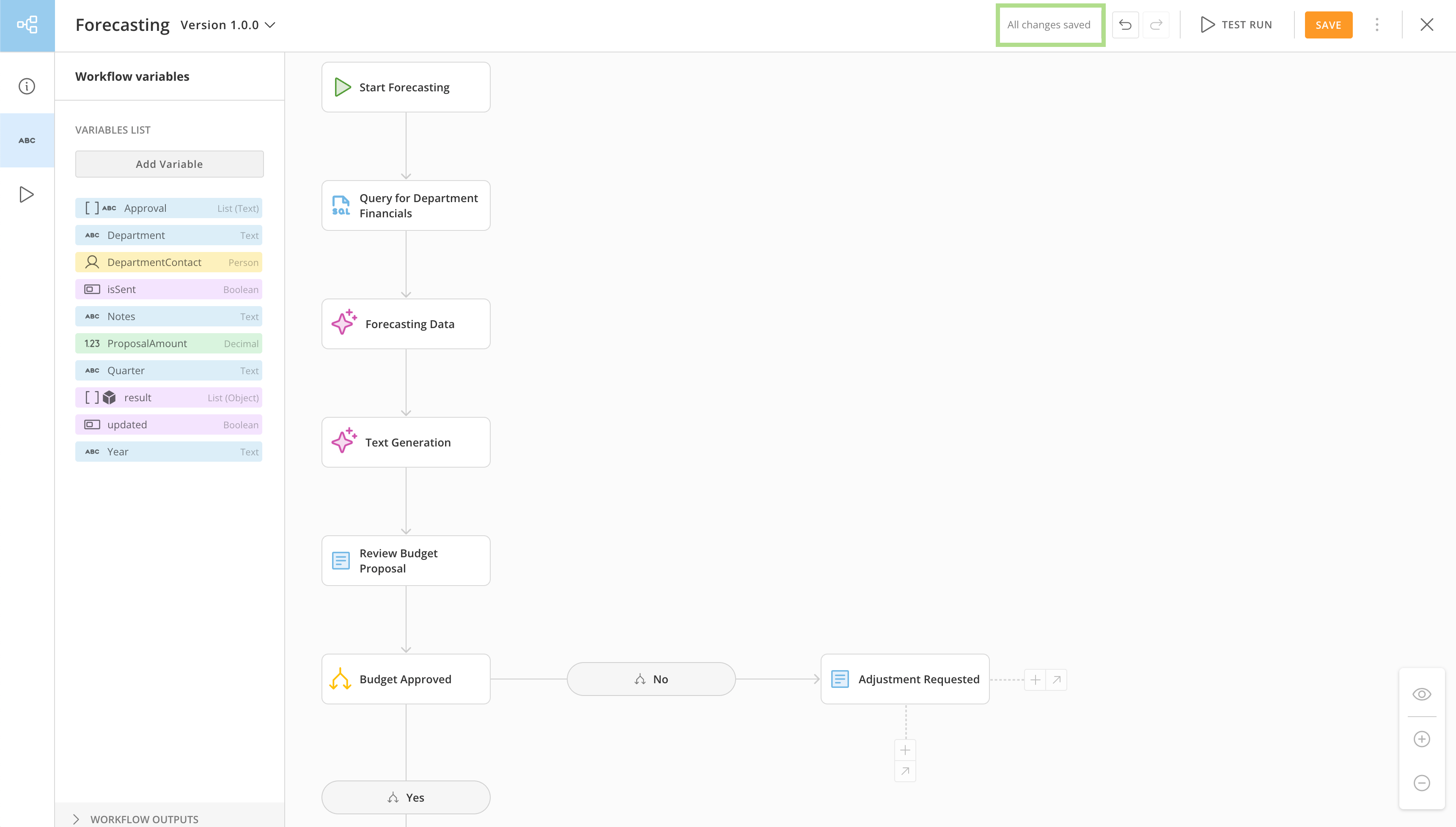
The new Auto Save functionality in Workflows ensures that any changes made to your canvas are continuously preserved in real time, reducing the risk of lost work due to unexpected interruptions. Learn more about [Auto Save in Workflows](https://domo-support.domo.com/s/article/000005331?language=en_US#auto_save).
### Workflows
#### Auto Save
The new Auto Save functionality in Workflows ensures that any changes made to your canvas are continuously preserved in real time, reducing the risk of lost work due to unexpected interruptions. Learn more about [Auto Save in Workflows](https://domo-support.domo.com/s/article/000005331?language=en_US#auto_save).
 #### Sub Flow
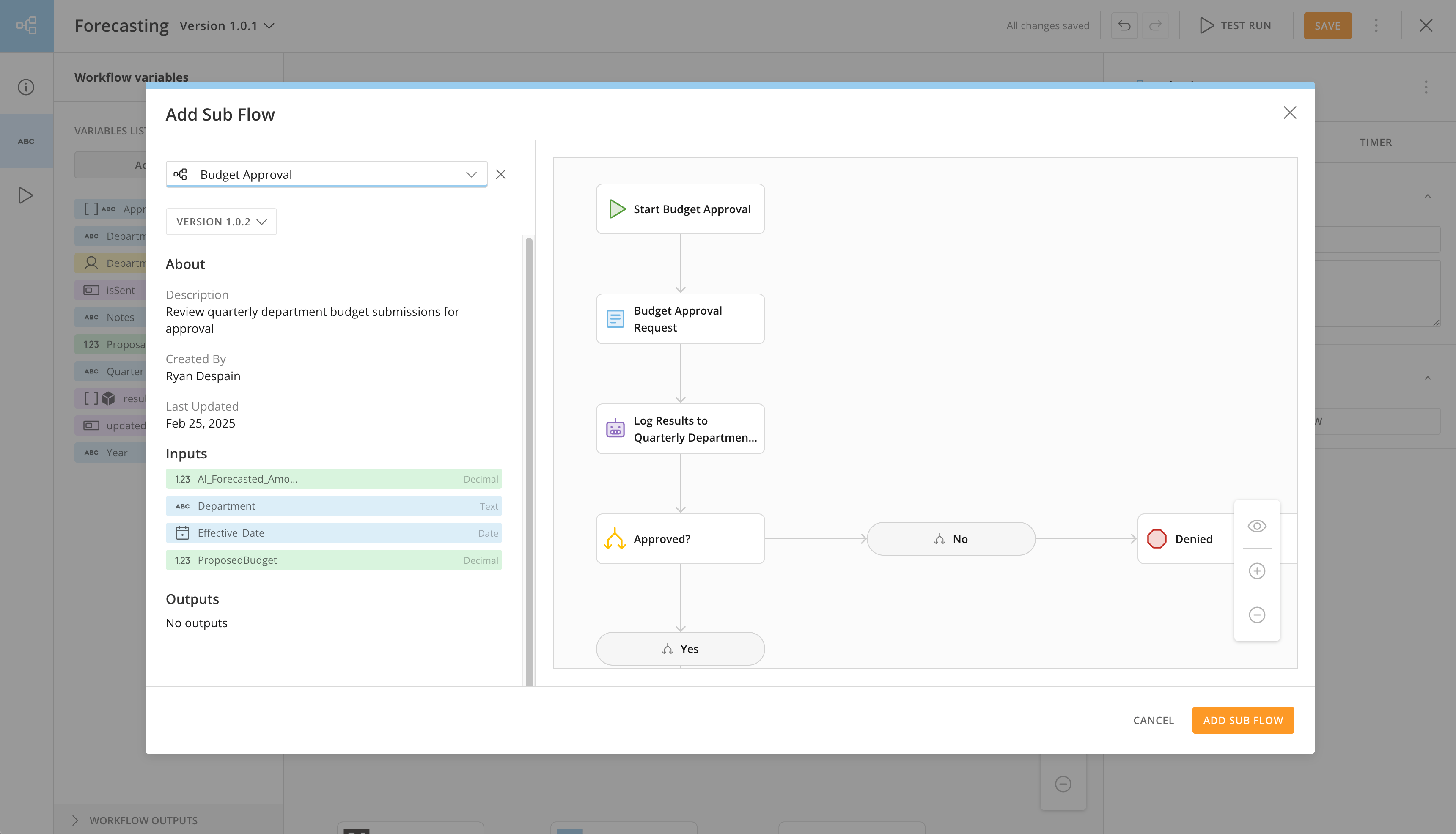
Call one workflow from within another and receive output values to be used in subsequent steps in the parent workflow with the new Sub Flow option in Workflows.
This feature enables you to build modular and scalable workflows by reusing existing logic and processes, reducing redundancy and simplifying workflow maintenance.
Learn how to [use Sub Flow to streamline your automations](https://domo-support.domo.com/s/article/000005930?language=en_US) in Workflows.
#### Sub Flow
Call one workflow from within another and receive output values to be used in subsequent steps in the parent workflow with the new Sub Flow option in Workflows.
This feature enables you to build modular and scalable workflows by reusing existing logic and processes, reducing redundancy and simplifying workflow maintenance.
Learn how to [use Sub Flow to streamline your automations](https://domo-support.domo.com/s/article/000005930?language=en_US) in Workflows.
 ## Beta Features
*To learn more about the Beta Program or have a Beta feature enabled in your instance, email [beta.admin@domo.com](mailto:beta.admin@domo.com).*
### Data Modeling
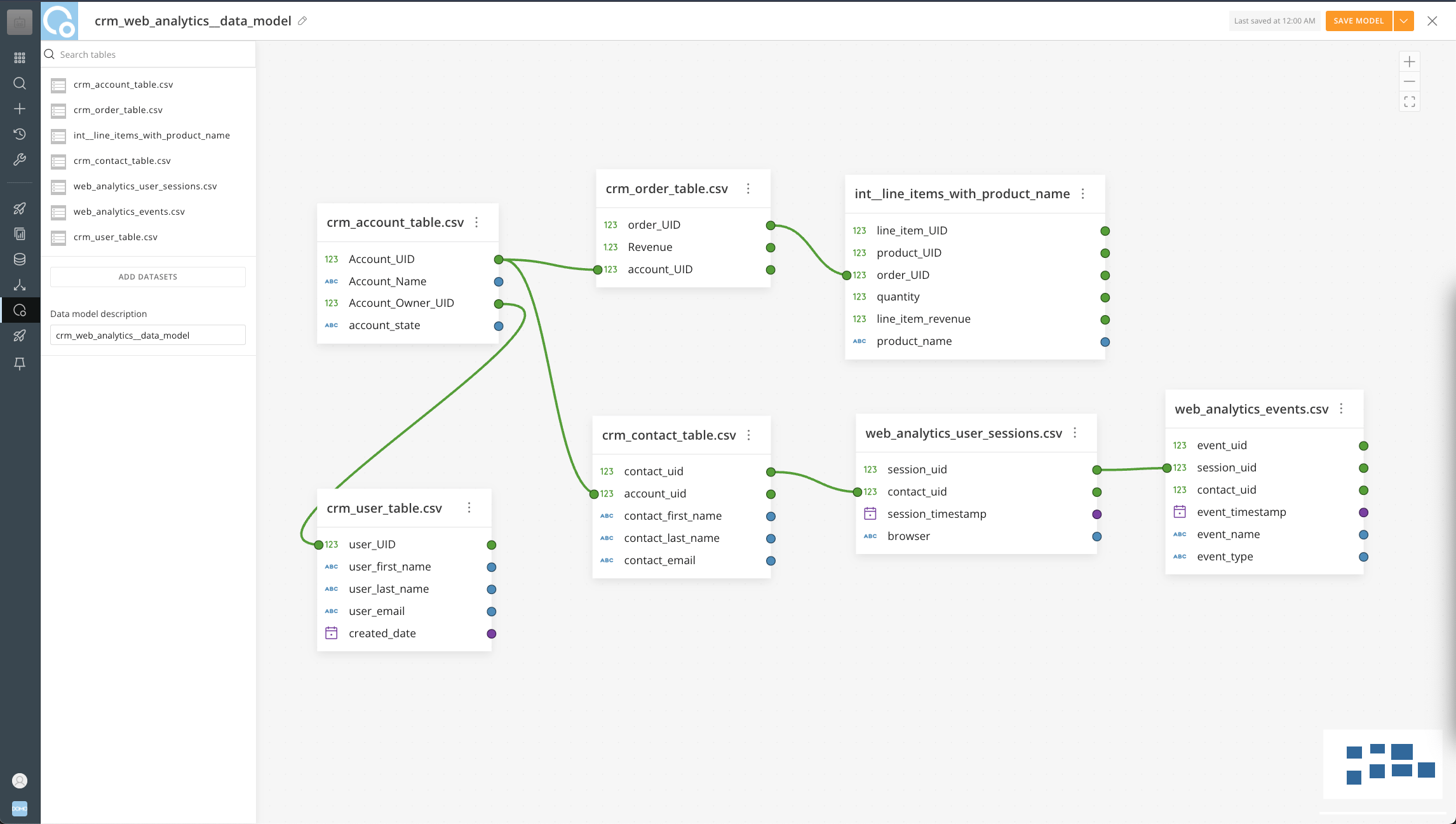
With Data Modeling, you can now easily relate tables in your data environment for fast querying and insight, and create calculated fields that contain the logic needed for querying data tables.
You can also incorporate logic into your data models, and more easily group and aggregate data by category or timeframe.
## Beta Features
*To learn more about the Beta Program or have a Beta feature enabled in your instance, email [beta.admin@domo.com](mailto:beta.admin@domo.com).*
### Data Modeling
With Data Modeling, you can now easily relate tables in your data environment for fast querying and insight, and create calculated fields that contain the logic needed for querying data tables.
You can also incorporate logic into your data models, and more easily group and aggregate data by category or timeframe.
 ### Magic ETL
#### "Add from Canvas" for Magic ETL Tiles
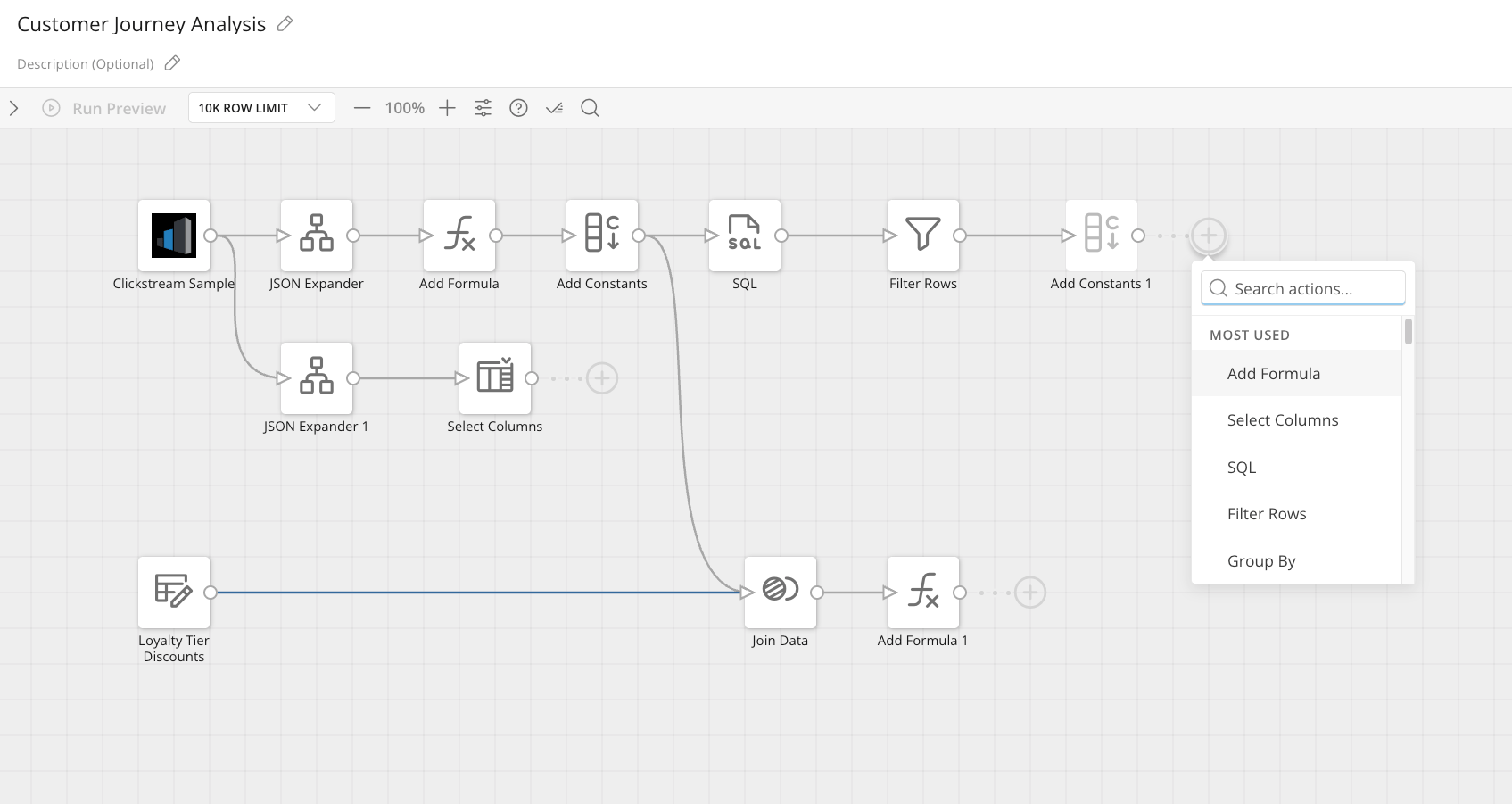
Magic ETL now includes the ability to add a tile directly to the canvas using a plus button that appears next to all non-terminal tiles on the canvas. This button opens a menu that enables you to search for the tile you want to add, or scroll through the list of tiles to choose from, with the most commonly used tiles listed at the top of the list.
The feature improves the speed of DataFlow creation and overall workflow efficiency.
### Magic ETL
#### "Add from Canvas" for Magic ETL Tiles
Magic ETL now includes the ability to add a tile directly to the canvas using a plus button that appears next to all non-terminal tiles on the canvas. This button opens a menu that enables you to search for the tile you want to add, or scroll through the list of tiles to choose from, with the most commonly used tiles listed at the top of the list.
The feature improves the speed of DataFlow creation and overall workflow efficiency.
 #### Power User Updates
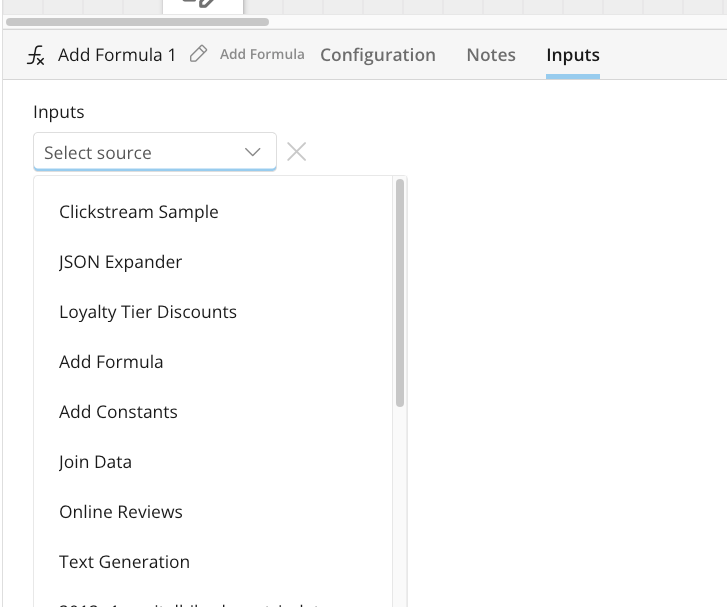
We are releasing a suite of Magic ETL feature enhancements over the next few months that will improve the lives of technical Magic ETL users.
The three new enhancements in this release include:
* The ability to configure a tile regardless of whether there are valid upstream tiles.
* The "Run to Here" functionality only runs the preview to the point where "Run to Here" is selected, allowing you to test streams of logic without needing to preview an entire DataFlow.
* An
**Inputs** tab on each tile that lets you select the input to the tile without having to drag the line from the previous tile to it.
#### Power User Updates
We are releasing a suite of Magic ETL feature enhancements over the next few months that will improve the lives of technical Magic ETL users.
The three new enhancements in this release include:
* The ability to configure a tile regardless of whether there are valid upstream tiles.
* The "Run to Here" functionality only runs the preview to the point where "Run to Here" is selected, allowing you to test streams of logic without needing to preview an entire DataFlow.
* An
**Inputs** tab on each tile that lets you select the input to the tile without having to drag the line from the previous tile to it.
 #### Split Join and Split Filter Tiles
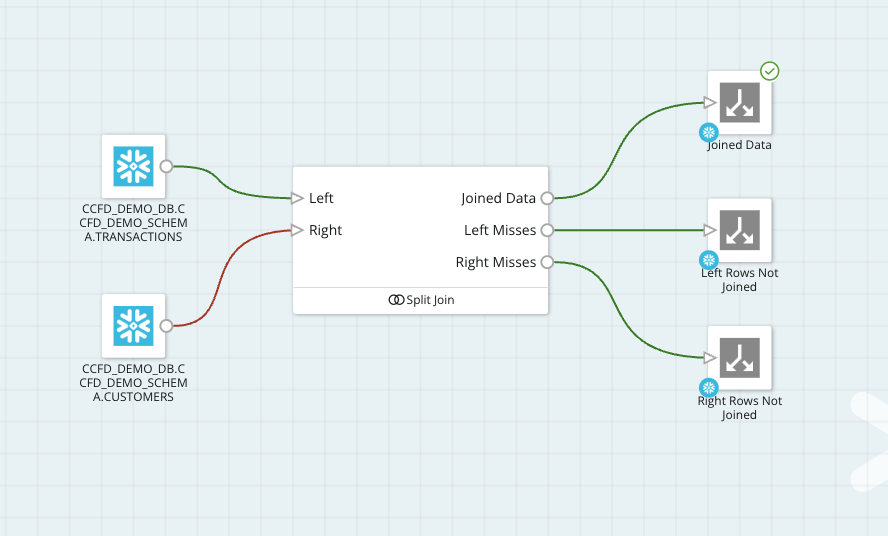
The new Split Join and Split Filter tiles provide more visibility into your data, easier troubleshooting, and pipeline development.
* **Split Join —**
Manage multiple output streams from a single Join and easily identify rows that joined and those that did not.
* **Split Filter —**
Capture rows that meet your filter criteria while viewing those that do not in a separate stream.
Learn how to [use the split join and split filter tiles](https://domo-support.domo.com/s/article/000005919?language=en_US) in Magic ETL.
#### Split Join and Split Filter Tiles
The new Split Join and Split Filter tiles provide more visibility into your data, easier troubleshooting, and pipeline development.
* **Split Join —**
Manage multiple output streams from a single Join and easily identify rows that joined and those that did not.
* **Split Filter —**
Capture rows that meet your filter criteria while viewing those that do not in a separate stream.
Learn how to [use the split join and split filter tiles](https://domo-support.domo.com/s/article/000005919?language=en_US) in Magic ETL.
 ### Mobile UI Updates
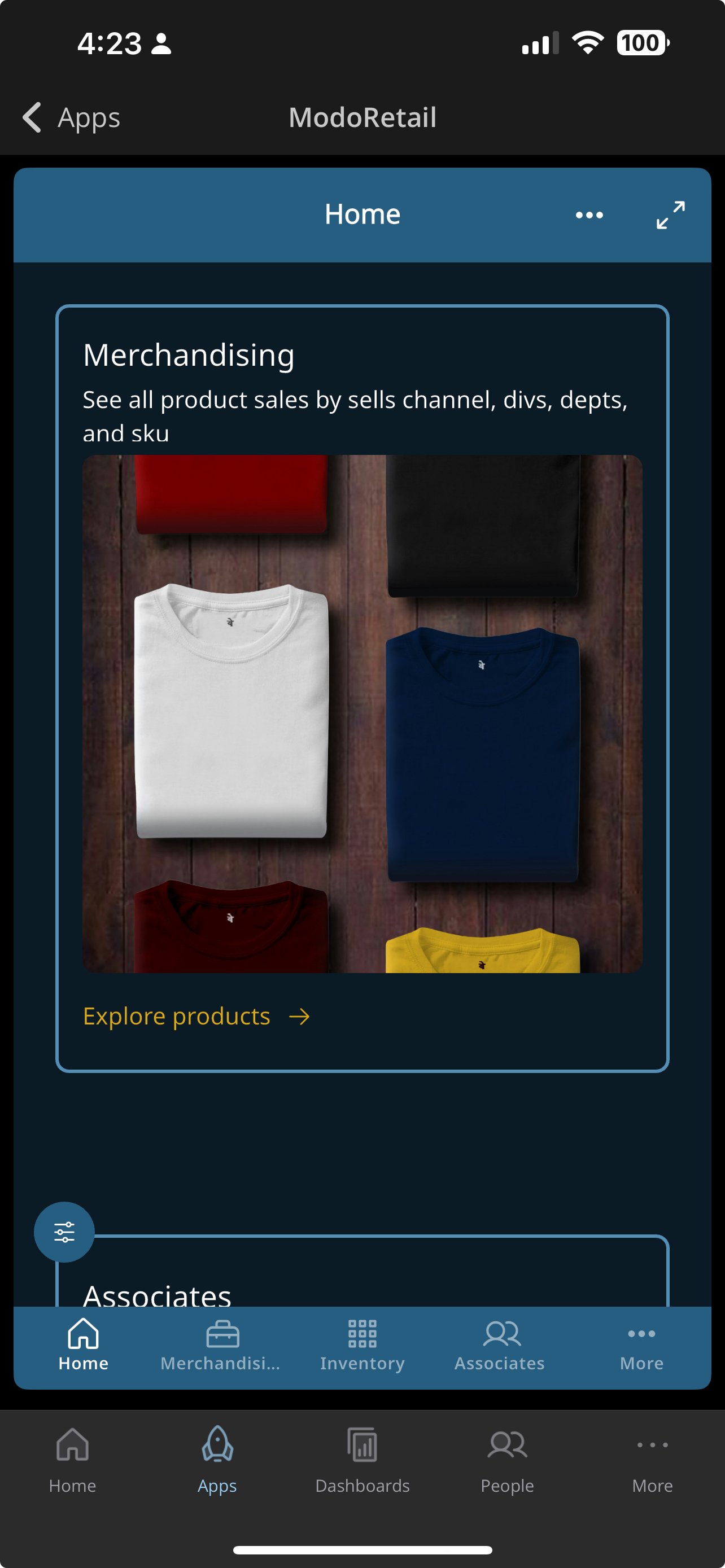
With App Studio apps on mobile, you can now access both the app pages and mobile tabs simultaneously. The filter dropdown has also been improved and appears in place, making it easier to select items.
Domo Mobile also supports app components —enabling you to elevate your app into a true native-like mobile experience.
### Mobile UI Updates
With App Studio apps on mobile, you can now access both the app pages and mobile tabs simultaneously. The filter dropdown has also been improved and appears in place, making it easier to select items.
Domo Mobile also supports app components —enabling you to elevate your app into a true native-like mobile experience.
 ### Workspaces
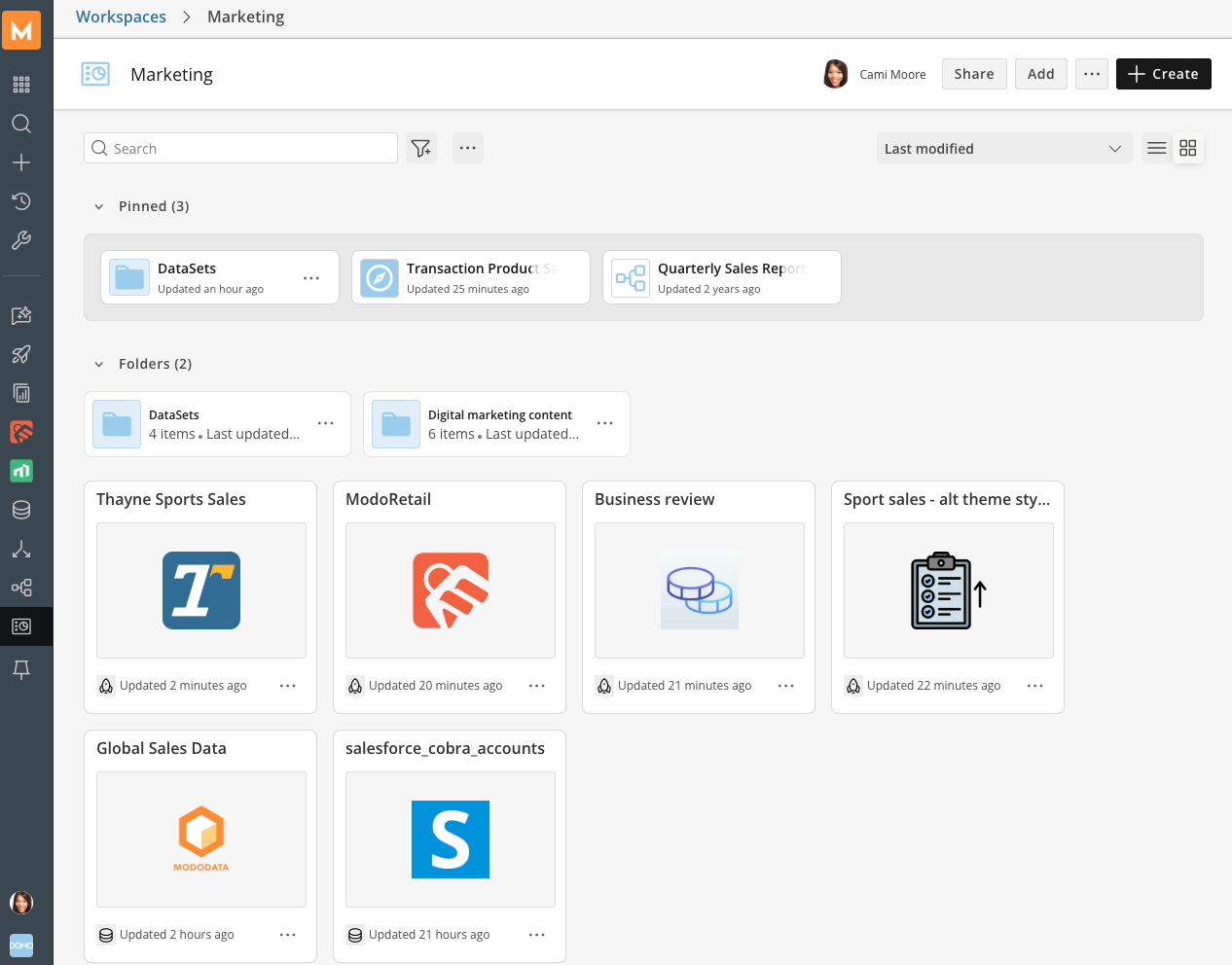
Workspaces, now available on the web and mobile, provide a centralized location for organizing Domo objects, such as Cards, Dashboards, Apps, DataSets, DataFlows, Workflows, and Worksheets.
Workspaces enable you to find relevant content more efficiently, support team and department-specific organization using folders and subfolders, and enhance the navigation experience on both web and mobile platforms. Additionally, Workspaces make it easy to control sharing the right content with the right people and also revoking access when needed.
### Workspaces
Workspaces, now available on the web and mobile, provide a centralized location for organizing Domo objects, such as Cards, Dashboards, Apps, DataSets, DataFlows, Workflows, and Worksheets.
Workspaces enable you to find relevant content more efficiently, support team and department-specific organization using folders and subfolders, and enhance the navigation experience on both web and mobile platforms. Additionally, Workspaces make it easy to control sharing the right content with the right people and also revoking access when needed.
 ## Support
Domo provides education, community answers, and technical support.
* Search for a topic in the
[Help Center](https://www.domo.com/domo-central/help) .
* Learn from
[Domo University](https://www.domo.com/domo-central/university) .
* Search for training apps in the
[Appstore ](https://www.domo.com/appstore/).
* Get answers in the
[Community Forums ](https://community-forums.domo.com/main).
* Contact Technical Support by entering a help ticket in the
[Domo Support Portal ](https://www.domo.com/login/customer-community).
* Reach out to your Domo account team.
## Support
Domo provides education, community answers, and technical support.
* Search for a topic in the
[Help Center](https://www.domo.com/domo-central/help) .
* Learn from
[Domo University](https://www.domo.com/domo-central/university) .
* Search for training apps in the
[Appstore ](https://www.domo.com/appstore/).
* Get answers in the
[Community Forums ](https://community-forums.domo.com/main).
* Contact Technical Support by entering a help ticket in the
[Domo Support Portal ](https://www.domo.com/login/customer-community).
* Reach out to your Domo account team.