> ## Documentation Index
> Fetch the complete documentation index at: https://domoinc-openapi-sync-dataflows.mintlify.site/llms.txt
> Use this file to discover all available pages before exploring further.

# Facebook Ad Library Connector

## Intro

The archive is a searchable database that stores Facebook and Instagram ads that are labeled as "Political Advertising" which include political issues and advocacy content. Use Domo's Facebook Ad Library connector to get the data about the archived ads. To learn more about the Facebook Ad Library API, visit their page ([https://www.facebook.com/ads/library/api](https://www.facebook.com/ads/library/api "https://www.facebook.com/ads/library/api") ).

You connect to your Facebook Developers account in the Data Center. This topic discusses the fields and menus that are specific to the Facebook Ad Library connector user interface. General information for adding DataSets, setting update schedules, and editing DataSet information is discussed in [Adding a DataSet Using a Data Connector](/s/article/360042926274 "Adding a DataSet Using a Data Connector").

## Prerequisites

To configure this connector, you must have the following:

* The ID of the app and the Secret associated with the app that you created at the
  [Facebook for Developers](https://developers.facebook.com "https://developers.facebook.com") portal.

### Obtaining the Client ID and Client Secret:

To obtain your Client ID and Client secret:

1. Visit the
   [Facebook for Developers](https://developers.facebook.com "https://developers.facebook.com") portal ([https://developers.facebook.com](https://developers.facebook.com "https://developers.facebook.com") ) and create a new app.
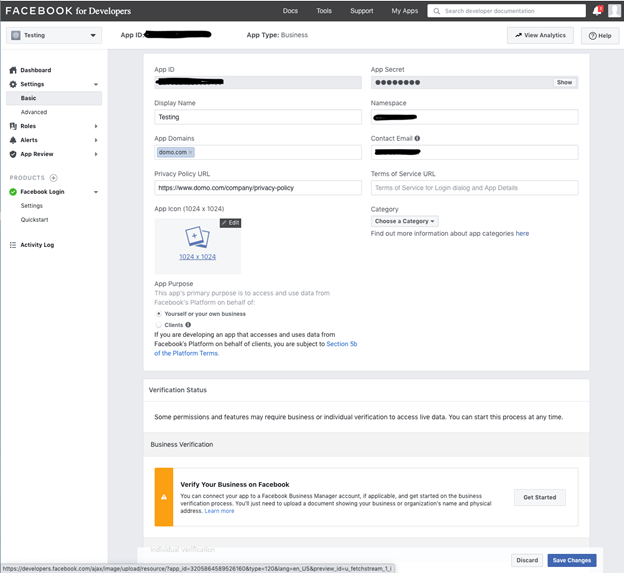
2. Once your app is created, you will see a screen as shown below displaying your app details.

<Frame>
  <img alt="clipboard_e6b3c94b600763adcd50440720c0288ff.png" src="https://mintcdn.com/domoinc-openapi-sync-dataflows/blcgkVgnZv6gj_XY/images/kb/ka05w000001236o-00N5w00000Ri7BU-0EM5w000005vNzG.png?fit=max&auto=format&n=blcgkVgnZv6gj_XY&q=85&s=dc34cf61693239454119a94739987030" width="624" height="573" data-path="images/kb/ka05w000001236o-00N5w00000Ri7BU-0EM5w000005vNzG.png" />
</Frame>

3. Here, the App ID and App Secret are your Client ID and Client Secret that you will need to enter in the connector UI credentials section.

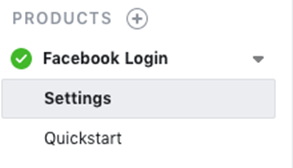
4. Now, go to the **Settings** in **Facebook Login** as shown below.
<Frame>
  <img alt="clipboard_ea9d6fb7aecd667f20883f5e50465f93d.png" src="https://mintcdn.com/domoinc-openapi-sync-dataflows/blcgkVgnZv6gj_XY/images/kb/ka05w000001236o-00N5w00000Ri7BU-0EM5w000005vNzh.png?fit=max&auto=format&n=blcgkVgnZv6gj_XY&q=85&s=a6c6560c622dee1b70bcad03609545af" width="293" height="168" data-path="images/kb/ka05w000001236o-00N5w00000Ri7BU-0EM5w000005vNzh.png" />
</Frame>

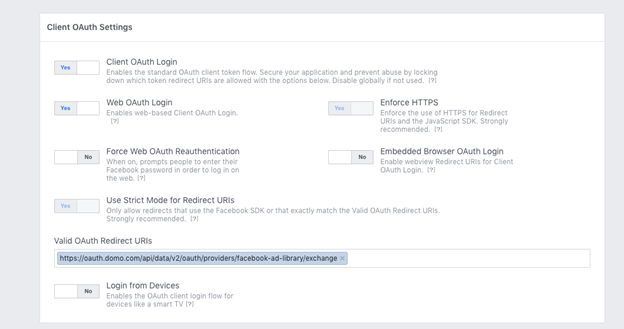
5. Enter the redirect URI in the **Valid OAuth Redirect URI** field as - [https://oauth.dev.domo.com/api/data/v2/oauth/providers/facebook-ad-library/exchange](https://oauth.dev.domo.com/api/data/v2/oauth/providers/facebook-ad-library/exchange) and save your changes.
<Frame>
  <img alt="clipboard_ea30f0485d2db684033eaefffa191e528.png" src="https://mintcdn.com/domoinc-openapi-sync-dataflows/blcgkVgnZv6gj_XY/images/kb/ka05w000001236o-00N5w00000Ri7BU-0EM5w000005vNzL.png?fit=max&auto=format&n=blcgkVgnZv6gj_XY&q=85&s=37f6f91235905581bf17341d744a7c45" width="624" height="329" data-path="images/kb/ka05w000001236o-00N5w00000Ri7BU-0EM5w000005vNzL.png" />
</Frame>

## Connecting to Your Facebook Ad Library Account

This section enumerates the options in the **Credentials** and **Details** panes in the Facebook Ad Library Connector page. The components of the other panes in this page, **Scheduling** and **Name & Describe Your DataSet**, are universal across most connector types and are discussed in greater length in [Adding a DataSet Using a Data Connector](/s/article/360042926274 "Adding a DataSet Using a Data Connector").

### Credentials Pane

This pane contains fields for entering credentials to connect to your Facebook Ad Library account. The following table describes what is needed for each field:

<table border="1" cellpadding="1" cellspacing="1" data-aura-rendered-by="33:201;a"><thead><tr><th colspan="1" rowspan="1"><p><span class="s1"> Field </span></p></th><th colspan="1" rowspan="1"><p><span class="s1"> Description </span></p></th></tr></thead><tbody><tr><td colspan="1" rowspan="1"> Client ID </td><td colspan="1" rowspan="1"> Enter the ID of the app that you created at <a href="https://developers.facebook.com" target="_blank" title="https://developers.facebook.com"> [https://developers.facebook.com](https://developers.facebook.com) </a>. For more information, see <a href="#h_01ES1R85KR59MVFDV0EEXQC24G" target="_self" title="Facebook Ad Library Connector"> Prerequisites </a>. </td></tr><tr><td colspan="1" rowspan="1"> Client Secret </td><td colspan="1" rowspan="1"> Enter the Secret associated with the app you created at <a href="https://developers.facebook.com" target="_blank" title="https://developers.facebook.com"> [https://developers.facebook.com](https://developers.facebook.com) </a>. For more information, see <a href="#h_01ES1R85KR59MVFDV0EEXQC24G" target="_self" title="Facebook Ad Library Connector"> Prerequisites </a>. </td></tr></tbody></table>

Once you have entered valid credentials, you can use the same account any time you go to create a new Facebook Ad Library DataSet. You can manage connector accounts in the **Accounts** tab in the Data Center. For more information about this tab, see [Managing User Accounts for Connectors](/s/article/360042926054 "Managing User Accounts for Connectors").

### Details Pane

This pane contains a primary **Reports** menu, along with various other menus which may or may not appear depending on the report type you select.

<table border="1" cellpadding="1" cellspacing="1" data-aura-rendered-by="33:201;a"><thead><tr><th colspan="1" rowspan="1"><p> Menu </p></th><th colspan="1" rowspan="1"><p> Description </p></th></tr></thead><tbody><tr><td colspan="1" rowspan="1"><p> Report </p></td><td colspan="1" rowspan="1"><p> Select the Facebook Ad Library report you want to run. The following reports are available: </p><table border="1" cellpadding="1" cellspacing="1"><tbody><tr><td colspan="1" rowspan="1"> Archived Ads </td><td colspan="1" rowspan="1"> Get archived ads related to politics or issues of national importance. </td></tr></tbody></table></td></tr><tr><td colspan="1" rowspan="1"> Status of Ad </td><td colspan="1" rowspan="1"> Specify whether you want to pull the data for all ads, active ads or inactive ads. </td></tr><tr><td colspan="1" rowspan="1"> Enter the Page IDs </td><td colspan="1" rowspan="1"> You can search for archived ads based on specific Facebook Page IDs. You can provide up to ten IDs, separated by commas. </td></tr><tr><td colspan="1" rowspan="1"> Enter Search Terms </td><td colspan="1" rowspan="1"> Enter the terms to search for in your query. The limit for the query is 100 characters or less. </td></tr><tr><td colspan="1" rowspan="1"> Reach of Ad </td><td colspan="1" rowspan="1"> Select the countries to retrieve data for by International Organization for Standardization. </td></tr><tr><td colspan="1" rowspan="1"> Type of Ad </td><td colspan="1" rowspan="1"> Select the Ad type. </td></tr><tr><td colspan="1" rowspan="1"> Number of Unique Ads </td><td colspan="1" rowspan="1"> Enter the number of unique ads you want to be returned from Facebook. </td></tr><tr><td colspan="1" rowspan="1"> By Lines </td><td colspan="1" rowspan="1"> Filter results for ads that are paid by disclaimer byline, such as political ads that reference 'immigration' paid by 'ACLU'. <p> Provide a string to search for a byline with or without a comma. </p><p> For instance "byline, with a comma,", "byline without a comma"; returns results with either text variation. </p></td></tr><tr><td colspan="1" rowspan="1"> Publisher Platforms </td><td colspan="1" rowspan="1"> Select the publisher platform(s) you want to pull the ad data from. </td></tr><tr><td colspan="1" rowspan="1"> Impression Condition </td><td colspan="1" rowspan="1"> Select an impression condition from the listed options to search for the ads based on the ad’s most recent appearance. </td></tr></tbody></table>

### Other Panes

For information about the remaining sections of the connector interface, including how to configure scheduling, retry, and update options, see [Adding a DataSet Using a Data Connector](/s/article/360042926274 "Adding a DataSet Using a Data Connector").
