> ## Documentation Index
> Fetch the complete documentation index at: https://domoinc-openapi-sync-dataflows.mintlify.site/llms.txt
> Use this file to discover all available pages before exploring further.
# Connecting to InContact Echo Data in Domo
## Intro
InContact Echo is a survey system that measures customer satisfaction by collecting feedback immediately after calls. You can retrieve survey results from the InContact Echo API using Domo's [JSON Advanced connector](/s/article/360042932034 "JSON Advanced Connector"). You can learn more about the InContact Echo API by visiting [http://echo.incontact.com/echo/help.taf?\_UserReference=7F00000146FFB91CDA7A004BDD05589A3AF8\&topic=Echo%20API](http://echo.incontact.com/echo/help.taf?_UserReference=7F00000146FFB91CDA7A004BDD05589A3AF8\&topic=Echo%20API).
## Prerequisites
To connect to InContact Echo data, you must obtain an Echo API key from your InContact representative. This API key is used in the HTTP header of the request. The header looks like this:
```
auth: ABCDEFG8-ABCD-1234-5678-ABCDEF123456
```
More information about authentication can be found in the Echo API documentation under the **Authorization** section.
## Steps to Connect
**To connect to InContact Echo data,**
1. Create a new [JSON Advanced connection](/s/article/360042932034 "JSON Advanced Connector") in Domo.
1. In the **Credentials** section...
1. Rename the title of the account provider from "JSON Account" to "Blank" to indicate no credentials are supplied in this section (instead the credentials will be provided in the HTTPS header section of the connector).
2. Leave the **Username** and **Password** fields blank.
3. Click **Connect**.
The account provider "Blank" is created.
4. Click **Save**.
2. In the
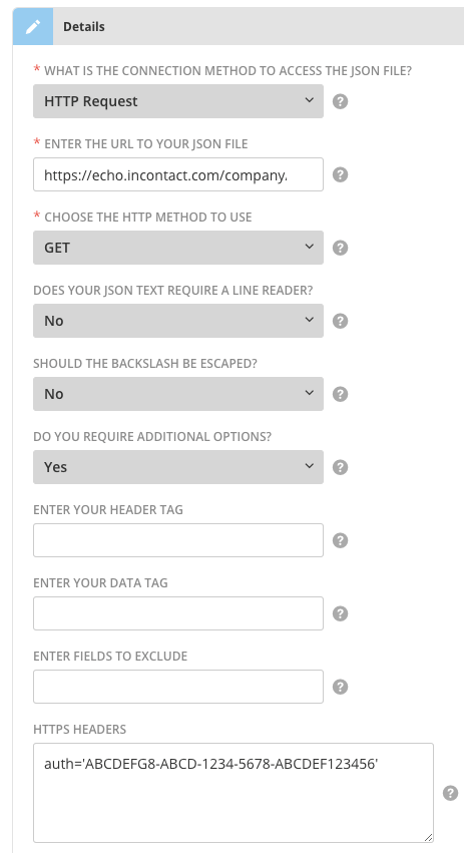
**Details** section...
1. In the **What is the connection method to access the JSON file?** dropdown, select **HTTP Request**.
2. In the **Enter the URL to Your JSON File** field, enter the requesting URL.
For instructions, refer to the **Request** section of the API documentation.
An example request URL would look like this:
`https://echo.incontact.com/company/api/echoapi.taf?classname=surveys&method=getSurveyName&outputtype=JSON&p1=101`
**Note:** To get the output as JSON, you must include the \&outputtype=JSON parameter.
* In the **Do you require additional options?** dropdown, select **Yes**.
* In the **HTTPS Headers** field, enter the API key received from InContact.
For more information, see "Prerequisites," above.
* Click **Save**.
 ## Best Practices
* A best practice when connecting to InContact Echo is to schedule it to run once a day on a full "Replace." However, you can also run on "Append" to provide a snapshot over time.
* There are no known limitations for the API so you may be able to schedule the connector to run up to 15 minutes; however you should check with your InContact representative to find out if your particular account has API limits that would prevent that update frequency.
* The primary use of this API is to collect survey data. The endpoint for surveys is the [https://echo.incontact.com/company/api/echoapi.taf?classname=surveys\&method=getSurveyResults\&p1=101](https://echo.incontact.com/company/api/echoapi.taf?classname=surveys\&method=getSurveyResults\&p1=101) example. This is explained in the API documentation in the **SURVEYS/getSurveyResults** section. It is possible to grab multiple surveys in one API pull; this is explained in the **Requests** section of the API documentation.
## Best Practices
* A best practice when connecting to InContact Echo is to schedule it to run once a day on a full "Replace." However, you can also run on "Append" to provide a snapshot over time.
* There are no known limitations for the API so you may be able to schedule the connector to run up to 15 minutes; however you should check with your InContact representative to find out if your particular account has API limits that would prevent that update frequency.
* The primary use of this API is to collect survey data. The endpoint for surveys is the [https://echo.incontact.com/company/api/echoapi.taf?classname=surveys\&method=getSurveyResults\&p1=101](https://echo.incontact.com/company/api/echoapi.taf?classname=surveys\&method=getSurveyResults\&p1=101) example. This is explained in the API documentation in the **SURVEYS/getSurveyResults** section. It is possible to grab multiple surveys in one API pull; this is explained in the **Requests** section of the API documentation.