> ## Documentation Index
> Fetch the complete documentation index at: https://domoinc-openapi-sync-dataflows.mintlify.site/llms.txt
> Use this file to discover all available pages before exploring further.
# 2016 Release 1 | January
export const InlineImage = ({src, alt = '', height = '1.6em'}) => {
return  ;
};
**Note:** Depending on the product version you are using, the documentation may include information about features that may not be available or may have changed.
## New features and enhancements
Features and enhancements in this release include the following:
### Ability to connect to JSON data in Workbench 4
Workbench 4 now provides the ability to create JSON DataSet Jobs. When you select JSON as your Data Source type, you can specify the data node with data you want to retrieve, the delimiter, and how you want the data to be flattened.
;
};
**Note:** Depending on the product version you are using, the documentation may include information about features that may not be available or may have changed.
## New features and enhancements
Features and enhancements in this release include the following:
### Ability to connect to JSON data in Workbench 4
Workbench 4 now provides the ability to create JSON DataSet Jobs. When you select JSON as your Data Source type, you can specify the data node with data you want to retrieve, the delimiter, and how you want the data to be flattened.
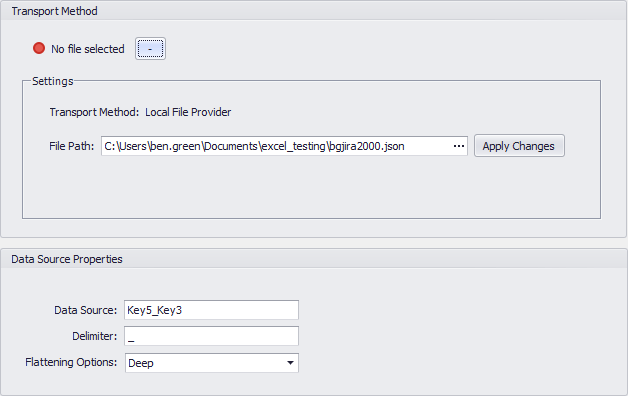 For more information about connecting to JSON data, see [Connecting to JSON data](/s/article/360042932714 "Creating a Job for Uploading Data Using Workbench 4").
### Workbench 4 Regular Expression Builder
Workbench 4's Search & Replace transform interface now includes a Regular Expression Builder to help you construct more robust regular expressions for use in searching. The Builder allows you to build regular expressions from a number of categories, including character escapes, character classes, anchors, grouping constructs, quantifiers, backreference constructs, alternation constructs, and substitutions. Descriptions are provided for all constructs.
For more information about connecting to JSON data, see [Connecting to JSON data](/s/article/360042932714 "Creating a Job for Uploading Data Using Workbench 4").
### Workbench 4 Regular Expression Builder
Workbench 4's Search & Replace transform interface now includes a Regular Expression Builder to help you construct more robust regular expressions for use in searching. The Builder allows you to build regular expressions from a number of categories, including character escapes, character classes, anchors, grouping constructs, quantifiers, backreference constructs, alternation constructs, and substitutions. Descriptions are provided for all constructs.
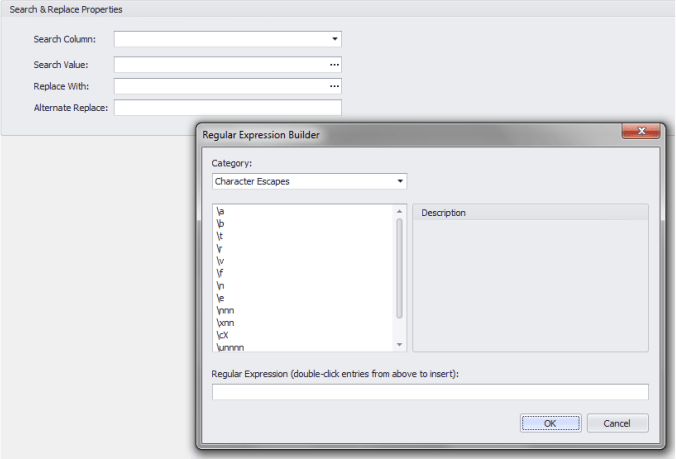 For more information about building regular expressions in Workbench 4, see [Replacing column values in Workbench 4](/s/article/360043437433 "Adding Transforms to a DataSet Job in Workbench 4").
### New information when searching
When you perform a Domo-wide search, your results contain additional information to help you find what you're looking for. This information includes the following:
* "People & Groups" results now show the user's profile picture for people results and the number of group members for group results.
* "DomoBuzz" results show the privacy setting for the conversation.
* "Cards" results show the owner and number of views.
For more information about filtering pages, see Searching in Domo.
## Getting Help
You can view the latest release notes information in the Help Center, which you can access from Domo by clicking **> Help Center**.
If you have questions about Domo,
* search for a topic in the Help Center
* train in Domo University at
[http://www.domo.com/university](http://www.domo.com/university "http://www.domo.com/university")
* get answers in the Domo Community at dojo.domo.com
* contact Technical Support by using @DomoSupport in DomoBuzz, by email at
[support@domo.com](mailto:support@domo.com "support@domo.com") or by phone at 801-805-9505 (Monday through Friday, 7 am to 6 pm MST)
* reach out to your Domo Customer Success Manager or Technical Consultant
If you have feedback, please send it from within Domo ( **> Feedback**). Or send an email to [product.feedback@domo.com](mailto:product.feedback@domo.com "product.feedback@domo.com").
For more information about getting help, see [Getting Help](/s/article/360042922874 "Getting Help").
For more information about building regular expressions in Workbench 4, see [Replacing column values in Workbench 4](/s/article/360043437433 "Adding Transforms to a DataSet Job in Workbench 4").
### New information when searching
When you perform a Domo-wide search, your results contain additional information to help you find what you're looking for. This information includes the following:
* "People & Groups" results now show the user's profile picture for people results and the number of group members for group results.
* "DomoBuzz" results show the privacy setting for the conversation.
* "Cards" results show the owner and number of views.
For more information about filtering pages, see Searching in Domo.
## Getting Help
You can view the latest release notes information in the Help Center, which you can access from Domo by clicking **> Help Center**.
If you have questions about Domo,
* search for a topic in the Help Center
* train in Domo University at
[http://www.domo.com/university](http://www.domo.com/university "http://www.domo.com/university")
* get answers in the Domo Community at dojo.domo.com
* contact Technical Support by using @DomoSupport in DomoBuzz, by email at
[support@domo.com](mailto:support@domo.com "support@domo.com") or by phone at 801-805-9505 (Monday through Friday, 7 am to 6 pm MST)
* reach out to your Domo Customer Success Manager or Technical Consultant
If you have feedback, please send it from within Domo ( **> Feedback**). Or send an email to [product.feedback@domo.com](mailto:product.feedback@domo.com "product.feedback@domo.com").
For more information about getting help, see [Getting Help](/s/article/360042922874 "Getting Help").