> ## Documentation Index
> Fetch the complete documentation index at: https://domoinc-openapi-sync-dataflows.mintlify.site/llms.txt
> Use this file to discover all available pages before exploring further.
# Edit a DataFusion
export const InlineImage = ({src, alt = '', height = '1.6em'}) => {
return  ;
};
You can edit a DataFusion in the Data Center. You can only edit a DataFusion if you are the owner OR have an Admin default security role OR a custom role with the Manage DataSet grant enabled. Learn more about [Managing Custom Roles](/s/article/360043438973 "Default Security Role Reference").
Follow these steps to edit a DataFusion:
1. From inside the Data Center, select
**DataSets** in the left navigation.
2. Find the DataFusion you want to edit.
3. Select the DataFusion to open the Details view and select
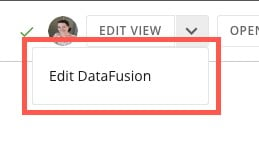
**down arrow** > **Edit DataFusion**.
;
};
You can edit a DataFusion in the Data Center. You can only edit a DataFusion if you are the owner OR have an Admin default security role OR a custom role with the Manage DataSet grant enabled. Learn more about [Managing Custom Roles](/s/article/360043438973 "Default Security Role Reference").
Follow these steps to edit a DataFusion:
1. From inside the Data Center, select
**DataSets** in the left navigation.
2. Find the DataFusion you want to edit.
3. Select the DataFusion to open the Details view and select
**down arrow** > **Edit DataFusion**.
 4. Update the DataFusion.
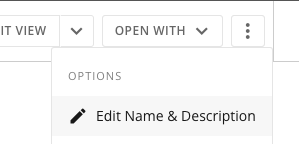
**Tip:** You can rename a DataFusion by selecting **action menu** > **Edit Name & Description**. Change the title or description of the DataFusion and select **Save**.
4. Update the DataFusion.
**Tip:** You can rename a DataFusion by selecting **action menu** > **Edit Name & Description**. Change the title or description of the DataFusion and select **Save**.