> ## Documentation Index
> Fetch the complete documentation index at: https://domoinc-openapi-sync-dataflows.mintlify.site/llms.txt
> Use this file to discover all available pages before exploring further.
# Restricting Edit Capability for a Card
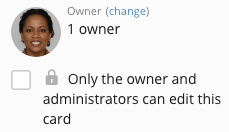
In Cards, except for Domo App Cards and Notebook Cards, you can restrict Card editing access to the Card owner and users with a [custom role](/s/article/360043438973 "Default Security Role Reference") with the Manage All Cards, Pages and Apps (App Studio) grant enabled. You can do this in the Details view for the Card. Users without Card editing access cannot edit the data for any Card type or connect new data.
**To restrict editing in the Details view,**
1. Click the Card to open its Details view.
2. Check the **Only the owner and administrators can edit this card** box.
If this setting has already been checked and you are not the owner or do not have an "Admin" default security role or a custom role with the Manage All Cards, Pages and Apps (App Studio) grant enabled, you do not see this checkbox or the accompanying text in the Details view. To get editing access for this Card, you must either be assigned as the owner or be given an "Admin" security role or a custom role with the necessary grant.