> ## Documentation Index
> Fetch the complete documentation index at: https://domoinc-openapi-sync-dataflows.mintlify.site/llms.txt
> Use this file to discover all available pages before exploring further.
# Managing Plugins in Workbench 4
**Important:** Support for Workbench 4 ended on **April 15, 2021**. Workbench may continue to run on installed machines, but it will no longer receive feature enhancements and security updates. When issues are encountered in Workbench 4, the recommended course of action from the Domo Support team will be to upgrade to the latest version of Workbench 5. To see this article for Workbench 5, click [**here**](/s/article/360043437353).
In Workbench 4's Plugin Manager you can view registered plugins, add plugins, and remove installed plugins. All Workbench plugins are contained within Dynamic Link Libraries (DLLs). In the Plugin Manager, you can click a DLL
file name to show the plugins within it. These are shown by type and name. For example, in the following screenshot, the user has clicked the DLL file *DomoDataProviders.dll* to show the plugins contained within it. All of these plugins are of the "Transport Method" type.
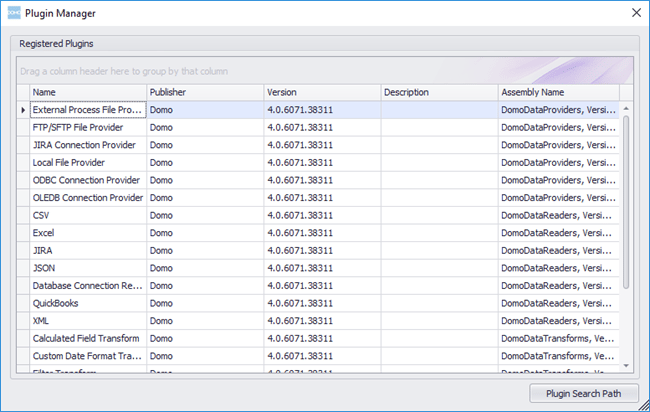 You can add plugins to Workbench by selecting the desired DLL on your machine or network. You can also remove plugins from Workbench.
**To add plugins to Workbench,**
1. Click
**Plugin Manager** in the **More** tab at the top of the Workbench window.
The **Plugin Manager** opens.
2. Click
**Add Plugin**.
3. On your machine or network, locate and open the DLL containing the plugins you want to add.
**To remove plugins from Workbench,**
1. Click
**Plugin Manager** in the **More** tab at the top of the Workbench window.
The **Plugin Manager** opens.
2. Select the DLL file with the plugins you want to remove.
3. Click
**Remove Plugin**.
4. Click
**Yes** to confirm.
You can add plugins to Workbench by selecting the desired DLL on your machine or network. You can also remove plugins from Workbench.
**To add plugins to Workbench,**
1. Click
**Plugin Manager** in the **More** tab at the top of the Workbench window.
The **Plugin Manager** opens.
2. Click
**Add Plugin**.
3. On your machine or network, locate and open the DLL containing the plugins you want to add.
**To remove plugins from Workbench,**
1. Click
**Plugin Manager** in the **More** tab at the top of the Workbench window.
The **Plugin Manager** opens.
2. Select the DLL file with the plugins you want to remove.
3. Click
**Remove Plugin**.
4. Click
**Yes** to confirm.