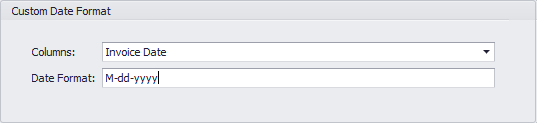
 **Training Video - Setting a Custom Date Format**
Learn how to apply a custom date format transform to your data in Workbench 4.
**To set a custom date format for a column in Workbench 4,**
1. In the
**Accounts** pane, select the DataSet job in which you want to set a custom date format.
2. In the
**Transforms** grouping in the Buttons toolbar at the top of the Workbench window, click **Add New**.
3. In the
**Transform Type** menu, select **Custom Date Format** then click **Next**.
4. Click
**Finish**.
A **Custom Date Format** item is added under **Transforms** for this DataSet job.
5. Click on the new
**Custom Date Format** item under **Transforms**.
**Custom Date Format** options now appear in the Dynamic Options panel.
6. In
**Columns**, select the column in which you want to set a custom date format.
7. In the
**Date Format** field, enter the desired date format.
For a list of accepted date formats, see the next section.
8. Click
**Save** in the **DataSet Jobs** grouping in the Buttons toolbar at the top of the Workbench window.
### Date format specifiers
You can either have Workbench automatically parse date formats or you can specify the date formats used in your data for columns containing dates and times.
* If you do not specify the date format, Workbench uses your current locale settings to parse date strings. In this auto-mode, various formats are supported, based on the locale.
For example, in the US locale, the following formats are supported:
* 2013-04-17 12:34:56
* 4/17/2013 12:34:56
* April 17, 2013
* April 17, 2013 12:34 PM
* 2013-04-17 12:34:56.123456
* If you specify a date format, Workbench uses the specified date format to parse date strings.
For example, suppose your current locale settings are for Australia and the dates in your data are formatted as day, month, and year using ":" as the separator rather than "/" (as in " 10:10:2013 "). Because the "auto" mode for Australia does not support using ":" as the separator, you would specify the date format string as d:M:yyyy to properly parse the dates.
**Training Video - Setting a Custom Date Format**
Learn how to apply a custom date format transform to your data in Workbench 4.
**To set a custom date format for a column in Workbench 4,**
1. In the
**Accounts** pane, select the DataSet job in which you want to set a custom date format.
2. In the
**Transforms** grouping in the Buttons toolbar at the top of the Workbench window, click **Add New**.
3. In the
**Transform Type** menu, select **Custom Date Format** then click **Next**.
4. Click
**Finish**.
A **Custom Date Format** item is added under **Transforms** for this DataSet job.
5. Click on the new
**Custom Date Format** item under **Transforms**.
**Custom Date Format** options now appear in the Dynamic Options panel.
6. In
**Columns**, select the column in which you want to set a custom date format.
7. In the
**Date Format** field, enter the desired date format.
For a list of accepted date formats, see the next section.
8. Click
**Save** in the **DataSet Jobs** grouping in the Buttons toolbar at the top of the Workbench window.
### Date format specifiers
You can either have Workbench automatically parse date formats or you can specify the date formats used in your data for columns containing dates and times.
* If you do not specify the date format, Workbench uses your current locale settings to parse date strings. In this auto-mode, various formats are supported, based on the locale.
For example, in the US locale, the following formats are supported:
* 2013-04-17 12:34:56
* 4/17/2013 12:34:56
* April 17, 2013
* April 17, 2013 12:34 PM
* 2013-04-17 12:34:56.123456
* If you specify a date format, Workbench uses the specified date format to parse date strings.
For example, suppose your current locale settings are for Australia and the dates in your data are formatted as day, month, and year using ":" as the separator rather than "/" (as in " 10:10:2013 "). Because the "auto" mode for Australia does not support using ":" as the separator, you would specify the date format string as d:M:yyyy to properly parse the dates.
Specifier | Description |
|---|---|
| Day of month, numeric (1-31) |
| Day of month, numeric (01-31) |
| Day of week abbreviated name (Sun-Sat) |
| Day of week full name (Sunday-Saturday) |
| Tenths of a second (0-9) |
| Hundreths of a second (00-99) |
| Milliseconds of a second (000-999) |
| Ten thousandths of a second (0000-9999) |
| Hundred thousandths of a second (00000-99999) |
| Millionths of a second (000000-999999) |
| Ten millionths of a second (0000000-9999999) |
| Tenths of a second if non-zero (-9) |
| Hundreths of a second if non-zero (-99) |
| Milliseconds of a second if non-zero (-999) |
| Ten thousandths of a second if non-zero (-9999) |
| Hundred thousandths of a second if non-zero (-99999) |
| Millionths of a second if non-zero (-999999) |
| Ten millionths of a second if non-zero (-9999999) |
| Period or era (such as A.D.) |
| Hour (1-12) |
| Hour (01-12) |
| Hour (0-23) |
| Hour (00-23) |
| Time zone information |
| Minutes, numeric (0-59) |
| Minutes, numeric (00-59) |
| Month, numeric (1-12) |
| Month, numeric (01-12) |
| Month abbreviated name (Jan-Dec) |
| Month full name (January-December) |
| Seconds (0-59) |
| Seconds (00-59) |
| AM or PM first character (A or P) |
| AM or PM |
| Year, one digit minimum (0-99) |
| Year, two digits (00-99) |
| Year, three digits minimum (000-999) |
| Year, four digits minimum (0000-9999) |
| Year, five digits (00000-99999) |
| Local timezone hours offset from UTC (such as -7) |
| Local timezone hours offset from UTC (such as -07) |
| Local timezone hours and minutes offset from UTC (such as -07:00) |
| Time separator |
| Date separator |
| Literal string delimiter in single or double quotes. |
% | Precedes a custom format specifier character |
\ | Precedes specifier character so it appears in result |
Non-specifier character | Appears in result |