> ## Documentation Index
> Fetch the complete documentation index at: https://domoinc-openapi-sync-dataflows.mintlify.site/llms.txt
> Use this file to discover all available pages before exploring further.
# Configure the CData Driver for SAP in Workbench 5.1
## Intro
The CData driver does not include all the files required to connect to SAP. To obtain these files, you must download and install the SAPGUI Frontend for Windows application by following the steps below.
## Download SAPGUI for Windows
1. Navigate to the
[SAP Software Downloads Center](https://support.sap.com/en/my-support/software-downloads.html?anchorId=section_2065063837).
2. Select **Types of Software** > **Installation & Upgrades** > **Access Downloads**.
The **Downloads** page opens.
3. Select **By Category** > **SAP Frontend Components** > **SAP GUI FOR WINDOWS**, then select the latest version.
Download the application and follow the prompts to install it on your Windows machine.
## Confirm Installation
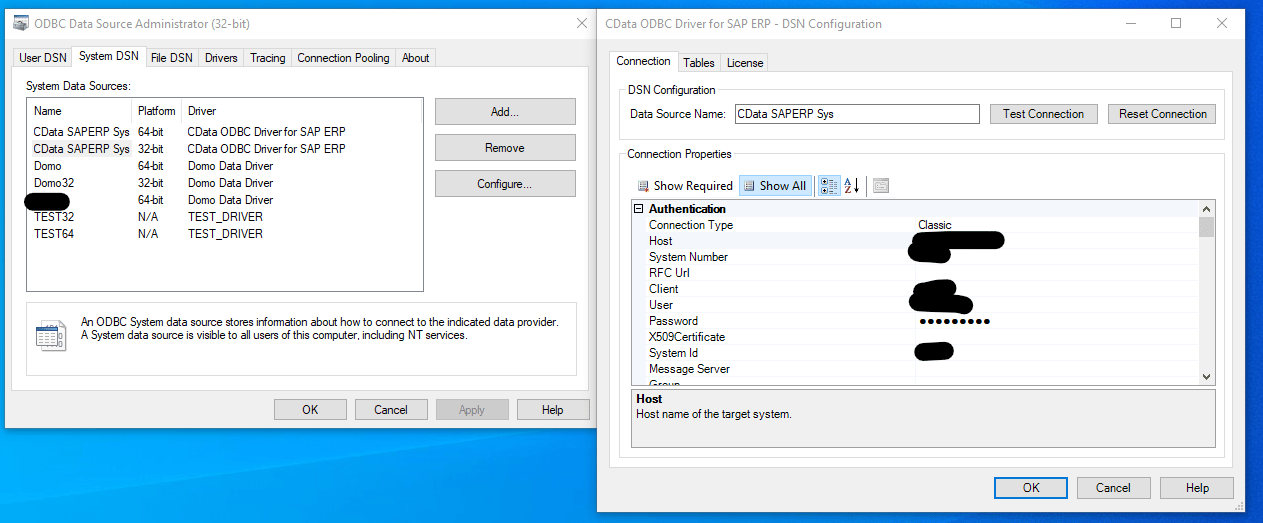
To verify that your SAPGUI installation worked, follow the steps below.
1. On your Windows machine, open the
**Run** dialog.
2. In the
**Open** field, enter "odbcad32", and then select **OK**.
The **ODBC Data Source Administrator** dialog opens.
3. In the
**System DSN** tab, find or create the DSN.
4. Select **Configure** > **Test Connection**.
**Note:** The **Test Connection** only works if you provide your own license key, otherwise a licensing error displays. You can either obtain a trial key from CData, or you can attach a Workbench job to this DSN and run a job preview in Workbench, in which case Workbench injects a Domo-provided license key when the job runs.
 ## Required Files
To use the SAP CDATA connection tool, you must copy the following.dll files to the System32/Win32 and SysWOW64 folders on the machine running the Workbench:
* icudt34.dll
* icuin34.dll
* icuuc34.dll
* libicudecnumber.dll
* librfc32.dll
* librfc32u.dll
* libsapu16vc80.dll
* libsapucum.dll
* sapnwrfc.dll
**Note:** The.dll files above are provided by SAP. Domo cannot distribute them due to SAPs licensing restrictions.
## Required Files
To use the SAP CDATA connection tool, you must copy the following.dll files to the System32/Win32 and SysWOW64 folders on the machine running the Workbench:
* icudt34.dll
* icuin34.dll
* icuuc34.dll
* libicudecnumber.dll
* librfc32.dll
* librfc32u.dll
* libsapu16vc80.dll
* libsapucum.dll
* sapnwrfc.dll
**Note:** The.dll files above are provided by SAP. Domo cannot distribute them due to SAPs licensing restrictions.