

- Datastores: Analogous to a database. A CustomApp has a single datastore that is created automatically, named with the CustomApp’s ID and managed transparently to the CustomApp.
- Collections: Analogous to a collection in a NoSQL database or a table in a relational database. A datastore can have multiple collections defined.
- Documents: Analogous to documents in a NoSQL database or a table row in a relational database. A collection can have multiple documents.
Defining Collections in the Manifest
Within the app manifest, you can define the Collections that you want your app to be able to use by simply listing them in a Collections property as in the following:
STRINGLONGDECIMALDOUBLEDATEDATETIME
Documents that contain DATE or DATETIME data must be formatted as YYYY-MM-DD or YYYY-MM-DDTHH:MM:SSZ in order to be successfully synced to a Domo DataSet.
Making API Calls to Your Collection
Examples of how to make calls to the Collections defined in your manifest are below. For now, you will not be able to make these calls in local dev without including a proxy. Instead, you must publish your app and ensure that it is making calls in an installed app.If you make any updates to the manifest and re-publish your app design, you will need to edit the installed app and re-save it for the manifest changes to take effect on the installed app (similar to what you would have to do when making changes to the mapping section of your manifest).
Create Document
Create a single document in a collection. Code Example ThedocumentContent variable in this POST request is equal to the sample request body.
HTTP Request
List Documents
Lists all documents from a given Collection. Code Example
HTTP Request
Get Document
Retrieves a single document from a Collection when given its document ID. Code Example
HTTP Request
Update Document
Updates an existing document in a Collection when given its document ID. Code Example The
documentContent variable in this PUT request is equal to the sample request body.
HTTP Request
Delete Document
Permanently deletes a document from your application’s Collection.
This is destructive and cannot be reversed.
Deleting documents in an AppDB Collection may have performance implications with regard to syncing to its corresponding DataSet in Domo if the
syncEnabled property is set to true for the Collection.Query Documents
Any MongoDB query that can be used in a Mongo
find() function can be used to query for documents in an AppDB Datastore. Official MongoDB query documentation is below:
https://docs.mongodb.com/manual/reference/operator/query/
Example of querying for a document that includes a comment that has the word ‘happy’ (via a regex operator) or does not include the username ‘Eeyore’ (via the not equals operator) can be found below. The return value of this call will be an array of documents that matches the query.
HTTP Request
Request Body
$date operator can be found here. The date string provided will need to be in the demonstrated ISO date format.
Query Documents with Aggregations
After the query limits the documents which will be returned by the API call, you can optionally add query string parameters to the URL to aggregate the query results. Each parameter (excluding
groupby) has the optional ability to take an alias. While it is not required to alias each property that is being aggregated, it is useful in the event that you need to pass the same property to different aggregations to avoid name collisions.
HTTP Request
Code Example
Partially Update Documents Using Queries
Using standard mongo queries and update operations, you can do partial updates on your documents. The query must reference a document, or reference a property in a document. Supported Operators:
- currentDate
- inc
- min
- max
- mul
- rename
- set
- unset
- addToSet
- pop
- pullAll
- each
- position
- slice
- sort
$setOnInsert is not supported.
Code Example
HTTP Request
Bulk Operations
AppDB also allows for the creation, upsertion, and deletion of bulk lists of documents as shown in the examples below.Create Documents in Bulk
Create multiple documents in a given collection in a single HTTP request. Code Example The documents variable in this post request is equal to the sample request body.
HTTP Request
Upsert Documents in Bulk
To upsert documents, you will need to provide the content object for each document and the ID for existing objects that need to be updated. Objects that have an ID will be updated; those with no ID (or where the ID is not found in the Collection) will be created. Code Example The documents variable in this POST request is equal to the sample request body.
HTTP Request
Delete Documents in Bulk
Provides a list of document IDs to be permanently deleted as a comma-separated query parameter.This is destructive and cannot be reversed.
Deleting documents in an AppDB collection may have performance implications with regard to syncing to its corresponding DataSet in Domo if the
syncEnabled property is set to true for the Collection.
HTTP Request
Programmatic Operations for Collections
While most of the time you are going to want to define a Collection in your manifest and have the platform automatically create the Collection for you, there is also the option to programmatically manipulate Dollections from your app code.Create a Collection
To create a Collection programmatically, send a POST request to the below endpoint and provide as the body of the request the same JSON value that you would have provided in your manifest for a Collection. Once created, the Collection can be retrieved by the name you provided as usual. Code Example Thecollection variable in this code sample is equal to the collection object in the sample request body.
List Collections
Retrieves a list of the existing Collections for your application. Code ExampleUpdate Collection
This PUT request allows you to modify any of your Collections programmatically.This is destructive and cannot be reversed.
If you manually override the properties of a Collection that exists in your manifest, then any time an app Card is saved, the Card will revert back to the manifest definition of that Collection. It is best practice to only update Collections that you have created manually. Otherwise, to update a Collection, simply update the manifest.
HTTP Request
Delete a Collection
Programmatically deletes a Collection.This is destructive and cannot be reversed.
Deleting a Collection may have performance implications with regard to syncing to its corresponding DataSet in Domo if the
syncEnabled property is set to true for the Collection.
HTTP Request
Manually Exporting Collections
Collections that are marked assyncEnabled will be exported to the Domo instance every 15 minutes. If for some reason, you need the Collections for your app to be exported at a certain moment in time, you can manually call the export endpoint, and it will begin the export process. If there is already an export in progress, you will receive a 423 LOCKED HTTP response. Otherwise, you will receive a 200 OK HTTP response suggesting that the export request was successfully received.
The export endpoint is a POST request that takes no body.
Code Example
includeRelatedCollections=true in the query string.
Document Level Security Filtering
While developing your application, you might find yourself creating specific queries to limit users to see or use only certain data that is stored in your AppDB Collections. These queries might be aimed at accomplishing some of the following use-case examples:- A user should only see data that has been assigned to a certain region or team.
- A user should only be able to update AppDB documents that they themselves created.
- Only a manager who belongs to a certain Domo group can delete documents from your Collection.
12 or 15 in Domo will only be able to see, modify, or delete documents that have the value of “West” in the document’s content.region property. As you can see, the filters property of this Collection’s configuration object takes a list of filter rules. Adding multiple filter rules in the filters property will chain together the rules as an OR statement as in any standard data query language. There are several properties of a filter rule that are required to secure your documents. The following image groups them together by function.
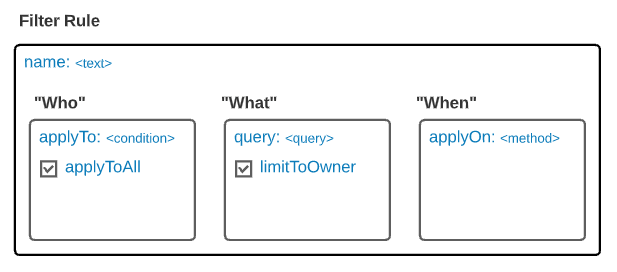
name– The name of the filter rule that you intend to create. This will be used mainly as a description of what you intend the rule to accomplish.
-
applyTo– The property that describes who to apply this filter rule to. This property takes a list of one or more condition objects.-
condition – The condition that must be met in order for the filter rule to apply to the current user. The condition contains two properties.
- type – The property that determines what kind of condition to compare against the current user:
USER_IDGROUP_ID
values– The property that takes a list of possible values that the current user will be compared to. For example, if thetypeof the condition isUSER_IDand thevalueslist contains the current user’s ID, then the condition will evaluate to true, and this filter rule will apply to the current user. If the list does not contain the user’s ID, the condition will evaluate to false, and the filter rule will not apply and will be skipped.- Wildcards: In addition to listing static values, this field also supports two wildcards:
%userId%and%groupIds%. An example of using one is,"query": {"content.user": "%userId%"}, which would replace the%userId%with the ID of the current user.
- Wildcards: In addition to listing static values, this field also supports two wildcards:
- type – The property that determines what kind of condition to compare against the current user:
-
condition – The condition that must be met in order for the filter rule to apply to the current user. The condition contains two properties.
-
applyToAll– A boolean value that overrides the applyTo property. If this property is set to true, then the current filter rule will apply to all users of the app.
query– The AppDB query that should be combined with any query the user is trying to make to further filter their request for documents. For example, let’s say the user belongs to the “West Sales” group, as defined in our example Collection, and they write the following query to search for documents:
applyTo section of the filter rule definition, the condition would be evaluated to true and our additional document-level security filter would be applied. The resulting query to AppDB on the server side would be transformed to look similar to the following:
limitToOwner– This property takes a boolean that determines whether to add another query to any request that limits documents to only those created by the current user. So, if this flag were set totrue, then the resulting query on the backend would be transformed still further to add the user’s ID to the request. In the case of our previous example, even though the user requested documents from the “US”, they would be returned all documents from the “US” that are in the “West” region and created by the existing user.
-
applyOn– Takes a list of HTTP methods that the current filter rule should apply to. The list of methods is as follows:READUPDATEDELETE
DELETE method existed in a filter rule that applied to those documents, then when they attempt to call the delete endpoint and use that document ID, they would not be allowed to delete it. In this case, if they called the single document’s delete endpoint, it would return a ‘404 not found’ error. If they called the bulk endpoint, it would return ‘0 documents deleted’.
Collection Level Security
Some applications might find it necessary to add security permissions at the Collection level. This could range from adding or removing the ability for a user to modify the definition of a programmatically created Collection to removing the ability of any user of the app to delete any documents from the Collection. By default, all users of the app who own the Collection have all permissions to the Collection and its documents until the permissions are updated to be more specific. Modify Permissions Assuming you already have permission to modify the Collection, you can change the permissions of a Collection by hitting the following endpoint: Code Exampleentity path parameter in the above endpoint:
USERGROUPRYUU_APP
entity path parameter will determine which entity ID you will need to provide for the entityId path parameter. For users and groups, you will use either the user ID or the group ID. If you want to modify permissions for anyone who has access to the app as a whole, you can use the RYUU_APP path parameter and provide the app instance ID as the entityId. The app instance ID is the first UUID provided in the URL of the iframe that houses the app. You should be able to pull down the URL in your JavaScript using window.location and parsing the first UUID programmatically.
Permission List
The following are the possible permissions that can be added using the permissions query parameter:
admin- All permissions to the Collection and its documentswrite- Permission to update properties of the Collectionread- Permission to read the properties of the Collectionshare- Permission to add or remove any permissions this entity already hasdelete- Permission to delete the Collection or its documentscreate_content- Permission to create documents in the Collectionupdate_content- Permission to update documents in the Collectionread_content- Permission to read documents in the Collectiondelete_content- Permission to delete documents in the Collection